How to give AI agents access to company data safely
Connecting Claude, ChatGPT or your own agent to company data is easy. Doing it so that each agent sees only what its person may see, changes data only through your rules, asks before anything that matters and leaves a record of what it did takes a few deliberate choices. Here they are, step by step.
SegmentStream team · Updated 28 October 2026 · 6 min read
On this page
- Four ways companies connect agents today
- 1. The agent acts as a person
- 2. Reads limited by role and by record
- 3. Writes only through actions with rules
- 4. Ask a person before anything that matters
- 5. Unattended work gets its own identity
- 6. Record everything
- 7. Credentials never reach the agent
- A setup checklist
- Example: connecting Claude to your CRM
- Frequently asked questions
Give an agent the access of the person it works for, never more. Let it change data only through actions that check their own rules, ask a person before anything that matters, and record who did what. Unattended work gets its own narrow identity, and credentials never reach the agent.
Every team now wants its agents to work on real data: ask about the pipeline, update a deal after a call, find the unpaid invoices, draft the follow-up. The fastest way to make that happen is also the most dangerous one: a shared key with access to everything. This guide sets out the safer way, which is not much slower.
Four ways companies connect agents today
| Approach | What it looks like | The risk |
|---|---|---|
| A shared API key | One key with broad access, pasted into an agent's settings | Every user of the agent sees everything the key can; history names the key, not the person |
| Database credentials | The agent connects straight to the database | No rules on writes, no per-person limits, secrets on laptops |
| One vendor agent per app | The CRM's agent, the helpdesk's agent, the finance tool's agent | Each sees one system; they disagree and can't work across them |
| Per-person sign-in over MCP | Each person connects their agent and signs in as themselves | The safe default, if the server enforces roles on every call |
The rest of this guide is about the fourth.
1. The agent acts as a person
When someone connects Claude or ChatGPT to company data, the agent should sign in as them and get exactly their permissions, at that moment. If their role changes or they leave, the agent's access changes with them.
The Model Context Protocol, the open standard Claude, ChatGPT, Cursor and others use to connect to external systems, has authorization built on OAuth 2.1 for this. The person signs in on your server's page; the agent receives a token for that person and that server only.
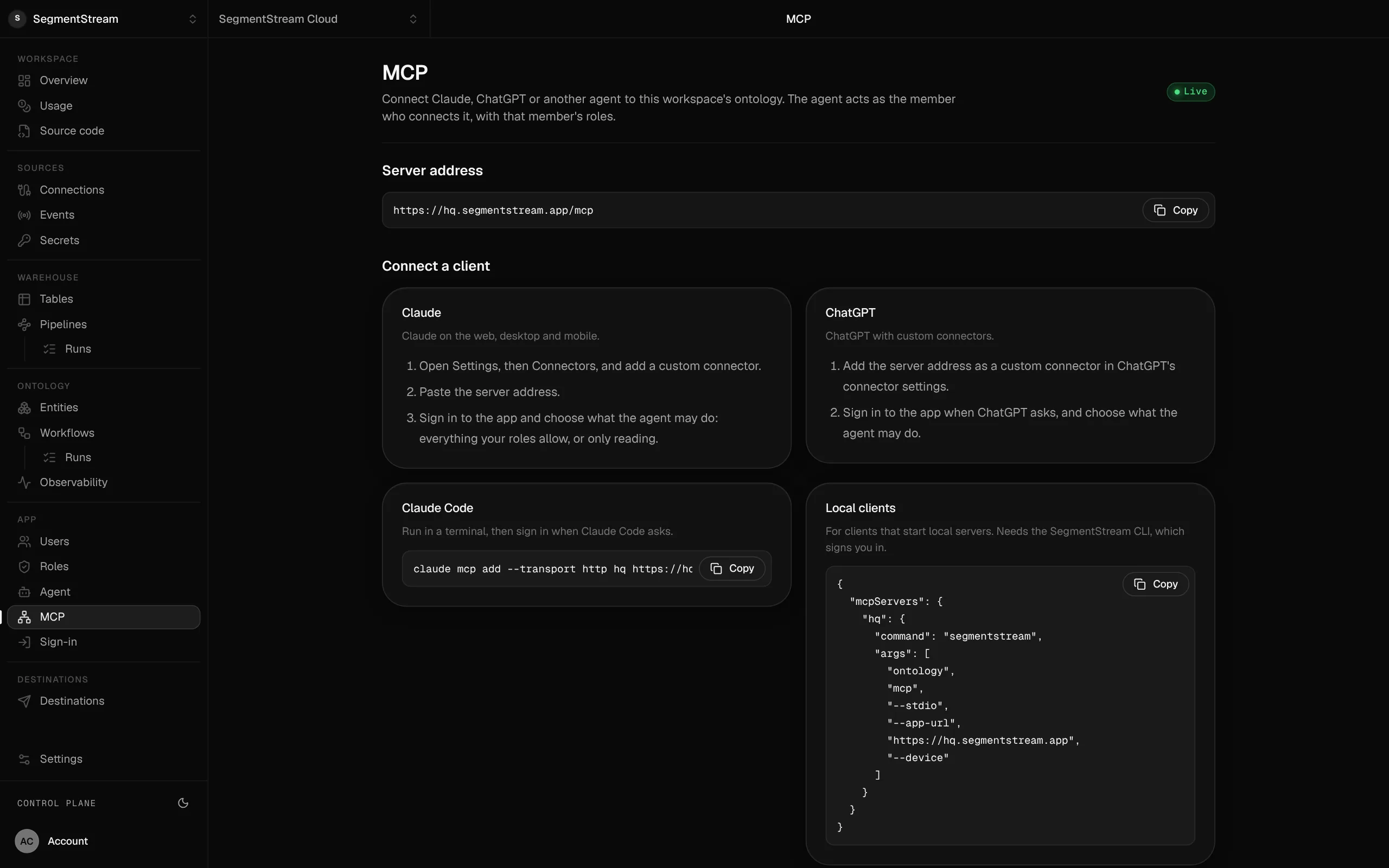
On SegmentStream, every app serves its data at /mcp. A member adds the address to their agent and signs in on the app's page, where they choose: everything their roles allow, read only, or deny. From then on the agent acts as them, and history names them.
2. Reads limited by role and by record
The tools an agent sees should depend on who it acts for. A person without permission to move deals shouldn't even see a "move deal" tool, and a person who sees only their own accounts shouldn't get anyone else's through the agent.
On SegmentStream, the list of tools holds only what the caller's roles allow, and every call is checked again on the server. A permission can be scoped to the caller's own records, and it applies the same way in the app, the API and every agent.
3. Writes only through actions with rules
Never give an agent a way to write rows directly. Every change should go through a named action, such as "qualify a lead" or "approve an invoice", that checks its own rules. When the agent's input breaks a rule, the action refuses it and says why, so the agent can correct itself instead of guessing.
4. Ask a person before anything that matters
Reading is cheap; changing data and talking to customers are not. Agents should show what they are about to do and wait for a yes:
- Changes to records: MCP clients such as Claude ask before running a tool that changes data, and the company agent shows the change with Confirm, Edit and Cancel.
- Messages on someone's behalf: a post to a team chat or an email to a customer is shown as an exact preview, and only the person who asked can approve it. On SegmentStream an approval expires after ten minutes, and a retried send never goes out twice.
- Thresholds: anything above a limit, such as a refund or a discount, goes to a role that may approve it, not to whoever asked the agent.
5. Unattended work gets its own identity
Some work runs with nobody signed in: a nightly import, a morning reconciliation, a weekly report. Don't run it on a person's account or a key with full access. Give it its own identity with exactly the role it needs.
On SegmentStream, API keys for unattended work hold exactly the roles they were created with, and each workflow runs as its own user with its own role, which history names.
6. Record everything
For every change you should be able to answer who, what, when and through which agent. Keep the history of the records themselves, and the logs of what agents were asked and what they did.
On SegmentStream, each change is kept with the action and the person who ran it. People in your organisation with access to the workspace can read the company agent's logs with segmentstream agent logs, and captured message content expires after 30 days.
7. Credentials never reach the agent
An agent that calls HubSpot, Stripe or your bank feed should do so through a connection held by the platform, never with a key in its prompt, its code or an environment file. If a key leaks into an agent's context, assume it has leaked everywhere that context goes.
A setup checklist
| Check | Done when |
|---|---|
| Per-person sign-in | Each agent signs in as its person over OAuth |
| Server-side checks | Roles are checked on every call, not only in the tool list |
| Scoped reads | People and their agents see only the records their role allows |
| Writes through actions | No agent has database credentials or a write-anything tool |
| Approvals | Changes and messages that matter wait for a person |
| Unattended identities | Scheduled work runs with its own narrow role |
| History and logs | Every change names who made it; agent turns are logged |
| No credentials in agents | Every external API goes through a connection |
| Leaving works | Deactivating a person ends their agents' access at once |
Example: connecting Claude to your CRM
On SegmentStream, a member connects Claude Code to the company CRM with one command, then signs in on the app's page:
claude mcp add --transport http crm https://crm.example.com/mcpWhat Claude can then do depends on the member's roles. A salesperson might get tools to find and read leads and deals, see their history, claim a lead and move a deal between stages; a manager would get more. For a scheduled job, an API key with a single role:
segmentstream ontology mcp --create-key nightly-report --role salesThe same records are also available to the team's company agent in Slack, Teams, WhatsApp, Telegram and email, which answers each person as themselves. See MCP and API for the details, and what a company brain needs before agents can act on it for the data side.
Frequently asked questions
Is it safe to give ChatGPT or Claude access to company data?
Yes, when each agent signs in as its person, gets only that person's permissions, changes data only through actions with rules, and asks before anything that matters. A shared key with broad access is the unsafe way.
What is MCP and how does it handle permissions?
MCP, the Model Context Protocol, is an open standard for connecting AI applications to external systems. Its authorization is built on OAuth 2.1, so a person can sign in and grant their agent access to one server. The server still has to check that person's roles on every call.
Should an AI agent have its own login or use mine?
An agent that works for you should act as you, with your permissions, so it can never do more than you could. Work that runs with nobody signed in, such as a nightly job, should have its own identity with a narrow role.
How do I stop an agent from changing the wrong records?
Give it no direct write access. Every change goes through an action that checks its rules and refuses bad input, the person's role decides which actions it may run, and changes that matter wait for a person to confirm.
How do I audit what an AI agent did?
Keep the history of every record change with the action and the person, and keep logs of the agent's turns. Then you can trace any change back to who asked for it.