
Move off spreadsheets to software you own, with rules, roles and an agent on the same records.
Clients, orders, stock and reports kept in Excel and Google Sheets become one system your company owns: records with rules that hold, roles for every team, the history of every change and a company agent. Your agent or our engineers build it around how you already work, and the sheets keep working until every team has switched.
- First version in two weeks, at a fixed price
- Every tab that matters comes over
- Your sheets keep working until every team has switched
- Sign-in and roles for every team
SegmentStream turns the spreadsheets your company runs on into your own software: one set of records with rules that hold, sign-in and roles for every team, the history of every change, and a company agent that answers and updates them. Keep spreadsheets for analysis and one-off models. Move the sheets that have become your CRM, order book or stock list. We build it with you and run both side by side until every team has switched.
Stay on spreadsheets if
- You use the sheet to analyse, model or plan, not to run the business day to day.
- One person owns it and nobody else edits it.
- A copied tab or a wrong formula would never lead to a wrong decision.
Move to SegmentStream if
- Several people edit the same sheet, and versions drift.
- A formula or a deleted row has already cost you money.
- You need to know who changed what, and to stop the wrong person changing it.
- You are near a sheet's limits: Google Sheets stops at 20 million cells, an Excel worksheet at 1,048,576 rows.
We move you, if you want
Our engineers turn your sheets into a data model with rules and roles, import every tab, rebuild the views your team works in, and run both side by side until every team has switched.
Request a pilot →Last reviewed October 2026 · Sources: Google Drive file limits, Excel specifications and limits
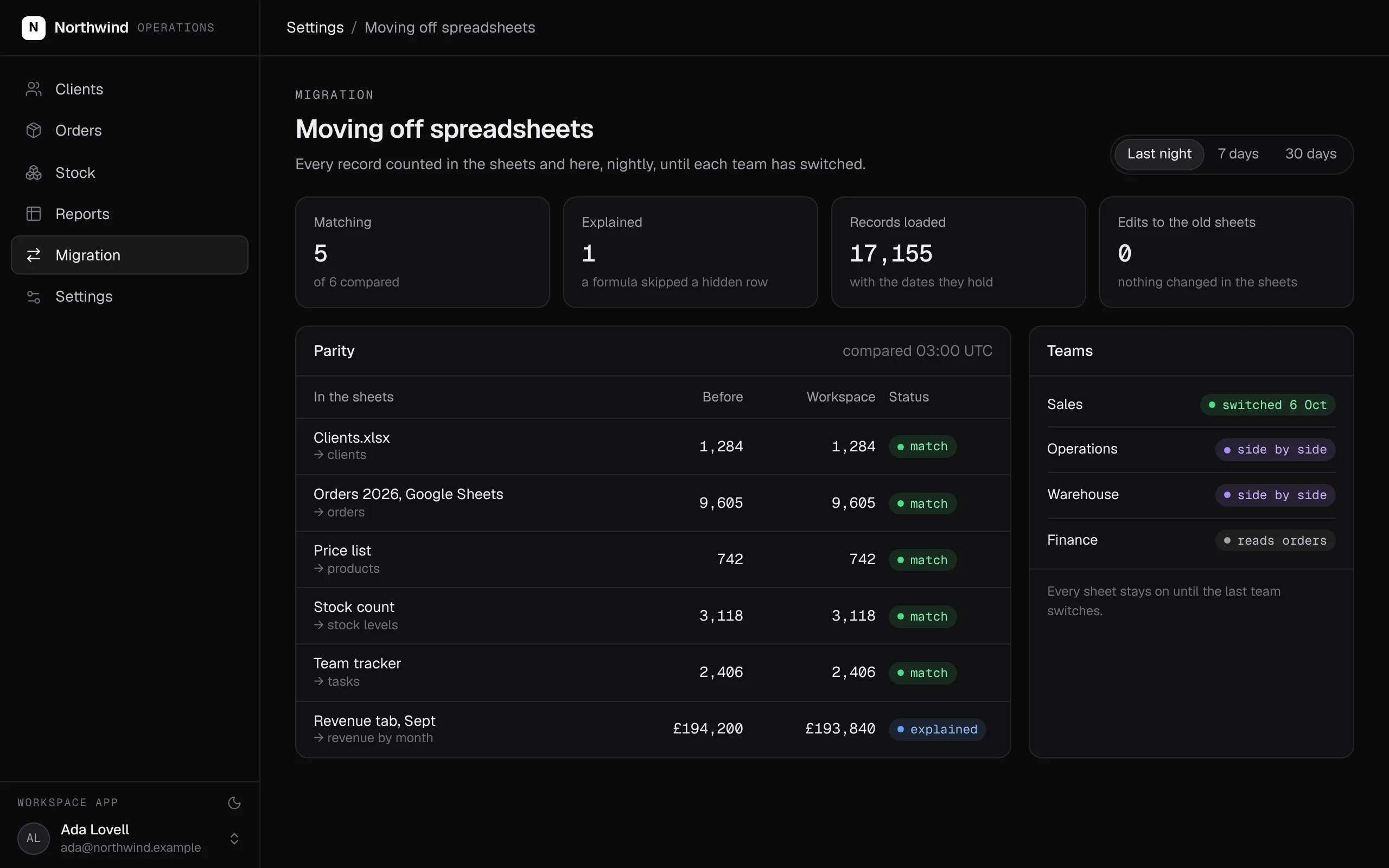
Every sheet that runs the business counted against your workspace, every night, until each team has switched. The sheets are never edited.
Swipe the screen sideways to see all of it.
What comes over, and what stays
What you bring from spreadsheets, and what you keep in the tools you like.
- Each tab that matters, as records with typed fields
- Lookups between tabs, as relationships
- Formulas that decide something, as rules that hold
- Totals and summary tabs, as numbers defined once
- Google Sheets others keep up to date, loaded on a schedule
- Excel workbooks, exported once as CSV or kept in a Google Drive folder
- Analysis, models and plans, in the spreadsheet tool you like
- Ad-hoc pivot tables: your BI tool can read the same warehouse
- Files nobody relies on
What it does
The sheets your company runs on become software it owns: one set of records instead of copies, rules that hold, a page for every team, and a company agent that answers from the same numbers. Nobody overwrites anyone without trace.
- The tabs that run the business become records with typed fields and relationships.
- Formulas that decide something become rules that hold, whoever makes the change.
- Each team gets its own pages, with sign-in and the roles you set.
- Totals are defined once, so every page and agent gives the same number.
- Every change is kept with who made it and when.
- The records sit next to your CRM, finance and support, open to your agents within your roles.
What it covers
Your sheets, as records →
Each tab that runs the business becomes a record type with typed fields. Lookups between tabs become relationships, so a client's orders are one click away.
Rules that hold
Formulas that decide something become rules that hold: a price below cost needs approval, and an order cannot ship without stock.
Pages instead of tabs →
Every team gets its own pages. Invited members sign in with an email code and see what their role allows.
One number for everyone →
Totals are defined once, so every page, report and agent gives the same revenue, margin or stock count.
Who changed what
Every change is kept with who made it and when, so nobody overwrites a colleague's work without trace.
The company agent →
Ask what is low on stock or which client has not paid in Slack, Teams, WhatsApp, Telegram or email, and the company agent answers from the same records.
Every part of a spreadsheet, and where it lives in your workspace
For your engineers: every part of a spreadsheet and where it lives once you have moved.
| In your sheets | In your workspace | What to know |
|---|---|---|
| A tab | An entity with typed properties | Named as your team names it |
| Rows | Records | Imported once and counted against the sheet |
| Lookups between tabs | Relationships | A client's orders are one click away |
| Formulas that decide | Rules inside actions | An order over a limit needs approval |
| Totals and summary tabs | Measures and SQL models | Every page and agent counts the same way |
| Sharing settings | Members with roles | Who may see and change each record |
| Version history | The history of every record | Every change, with who made it and when |
| Sheets others keep up to date | A Google Sheets connection on a schedule | Read only, for the ranges you name |
What SegmentStream does not do
- Free-form editing of any cell. Records change through actions with checks, so the rules hold.
- Spreadsheet maths for analysis and planning. Keep Excel or Google Sheets for that; your BI tool can read the same warehouse.
How a move off spreadsheets works
We build it with you, or your team does it with its own agent and our engineers on call. Your sheets keep working until the last team has switched.
- 01
Choose the sheets that run the business
We list the sheets the business actually runs on, who edits each one and what decisions they feed. The rest stay where they are.
- 02
Model them as records with rules
Each tab becomes a record type with typed fields, relationships, rules and the roles that may change it, as a pull request you read before anything moves.
- 03
Import every tab
Every row is imported and counted against the sheet. Google Sheets others keep up to date load on a schedule through a read-only connection.
- 04
Rebuild the views your team works in
The views your team works in become pages in your own app, each compared with the tab it replaces.
- 05
Switch team by team
Each team switches when its pages match, and the sheets are archived, not deleted.
Running on spreadsheets? We build it with you.
Our engineers turn the sheets that run your business into a data model with rules and roles, import every tab, rebuild the views your team works in, and run both side by side until every team has switched. It starts with a fixed-scope pilot.
Nothing switches until the numbers match.
Both systems run side by side. Every number your teams rely on is compared, and every difference is explained before anything is turned off.
| Sheet | Spreadsheet | Workspace | Status |
|---|---|---|---|
| Clients | 1,284 | 1,284 | match |
| Orders 2026 | 9,605 | 9,605 | match |
| Price list | 742 | 742 | match |
| Revenue, Sept | £194,200 | £193,840 | explained |
| Stock lines | 3,118 | 3,118 | match |
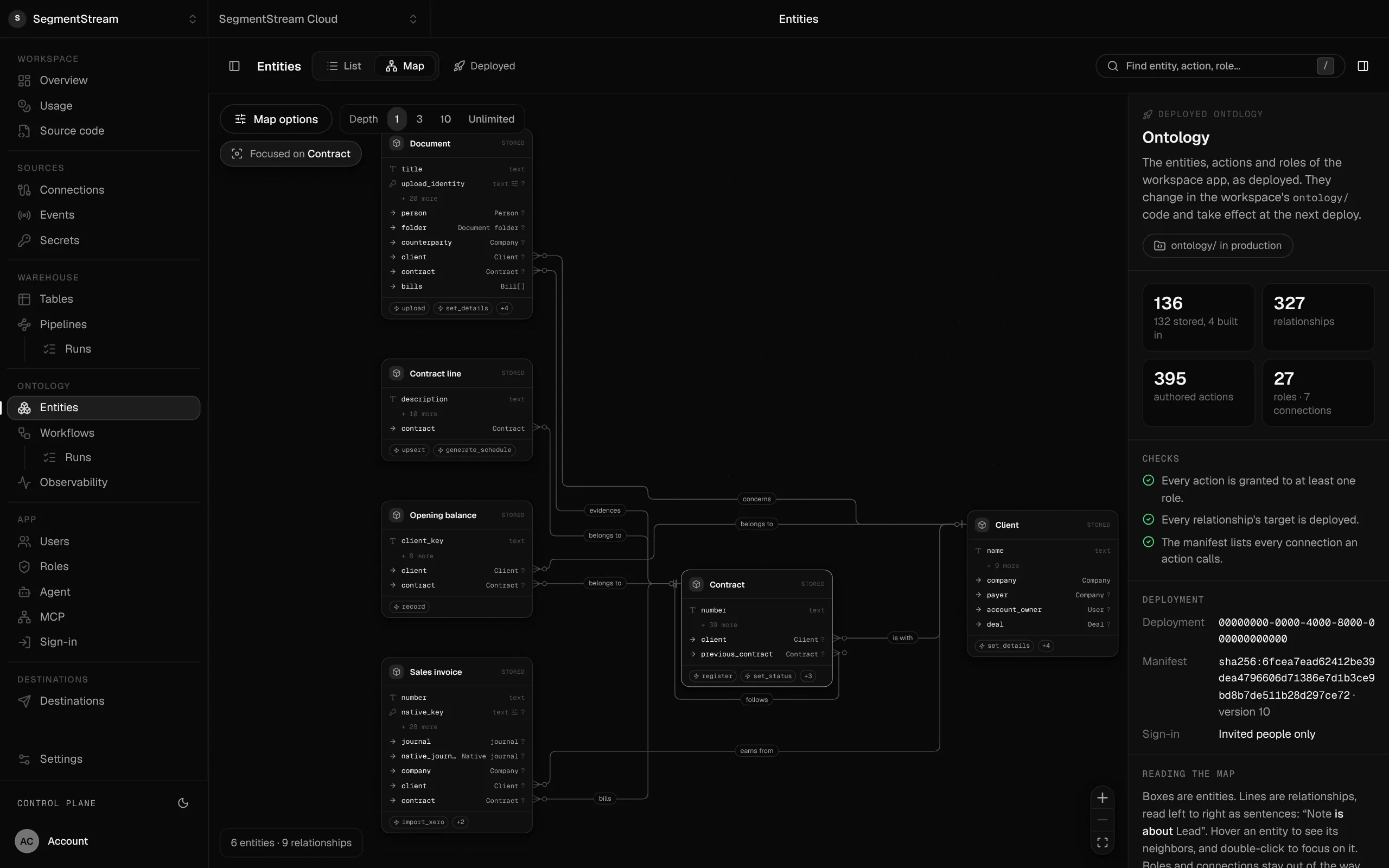
Your sheets become one company database.
Every sheet becomes an entity with typed fields, named relationships and the actions that change it, checked on every deploy.
- Excel trackers
- Google Sheets order books
- Copied tabs and emailed versions
Your sheets keep working while you move. The tabs that run the business become records with rules and roles, every row comes over and is counted, and each page is compared with the tab it replaces. Each team switches when its pages match.
Enterprise, with our engineers
Our engineers turn the sheets that run your business into a data model with rules and roles, import every tab, rebuild the views your team works in, and run both side by side until every team has switched.
Self-serve, with your own agent
Tell your agent which sheets run the business and connect Google Sheets or share the files. It writes the entities, actions and roles, loads your rows, and segmentstream deploy gives you the app, the API and the MCP tools.
curl -fsSL https://cloud.segmentstream.com/install.sh | shRelated solutions
Questions
Does SegmentStream replace our spreadsheets?
For the sheets that have become your CRM, order book, stock list or reporting, yes. For analysis, models and plans, keep Excel or Google Sheets; your BI tool can read the same warehouse.
How do our sheets come over?
Each tab is imported and counted against the sheet, and Google Sheets that others keep up to date can load on a schedule through a read-only connection. Nothing in your sheets is changed, and both run side by side until each team's pages match.
What happens to our formulas?
Yes, and that is the point. A formula that decides something, such as a discount or a stock check, becomes a rule in an action, so it holds whoever makes the change: a person in the app, a script or an agent.
Will you build it for us?
Yes. Our forward-deployed engineers build it with you if you want: the model, the import, the pages and the side-by-side comparison, starting with a fixed-scope pilot.
What does it cost?
Usage: compute, storage, queries, app traffic, the company agent and AI evaluations. No seats.
Who owns the code and the data?
You do. The code lives in a private git repository for your workspace; clone it with plain git, keep a copy on GitHub, take it with you. The database is yours, with no limit on API calls and full agent access within the roles you give. SegmentStream runs it.
Rather have it moved for you? Request a pilot.
Our engineers turn the sheets that run your business into a data model with rules and roles, import every tab, rebuild the views your team works in, and run both side by side until every team has switched.
- One solution, on your data, in your own workspace
- First version live in two weeks
- Parity proven before anything is switched off
- Fixed scope and price, credited to your contract if you continue
Not ready for a pilot? Send the form anyway with your question. An engineer will reply, not a sales rep.
How the pilot worksBuild your company’s own software. Let agents run it.
$ segmentstream workspace create acme --region eu --subdomain acme
▸ Created workspace acme · database, warehouse and a private git repository
$ segmentstream workspace WORKSPACE-ID clone acme && cd acme
▸ your coding agent builds what your team asked for and runs the checks
$ git add -A && git commit -m "First version"
$ segmentstream deploy
▸ app, company agent, API and MCP tools live for your invited members
Our engineers build the first version on your data in two weeks, at a fixed price.
Or build it yourself with your coding agent:
curl -fsSL https://cloud.segmentstream.com/install.sh | sh