
The QuickBooks alternative you own: your books beside the rest of the company, open to your agents.
Contacts, invoices, bills, payments and journals in a ledger you own, beside the clients, contracts and orders the rest of the company works on. Every posting goes through rules you can read, agents prepare and reconcile for your accountant to approve, and each month is reconciled against QuickBooks before you switch.
- First version in two weeks, at a fixed price
- Every month reconciled before you switch
- QuickBooks keeps running until then
- Our own books run on it
SegmentStream gives you a ledger you own instead of QuickBooks: invoices, bills, bank lines and journals beside the clients, contracts and orders the rest of the company works on, with posting rules in code, no cap on users, and agents that reconcile and prepare entries for your accountant to approve. Stay on QuickBooks if your accountant runs your books in it or you rely on its payroll. Move if you want your books in the same system as the rest of the company. We move you month by month, and nothing switches until every month reconciles.
Stay on QuickBooks if
- Your accountant runs your books in QuickBooks and wants to keep it that way.
- You rely on QuickBooks Payroll or its tax features.
- Your plan's user limit has never got in your team's way.
Move to SegmentStream if
- QuickBooks plans cap how many people use the books, from one user on Simple Start to 25 on Advanced.
- Invoices, contracts and revenue live in different systems and are reconciled by hand.
- You want approval rules that hold, and agents that match bank lines and prepare entries for your accountant to approve.
- You want profit and loss read from the same records as sales and operations.
We move you, if you want
Our engineers set up your entities, chart of accounts and approval limits, bring customers, vendors, invoices, bills, payments and journal entries over from QuickBooks, and reconcile each month against QuickBooks before anything switches.
Request a pilot →Last reviewed October 2026 · Sources: QuickBooks pricing
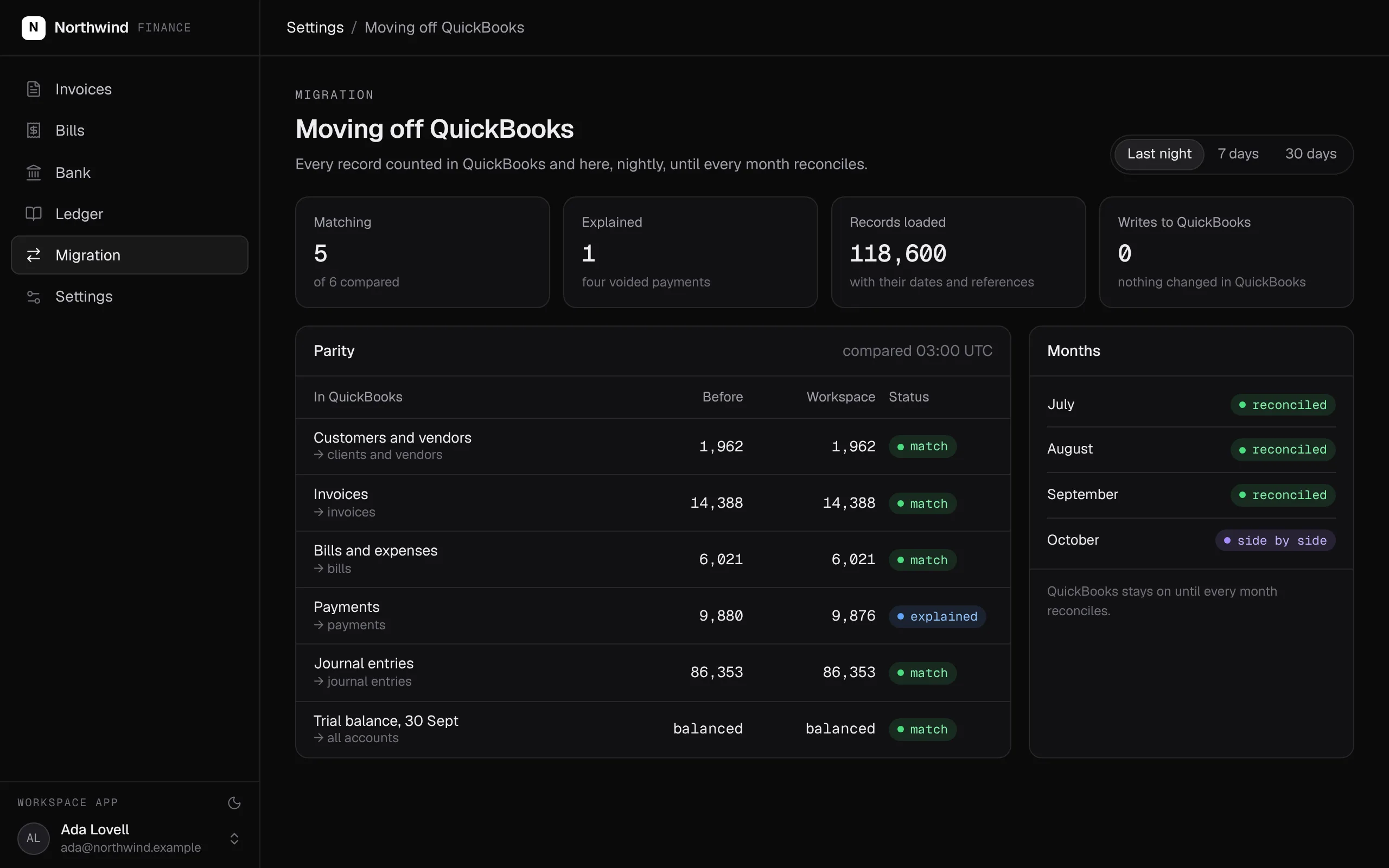
Every record counted in QuickBooks and in your ledger, every night, until every month reconciles. QuickBooks is never written to.
Swipe the screen sideways to see all of it.
What comes over, and what stays
What you bring from QuickBooks, and what you keep in the tools you like.
- Your chart of accounts, with your codes
- Contacts, as clients and vendors linked to their contracts and orders
- Invoices and bills, with their dates and references
- Payments, matched to what they paid
- Journals, so every month's balances match
- Bank transactions, matched line by line
- Payroll, in QuickBooks Payroll or the payroll service you use
- Filing returns, with your accountant or the tool they use
- Your bank: its feed comes in through a connection
What the QuickBooks alternative does
Your books sit in the same system as the rest of the company: revenue traced to the deal behind it, approvals that hold, and agents that do the matching and preparing while your accountant decides. The ledger, and the history in it, is yours.
- Contacts, invoices, bills, payments and journals come over, and every month is reconciled before you switch.
- Every posting goes through an action: an entry must balance, and a manual one over your threshold needs a second approver.
- Bank feeds come in on a schedule and each line is matched to an invoice, a bill or a transfer.
- A month closes once, and nothing posts into it afterwards.
- Profit and loss and the balance sheet read straight from the posted journal lines.
- An agent prepares invoices, journals and bank matches for your accountant to approve, under the same roles.
- The ledger is yours, next to your CRM and contracts, with no limit on API calls.
What it covers
A ledger with rules that hold →
Every posting goes through an action. An entry posts only when it balances and never into a closed month, and a manual entry over your threshold needs a second approver who did not prepare it.
Bank lines matched for you
Bank feeds come in on a schedule and each line is matched to an invoice, a bill or a transfer. The accountant confirms the rest and reconciles the account.
Month-end close and reports
A month closes once, and nothing posts into it afterwards. Profit and loss and the balance sheet read straight from the posted journal lines.
Agents prepare, your accountant approves →
An agent issues invoices, prepares journals and suggests bank matches for the accountant it works for, under the same roles and approvals as a person.
Next to the rest of the company →
Invoices and bills sit on the same clients, vendors and contracts that sales and operations work on, so revenue can be traced to the deal behind it.
A history your auditor can follow
Every change is kept with who made it and when, and a posted entry is corrected by reversing it, so the history stays whole.
Every QuickBooks concept, and where it lives in your workspace
For your engineers and your accountant: every QuickBooks concept and where it lives once you have moved.
| In QuickBooks | In your workspace | What to know |
|---|---|---|
| Chart of accounts | account entity with codes and types | Your codes kept as they are |
| Contacts | client and vendor entities | Linked to contracts, orders and deals |
| Invoices and bills | invoice and bill, with issue and approve actions | Loaded with their dates and references |
| Payments | Matched to invoices and bills | Every difference explained in the parity report |
| Journals | journal_entry and journal_line, posted only when they balance | Loaded so every month's balances match |
| Bank feeds and reconciliation | bank_transaction with a match action, and a reconciliation per account | Mercury, Starling and Wise connect directly |
| Closing a period | period.close | Nothing posts into a closed month |
| Reports | Profit and loss and the balance sheet from posted lines | Compared with QuickBooks's for every month |
| Users | Members with roles: accountant, finance lead | Approval by someone other than who prepared |
What SegmentStream does not do
- Payroll. Keep the payroll service you use; the journals it produces come in like any other.
- Filing returns with your tax authority. Your accountant files from their tool, using the ledger's reports.
- A marketplace of add-on apps. Connections are written into your workspace by your agent or our engineers.
How a migration from QuickBooks works
We do every step for you, or your team does it with its own agent and our engineers on call. QuickBooks keeps running until every month reconciles.
- 01
Set up your entities, accounts and approval limits
Your legal entities, chart of accounts, roles and approval limits are written with your finance lead, as a pull request you read before anything moves.
- 02
Bring your history over from QuickBooks
Contacts, invoices, bills, payments and journals load with their dates and references. Nothing in QuickBooks is changed.
- 03
Connect your bank
Your bank feed comes in on a schedule, and each line is matched to an invoice, a bill or a transfer.
- 04
Reconcile every month against QuickBooks
Receivables, payables, revenue and the trial balance are compared with QuickBooks's month by month, and every difference is explained, with no plug entries.
- 05
Switch when every month agrees
Your team works in the new ledger from the first open month. QuickBooks stays until your subscription says otherwise.
Moving off QuickBooks? We do the whole move for you.
Our engineers set up your entities, chart of accounts and approval limits with your finance lead, bring your history over from QuickBooks, connect your bank and reconcile every month against QuickBooks before anything switches. It starts with a fixed-scope pilot.
Nothing switches until the numbers match.
Both systems run side by side. Every number your teams rely on is compared, and every difference is explained before anything is turned off.
| Metric · Sept | QuickBooks | Workspace | Status |
|---|---|---|---|
| Receivables | £418,220 | £418,220 | match |
| Payables | £96,410 | £96,410 | match |
| Revenue | £184,300 | £184,300 | match |
| Payments | 1,184 | 1,180 | explained |
| Trial balance | balanced | balanced | match |
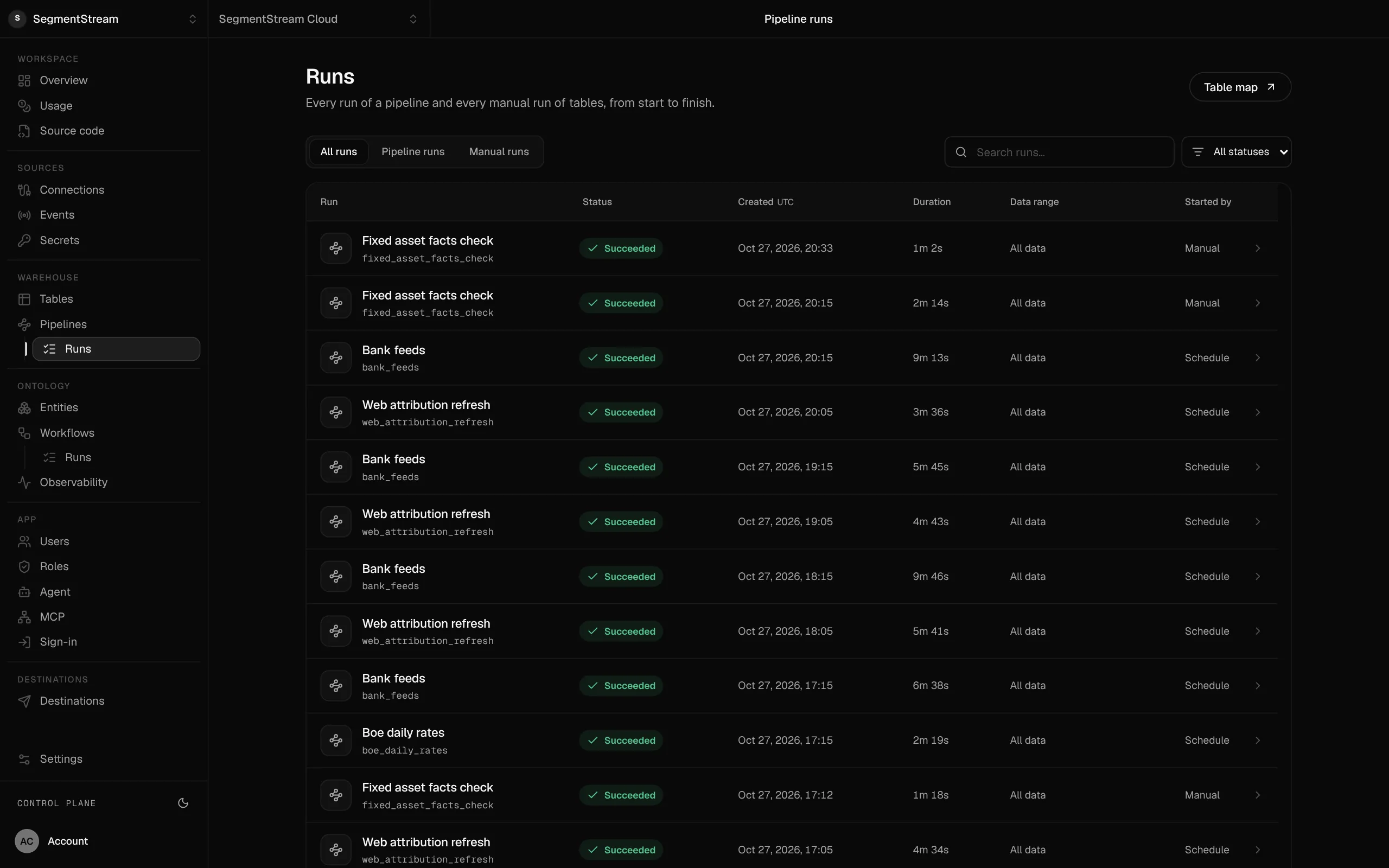
Bank feeds and checks on a schedule.
Statements, rates and ledger checks run as pipelines, each run kept with its status and duration.
- QuickBooks
- QuickBooks reports
- Month-end spreadsheets
QuickBooks keeps running while you move. Your history comes over, your bank feed connects, and each month is reconciled against QuickBooks, with no plug entries, before anything switches.
Enterprise, with our engineers
Our engineers set up your entities, chart of accounts and approval limits with your finance lead, bring your history over from QuickBooks, connect your bank and reconcile every month against QuickBooks before anything switches.
Self-serve, with your own agent
Connect QuickBooks and tell your agent how your books work: your legal entities, chart of accounts and approval limits. It writes the ledger, invoice, bill and reconciliation actions with their roles, loads your history, and segmentstream deploy gives you the app, the API and the MCP tools.
curl -fsSL https://cloud.segmentstream.com/install.sh | shRelated solutions
Questions
Is SegmentStream Cloud a QuickBooks alternative?
For a company that wants its books in the same system as the rest of the business, yes: invoices, bills, bank lines and journals live in a ledger you own, with posting rules in code, roles for your accountant and finance lead, and agents that prepare work for them to approve. It does not run payroll or file returns; keep the tools you use for those.
How do we move off QuickBooks without losing history?
Customers, vendors, invoices, bills, payments and journal entries come in through QuickBooks' API with their dates and references, or from your accountant's exports where that is simpler. Each month is then reconciled against QuickBooks, with no plug entries, before you switch.
Which banks connect?
Mercury, Starling and Wise connect directly, and Stripe payouts come in from Stripe. We connect other banks with you.
Can an agent really work in the ledger?
Yes, through the same actions as a person. Connect an agent and it works as the accountant it acts for: it can issue an invoice, prepare a journal entry, match a bank line or reconcile an account. The role check, the balance rule and the approval threshold apply to it exactly as they do in the app, and every change is kept with who made it and when.
Does our accountant still have access?
Yes. Invite them as a member with the accountant role. They see and change what the role allows, and every change they make is kept with their name.
How long does it take?
Our engineers put the first version in your workspace in two weeks at a fixed price. Each month is reconciled against QuickBooks before you switch, and QuickBooks stays until then.
What does it cost?
Usage: compute, storage, queries, app traffic, the company agent and AI evaluations. No seats and no feature gates.
Who owns the code and the data?
You do. The code lives in a private git repository for your workspace; clone it with plain git, keep a copy on GitHub, take it with you. The ledger is yours, with no limit on API calls and full agent access within the roles you give. SegmentStream runs it.
Rather have it moved for you? Request a pilot.
Our engineers set up your entities, chart of accounts and approval limits with your finance lead, bring your history over from QuickBooks, connect your bank and reconcile every month against QuickBooks before anything switches.
- One solution, on your data, in your own workspace
- First version live in two weeks
- Parity proven before anything is switched off
- Fixed scope and price, credited to your contract if you continue
Not ready for a pilot? Send the form anyway with your question. An engineer will reply, not a sales rep.
How the pilot worksBuild your company’s own software. Let agents run it.
$ segmentstream workspace create acme --region eu --subdomain acme
▸ Created workspace acme · database, warehouse and a private git repository
$ segmentstream workspace WORKSPACE-ID clone acme && cd acme
▸ your coding agent builds what your team asked for and runs the checks
$ git add -A && git commit -m "First version"
$ segmentstream deploy
▸ app, company agent, API and MCP tools live for your invited members
Our engineers build the first version on your data in two weeks, at a fixed price.
Or build it yourself with your coding agent:
curl -fsSL https://cloud.segmentstream.com/install.sh | sh