
The Salesforce alternative you own: your pipeline, your rules, and numbers you can explain.
Accounts, contacts, leads and opportunities in one place you own, with your stages and rules written as code your team can read. Every change is recorded with who made it, so the pipeline number you take to the board is one you can explain. Your agents work the same records, and you pay for usage, not licences. We do the whole move off Salesforce for you and run both side by side until every team has switched.
Every object counted in Salesforce and in your workspace, every night, until each team has switched. Salesforce is never written to.
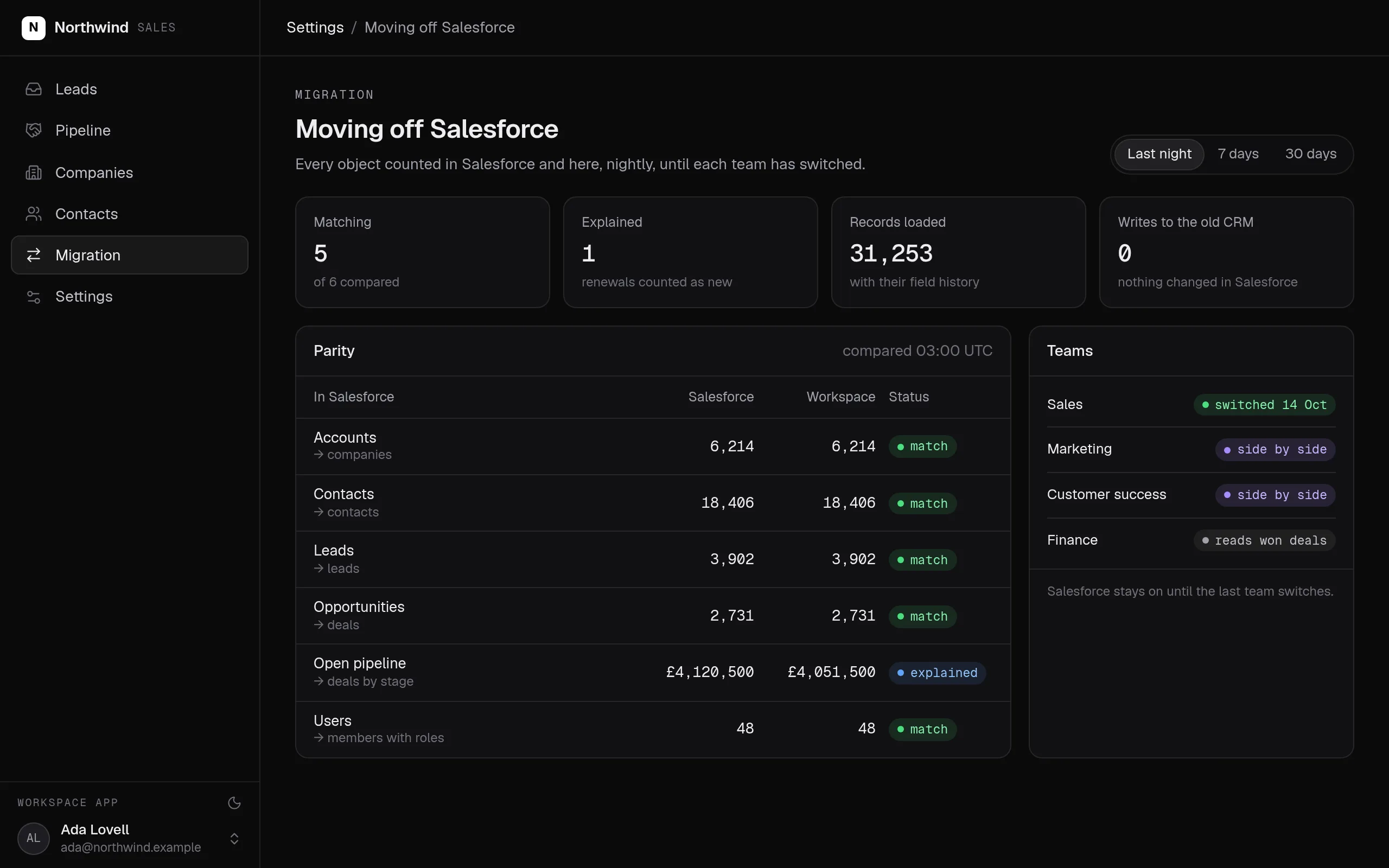
Swipe the screen sideways to see all of it.
What the Salesforce alternative does
Your sales leaders get a pipeline they can explain to the board, record by record. RevOps changes a rule by describing it, not by waiting in an admin queue, and every team that needs the CRM has it without a per-user licence.
- Accounts, contacts, leads and opportunities come over from Salesforce with their field history.
- Your stages and rules are code your team can read: a deal moves only through its own step, lost needs a reason, and won creates the client.
- Every change is kept with who made it and when, so the forecast can be traced back record by record.
- Roles decide who sees amounts and who may change what, for people and agents alike.
- Your agents qualify and enrich leads and answer pipeline questions in Telegram, as the person asking.
- No licences per user and no admin backlog: describe a change, your agent writes it, your team reviews it, and one command deploys it.
- You own it: your own database, direct API access with no limit on calls, and full agent access within the roles you give.
What it covers
A pipeline you can explain
Opportunities by stage with the history of every change, so a number in the forecast can be traced to the records and the people behind it.
Rules in code, not in admin settings
Stage gates, required fields and ownership rules live in actions your team can read. A change is a reviewed pull request, not a ticket in the admin queue.
Moved over with field history →
Accounts, contacts, leads and opportunities come over with their field history, and both CRMs run side by side until each team switches.
Roles for people and agents →
Sales sees amounts, other teams do not. The same roles apply in the app, the API and every agent over MCP.
Leads graded for you →
Every inbound lead graded A to D against standards you write in plain language, with the reason, in your sales team's own app.
The company agent →
Ask about the pipeline in Telegram. It answers as the member asking, with that member's permissions.
Every Salesforce concept, and where it lives in your workspace
For your engineers: every Salesforce concept and where it lives once you have moved.
| In Salesforce | In your workspace | What to know |
|---|---|---|
| Accounts and contacts | company and contact entities with your fields | Loaded with their field history |
| Leads | lead with intake, triage and qualification | Website forms submit through an API key |
| Opportunities and stages | deal with your stages, moved only through its moveStage action | Lost needs a reason; won creates the client |
| Custom objects and fields | Your own entities and typed properties | Named as your team names them |
| Validation rules and Apex triggers | Rules inside actions, in TypeScript | Reviewed as pull requests, deployed with one command |
| Flows | Workflows in code | Started on a schedule, from the app or from another workflow; every run recorded |
| Profiles, permission sets and sharing | Roles on every entity and action | The same for people, API keys and agents |
| Field history tracking | The full history of every record | Every change, with who made it and when |
| Reports and dashboards | Pages in your own app and SQL models in your warehouse | Definitions in code |
| Einstein and Agentforce | Any agent over MCP, as the member it works for | Under your roles, with every change recorded |
| User licences | Members with roles | No licences per user; you pay for usage |
What SegmentStream does not do
- CPQ, a phone dialler or a meeting scheduler. Keep the tools you use for those, or connect them through their APIs.
- An app marketplace to install packages from. Connections and features are written into your workspace by your agent or our engineers.
- A drag-and-drop flow builder. Workflows are code your team reviews as pull requests.
How a migration from Salesforce works
We do every step for you, or your team does it with its own agent and our engineers on call. Salesforce keeps running until the last team has switched.
- 01
Map how you actually sell
Your objects, stages, validation rules and roles are written with your sales leaders and RevOps, as a pull request you read before anything moves. What nobody uses stays behind.
- 02
Bring the data over with its history
Accounts, contacts, leads and opportunities load with their field history. Nothing in Salesforce is changed.
- 03
Rewrite rules and flows as code
Validation rules, triggers and flows become actions and workflows your team can read, each with the role that may run it.
- 04
Rebuild the views and reports
The pipeline by stage, the forecast and the reports your board sees become pages in your own app, compared with Salesforce's numbers side by side.
- 05
Point lead intake at your workspace
Website forms and other sources send leads straight in, and can submit nothing but leads. During the side-by-side run both CRMs receive them.
- 06
Switch team by team
Each team switches when its views match. Salesforce stays until your contract says otherwise, and nothing is switched off before that.
Moving off Salesforce? We do the whole move for you.
Our engineers map your objects, stages and rules with your sales leaders and RevOps, bring accounts, contacts, leads and opportunities over with their field history, rewrite the rules and flows that matter as code, and run both CRMs side by side until every team has switched. It starts with a fixed-scope pilot.
Nothing switches until the numbers match.
Both systems run side by side. Every number your teams rely on is compared, and every difference is explained before anything is turned off.
| Metric · Sept | Salesforce | Workspace | Status |
|---|---|---|---|
| Open opportunities | 214 | 214 | match |
| Pipeline value | £4,120,500 | £4,051,500 | explained |
| Opportunities won | 37 | 37 | match |
| Contacts | 18,406 | 18,406 | match |
| New leads | 1,408 | 1,408 | match |
Built from typed blocks
No new product to buy: the blocks below, written by an agent into your workspace's repository and deployed with one command.
None required.
$ segmentstream deploy
Every block ships together from one git repository your company owns. SegmentStream runs it.
- Salesforce Sales Cloud
- Salesforce reports and dashboards
- Admin backlog
Salesforce keeps running while you move. Accounts, contacts, leads and opportunities come over with their field history, the rules and flows that matter are rewritten as code, and each view your teams rely on is rebuilt and compared with Salesforce's numbers. Each team switches when its views match. We do the whole move for you if you want: see the offer below.
Moving off Salesforce? We do the whole move for you.
Our engineers map your objects, stages and rules with your sales leaders and RevOps, bring accounts, contacts, leads and opportunities over with their field history, rewrite the rules and flows that matter as code, and run both CRMs side by side until every team has switched. It starts with a fixed-scope pilot.
Enterprise, with our engineers
Our engineers map your objects, stages and rules with your sales leaders and RevOps, bring accounts, contacts, leads and opportunities over from Salesforce with their field history, rewrite the rules and flows that matter as code, and run both CRMs side by side until every team has switched.
Self-serve, with your own agent
Connect Salesforce and tell your agent how you sell. It writes the entities, actions and roles, loads your records, and segmentstream deploy gives you the app, the API and the MCP tools.
Related solutions
Read more
Questions
Is SegmentStream Cloud a Salesforce alternative?
For the CRM your sales team runs on, yes: accounts, contacts, leads and opportunities live in a workspace you own, with your stages and rules as code, roles for every team, and agents working the same records. It has no CPQ, phone dialler or app marketplace; keep the tools you rely on for those.
Can we keep our Salesforce field history?
Yes. Accounts, contacts, leads and opportunities come over with their field history. From then on every change is kept with who made it and when.
What happens to our validation rules, triggers and flows?
The ones that matter become actions and workflows in code: a stage gate is a rule inside the action that moves a deal, a flow is a workflow started on a schedule, from the app or from another workflow. Your team reads them as pull requests; what nobody uses stays behind.
Will you do the Salesforce migration for us?
Yes. Our forward-deployed engineers do the whole move if you want it: the model, the import, the rules, the views your teams use and the side-by-side comparison, starting with a fixed-scope pilot. Request it on this page and your note goes to our founder, not a sales queue.
Do we need a Salesforce admin to run it?
No. A change is described in plain language, your agent writes it in your repository, your team reviews the pull request, and one command deploys it. Our engineers are on call if you want them.
What does it cost?
Usage: compute, storage, queries, app traffic, the company agent and AI evaluations. No licences per user and no feature gates.
How long does a Salesforce migration take?
Our engineers put the first version in your workspace in two weeks at a fixed price, usually the pipeline, the lead inbox and the reports your leadership reads. Each team switches when its views match Salesforce's.
Who owns the code and the data?
You do. The code lives in a private git repository for your workspace; clone it with plain git, keep a copy on GitHub, take it with you. The database is yours, with no limit on API calls and full agent access within the roles you give. SegmentStream runs it.
Rather have it moved for you? Request a pilot.
Our engineers map your objects, stages and rules with your sales leaders and RevOps, bring accounts, contacts, leads and opportunities over from Salesforce with their field history, rewrite the rules and flows that matter as code, and run both CRMs side by side until every team has switched.
- One solution, on your data, in your own workspace
- First version live in two weeks
- Parity proven before anything is switched off
- Fixed scope and price, credited to your contract if you continue
Not ready for a pilot? Send the form anyway with your question. An engineer will reply, not a sales rep.
How the pilot worksYour company’s software, built by agents, owned by you.
$ segmentstream workspace create acme --region eu --subdomain acme
▸ Created workspace acme · database, warehouse and a private git repository
$ segmentstream workspace WORKSPACE-ID clone acme && cd acme
▸ your agent writes the five folders and runs the checks
$ git add -A && git commit -m "First version"
$ segmentstream deploy
▸ app, ontology API and MCP tools live for your invited members
Our engineers build the first version on your data in two weeks, at a fixed price.
Or join the waitlist for self-serve:
Self-serve opens to the waitlist first.