
Every app's ontology as an API and MCP tools, checked per caller.
Deploy an ontology and it is served four ways: a REST API, an OpenAPI reference, a typed SDK for your apps and an MCP server for agents. People connect their agents with OAuth and the agent acts as them, with tools only for what their roles allow.
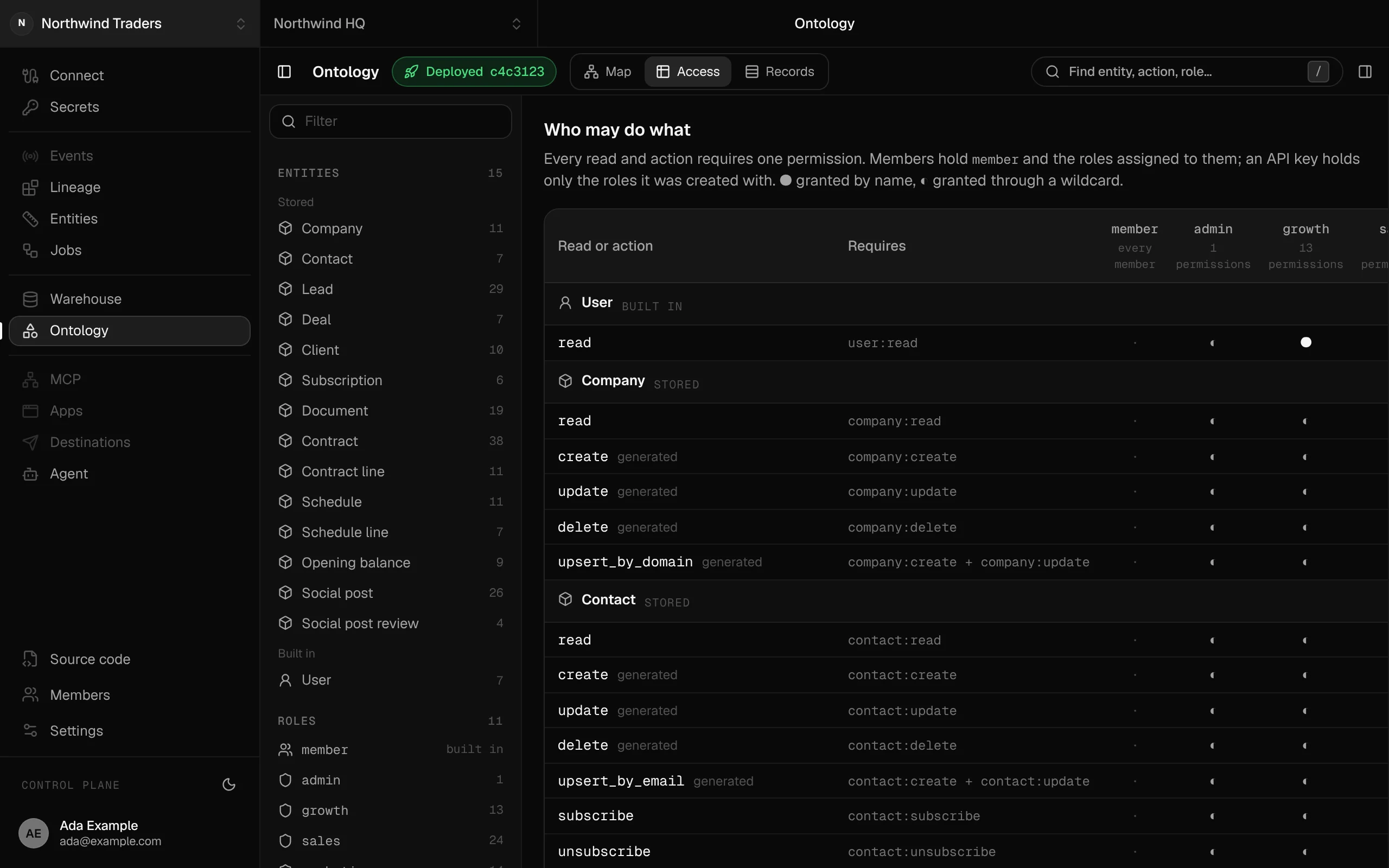
An MCP server per app
Every app in a workspace serves its ontology at /mcp. Add the address to Claude, ChatGPT, Claude Code or any MCP client that supports OAuth.
Agents sign in as the person
The member signs in on the app's own page and chooses: everything their roles allow, read only, or deny. The agent then acts as them, and history names them.
Tools per role
tools/list holds only the tools the caller's roles allow, and every call is checked again. A role without deal:moveStage never sees deal_move_stage.
REST, OpenAPI and a typed SDK
The same model is a REST API at /api/ontology with an OpenAPI reference, and a typed client for your apps. One code path serves all of them, so a rule enforced in one is enforced in all.
API keys for unattended work
Jobs that run with nobody signed in use API keys. A key holds exactly the roles it was created with.
Errors an agent can act on
A refused call returns the action's own message, so the agent can fix its input and try again. Clients ask before running an action that changes data.
In code
# A member connects their agent, then signs in on the app's page.$ claude mcp add --transport http crm https://crm.example.com/mcp# The tools it gets depend on the member's roles, for example:describe me aggregatedeal_find deal_get deal_history deal_move_stagelead_find lead_get lead_history lead_claim lead_qualify# Unattended work uses an API key with one role.$ segmentstream ontology mcp --create-key nightly-report --role salesUse it, build on it, or have it built
Use it
Copy your app's /mcp address into Claude or ChatGPT and sign in.
Build it with your agent
Add an action or a role in ontology/ and deploy; the API and the tool list follow.
Have our engineers build it
Our engineers connect your team's agents and set up the keys your other systems need.
Replaces Hand-built MCP servers, Database credentials handed to agents and Vendor APIs with dozens of tools to choose from.
Works with
Solutions built with it
Read more
- 8 October 2026Agent sprawl: how to run a company on one AI agent instead of 3,000Companies are building AI agents by the thousand, each with its own instructions, its own keys and its own copy of the rules. Vercel went the other way and moved hundreds of internal agents behind one. Here is how a company runs on a single agent, and what has to sit behind it.
- 8 October 2026MCP gateway vs raw MCP servers: how to run a company through any agentEvery tool your company uses now has an MCP server, and the usual way to give an agent access is to plug them all in. It demos well and breaks on permissions, rules, context and the next agent you try. An MCP gateway over your company's ontology gives every agent one door, with your own actions, roles and history behind it.
- 7 October 2026Read this before you cancel HubSpot or SalesforceCompanies are cancelling CRM contracts and having AI agents write their own. Writing the CRM is now the easy part. What decides whether it survives is the layer underneath it: objects, permissions, actions, history and safe access for agents. That layer is called an ontology.
- 3 October 2026AI agents can build your BI. Here's why they get the numbers wrong.Benchmarks keep finding that agents writing SQL against raw tables give confident wrong answers, while the same agents answering through a semantic layer get nearly everything right. What that means for how you build analytics now.
Start a pilot.
Want mcp and api set up for you? Our forward-deployed engineers build it with you in your workspace, as code you own.
- One solution, on your data, in your own workspace
- First version live in two weeks
- Parity proven before anything is switched off
- Fixed scope and price, credited to your contract if you continue
Not ready for a pilot? Send the form anyway with your question. An engineer will reply, not a sales rep.
How the pilot worksYour company’s software, built by agents, owned by you.
$ segmentstream workspace create acme --region eu --subdomain acme
▸ Created workspace acme · database, warehouse and a private git repository
$ segmentstream workspace WORKSPACE-ID clone acme && cd acme
▸ your agent writes the five folders and runs the checks
$ git add -A && git commit -m "First version"
$ segmentstream deploy
▸ app, ontology API and MCP tools live for your invited members
Our engineers build the first version on your data in two weeks, at a fixed price.
Or join the waitlist for self-serve:
Self-serve opens to the waitlist first.