
Built by agents. Readable by humans.
Every workspace is one git repository with five folders: app/, ontology/, pipeline/, connections/ and agent/. Your agent builds in them from typed building blocks, and one deploy runs them. The CLI and MCP give agents the same operations and permissions as people.
The building surface
Four SDKs, one per kind of folder, plus the CLI, and the API and MCP server every app serves. Everything a person can do here, an agent can do with the same calls.
Ontology SDK
@segmentstream-cloud/ontology
Entities, actions and roles; REST, OpenAPI and MCP from one model
App SDK
@segmentstream-cloud/app
Email-code sign-in, roles, records and warehouse data for Next.js
Pipeline SDK
segmentstream-pipeline (Python)
Connections, ingestion, models, checks and schedules in Python
Agent SDK
@segmentstream/agent
The company agent: ontology tools as the member, Telegram channel
CLI
segmentstream
Workspaces, deploys, members, jobs and data from the terminal
MCP and API
/mcp and /api/ontology on every app
REST, OpenAPI and MCP on every app, per caller
From zero to a deployed workspace.
A new workspace comes with the starter: an app with sign-in, an ontology, a pipeline and the docs your agent reads. Clone its repository, deploy, and invite your team.
$ curl -fsSL https://cloud.segmentstream.com/install.sh | sh$ segmentstream login$ segmentstream workspace create acme --region eu --subdomain acme$ segmentstream workspace WORKSPACE-ID clone acme && cd acme# your agent writes the five folders$ git add -A && git commit -m "First version"$ segmentstream deploy$ segmentstream ontology member invite ada@example.com --role sales$ segmentstream ontology mcp # connect your agent to the appFive folders are the whole workspace.
Each folder owns its dependencies and deploys together with the others. The instructions your agent needs ship in the repository.
acme/├─ AGENTS.md # what your agent reads first├─ .agents/skills/ # ontology, app-auth, app-data, connections, ...├─ app/ # Next.js app: the screens your team opens├─ ontology/ # entities, actions and roles│ └─ index.ts # export default defineOntology({ ... })├─ pipeline/│ ├─ ingestion/ # one asset per file│ ├─ models/ # bronze, silver, gold│ └─ definitions.py # jobs and schedules├─ connections/│ └─ connections.py # the tools you keep├─ agent/ # the company agent└─ docs/What deploy gives you
Deploy the five folders and the platform runs them: the app with sign-in, Postgres under the ontology with its API and MCP tools, pipelines and a warehouse, the connection vault and the company agent. The console shows all of it.
The deployed ontology at a glance: entities, relationships, actions, roles and connections, with the checks every deploy passes.
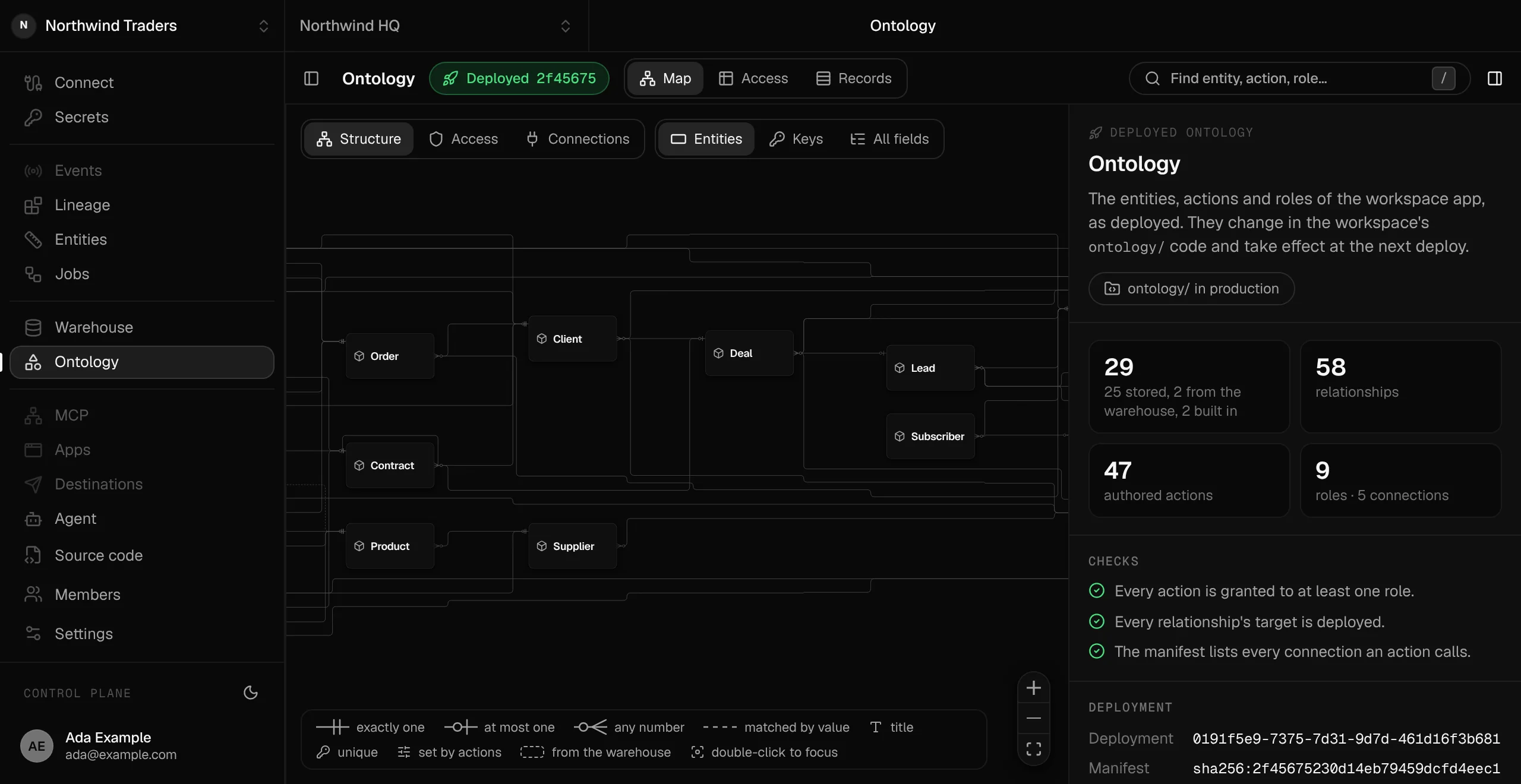
Developer tools, agent-first
Everything a person can do here, an agent can do too.
CLI
Create and link workspaces, deploy, invite members, run and backfill jobs, inspect lineage and query the warehouse, with JSON output for agents and CI.
More →MCP and API
Every app serves its ontology at /mcp and /api/ontology. Agents sign in as the person and see only the tools that person's roles allow.
More →Agent guide
AGENTS.md and docs in every workspace repository: the layout, the platform rules and the commands your agent may run.
Agent skills
Skills for the work agents do most: the ontology, app sign-in, app data, connections, ingestion, models and the agent, versioned in the repository.
Docs that stay current
segmentstream sync brings the guide, docs and skills up to date with the installed CLI, without touching the files you edited.
Your repository
A private git repository per workspace. Clone it with plain git; a deploy runs one exact commit.
More →What the code looks like
This is the shape of the code in a workspace, from the published SDKs. Your agent writes it; you review it like any other change.
.actions((self) => ({ win: action({ description: "Mark the lead as won.", input: Schema.Struct({ lead: self.ref }), // Requires lead:win: <entity>:<action name>. handler: ({ input }) => Effect.gen(function* () { const lead = yield* self.get(input.lead, { forUpdate: true }); if (lead.status === "won") { return yield* new ActionRejected({ message: "The lead is already won." }); } yield* self.update(lead, { status: "won" }); }), }),}));const { items, nextCursor } = await segmentstream.ontology.lead.find({ where: { status: { in: ["new", "contacted"] } }, orderBy: [{ field: "createdAt", direction: "desc" }], include: { owner: true }, limit: 20,});const { result, validation } = await segmentstream.ontology.lead.actions.changeStatus( { lead: id, status: "contacted" },);@s.model( tier=s.Tier.Gold, partitioning=s.Partitioning.Daily(column="order_date", start_date="2026-01-01"), schema={"order_date": "date", "customer_count": "int64", "total_revenue": "float64"},)def revenue_summary(customer_revenue: ir.Table) -> ir.Table: return customer_revenue.group_by("order_date").aggregate( customer_count=customer_revenue.count(), total_revenue=customer_revenue.revenue.sum(), )// agent/agent/extensions/segmentstream.tsimport { segmentstream } from "@segmentstream/agent/extension";import config from "../../segmentstream.json";export default segmentstream(config);// agent/segmentstream.json{ "channels": { "telegram": { "connection": "telegram", "policy": "smart" } }}Your company's software, in a repository you own.
Every workspace owns a private git repository with the five folders and their full history. Clone it with plain git, keep a copy on GitHub, take it with you. segmentstream deploy, or a push to main, deploys that exact commit. If a deploy fails, production keeps serving the last good one.
One repository, one workspace
Commit, then deploy
$ segmentstream workspace WORKSPACE-ID clone acme$ cd acme# Your agent edits the folders; you review the diff.$ git add -A && git commit -m "Add contract approvals"$ segmentstream deployThe deploy checks every folder first: the ontology's changes are planned against the live database and tried on a copy, and unsafe changes are refused before anything applies.
Your company’s software, built by agents, owned by you.
$ segmentstream workspace create acme --region eu --subdomain acme
▸ Created workspace acme · database, warehouse and a private git repository
$ segmentstream workspace WORKSPACE-ID clone acme && cd acme
▸ your agent writes the five folders and runs the checks
$ git add -A && git commit -m "First version"
$ segmentstream deploy
▸ app, ontology API and MCP tools live for your invited members
Our engineers build the first version on your data in two weeks, at a fixed price.
Or join the waitlist for self-serve:
Self-serve opens to the waitlist first.