
Your company's ontology: the entities it runs on, and the rules around them
SegmentStream Cloud lets you define your customers, deals and orders once, in code, along with the rules for changing them. Your team, your other software and your AI agents then work on the same records under the same rules.
Sales rep
Rep’s agent
- role: sales
- rule: lost needs a reason
- one transaction
- history
Deal: Acme annual plan
stage:Won
Sales rep
Rep’s agent
- role: sales
- rule: lost needs a reason
- one transaction
- history
Deal: Acme annual plan
stage:Won
What an ontology is
An ontology is a company's model of itself.
It holds every customer, deal, product and order, how they connect, and who may change what. Every CRM has one behind its screens. So does most other back-office software, such as accounting and inventory systems. SegmentStream Cloud lets you write your own.
If you have used a spreadsheet or a database, you already know most of the parts:
- In an ontology
- Entity
- You may know it as
- A table, or a tab in a spreadsheet
- Example
- Deal
- In an ontology
- Record
- You may know it as
- A row
- Example
- The Acme deal
- In an ontology
- Property
- You may know it as
- A column
- Example
- The deal's stage
- In an ontology
- Relationship
- You may know it as
- A lookup between tables
- Example
- A deal is with a company, and a company has deals
- In an ontology
- Action
- You may know it as
- A form with validation
- Example
- Move a deal to a stage
- In an ontology
- Role
- You may know it as
- Sharing settings
- Example
- Sales may read deals and move them
The parts fall into two groups.
What exists.
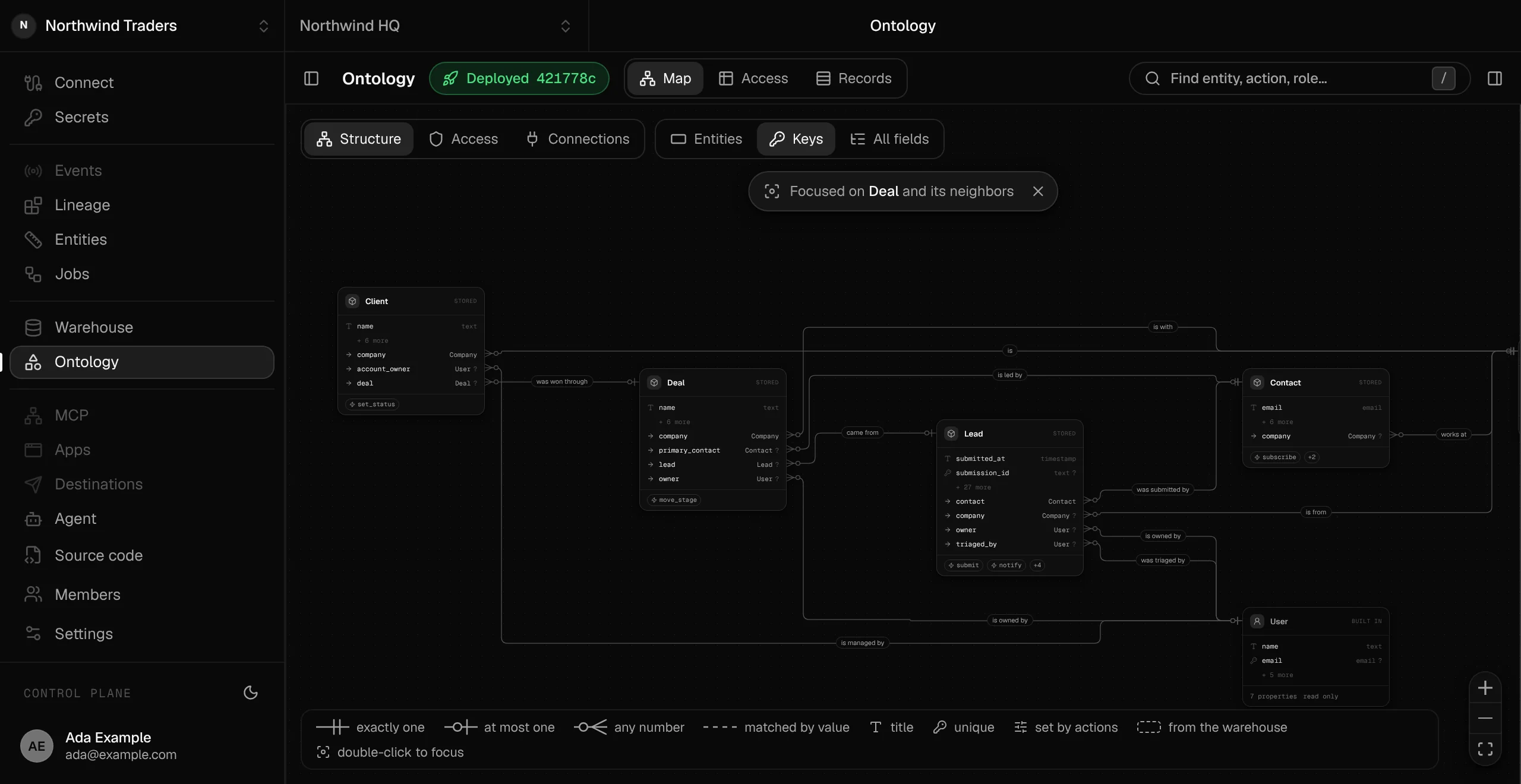
- Entities are the kinds of things the business runs on, such as Company, Contact, Deal and Order.
- Properties are the values each record holds, each of a set type, such as an amount, an email, or a stage picked from a fixed list.
- Relationships name how records connect, in both directions.
How it changes.
- Actions are named operations with your business rules inside, such as qualify a lead, move a deal or approve an order.
- Roles are named sets of permissions. They say who may read which entities and run which actions.
Why agents need one
An AI agent is an AI model, such as Claude or ChatGPT, that can take actions in your software for you.
Wired straight into your tools, it sees each tool's API (the interface software offers to other programs) and raw database tables.
It has to guess what "active customer" means, which column holds the deal stage, and whether a won deal can be reopened.
When it guesses wrong while changing data, the mistake lands in your records.
An ontology gives the agent your company's vocabulary and your rules.
- The agent reads a plain description of every entity and action.
- It can call only the actions its user's role allows.
- If it breaks a rule, the action refuses and explains why, and the agent can fix its call.
People and agents then work as one team under one set of controls.
A person connects an agent by signing in as themselves.
From then on, the agent acts as that person, with the roles the person holds at that moment.
History records the person's name on every change the agent makes.
Deactivate the person and all of their agents stop.
Jobs that run with nobody signed in, such as a website form, use API keys. Each key acts as its own user and holds exactly the roles it was given.
Your company as a Git repo, deployed to SegmentStream Cloud
Git is the tool software teams use to track and review every change to their code. Code lives in a Git repository, or repo, and your company's model can live in one too.
- Each entity is a file written in TypeScript, a widely used programming language, and holds the entity's properties, relationships and actions.
- Roles sit in one more file.
- Every definition carries a plain-language description.
You review a change to the business the way engineers review a change to software. You see it as a diff, a line-by-line view of what changed, with full history. An AI coding assistant can draft the change for you.
The repo holds the definitions. To run a company on them you also need live data: thousands of records edited at once by people and agents, plus files, permissions and a log of every change.
One command deploys the repo to SegmentStream Cloud, which sets up everything the definitions describe:
- a Postgres database with a table for each entity (Postgres is a widely used open-source database)
- an action for each kind of change. It checks the caller's role, runs your rules in one transaction, which saves all of the changes together or none of them, and writes history
- a REST API, the standard web interface your other systems call
- an MCP server for AI agents. MCP (Model Context Protocol) is the open standard that Claude, ChatGPT and other agents use to call outside tools
- a typed SDK, a code library that your internal apps use from their screens. The apps run on SegmentStream Cloud next to your ontology
- copies of every record in your BigQuery warehouse, the Google database where analysts keep company data for reporting
A web app works the same way: its code lives in Git and it runs on a hosting platform. Change a definition and deploy again, and the database, the API and every agent's tools follow. Each company gets its own environment on SegmentStream Cloud, with its own Git repo, Postgres database and warehouse.
- company.ts
- contact.ts
- deal.ts
- client.ts
- roles.ts
Your environment on SegmentStream Cloud
How it works
- 01
You define the model in your repo.
Entities, properties, relationships, actions and roles are TypeScript files in an
ontology/folder. Every entity, property, option, action and role needs a plain-language description. The same text documents the API and tells agents what each thing means. - 02
A deploy plans the change against the live database.
Every entity and property has a permanent id, so the deploy can tell exactly what changed. New entities, properties and options apply automatically. You declare renames in code. Type changes and dropped properties are refused before anything runs. Changes to the database structure are first tried on a copy of the production database, and if anything fails, the running version stays live.
- 03
Records live in your own Postgres database.
Each entity gets its own table. Required properties, unique values and allowed options are checked on every write, whoever makes it.
- 04
Every change goes through an action.
The platform generates create, update, delete and upsert actions for each entity. An upsert creates a record or updates the one that matches. You write the actions that carry business logic. Each action validates the input, checks the caller's role and runs your rules in one transaction. Then it writes a history row with the action, the caller, and the before and after values of each changed property. Callers can pass
validate_onlyto get back every problem with the input without saving anything. - 05
One definition generates three interfaces.
These are the REST API, with reference docs in the OpenAPI format, the MCP server for agents, and the typed SDK for your apps. All three share one code path, so a rule enforced in one is enforced in all of them.
- 06
Measures count over warehouse data.
An entity can point at a table in your warehouse and declare measures, such as a count of orders or a sum of revenue. Apps and agents ask for totals by dimension (such as product), for a date range, at a granularity such as per month.
- 07
Connections call outside services while the credentials stay hidden.
An action can name a connection and call it before its transaction opens. The connection might be a payment provider or a service that looks up company details. Credentials stay in a secret store inside your environment and are added to each call on the way out. The app, the agent and test deployments never receive them.
- 08
Follow-up effects run once a change is saved.
After an action saves, it can send an email, post to Telegram or call a webhook (a web address another system listens on). If one of these fails, the failure is logged and the saved change stands.
- 09
Records replicate to BigQuery.
By default, every stored entity streams into your warehouse. You can opt out per entity or per property. Analysts can then join decisions made in the app with the rest of your data.
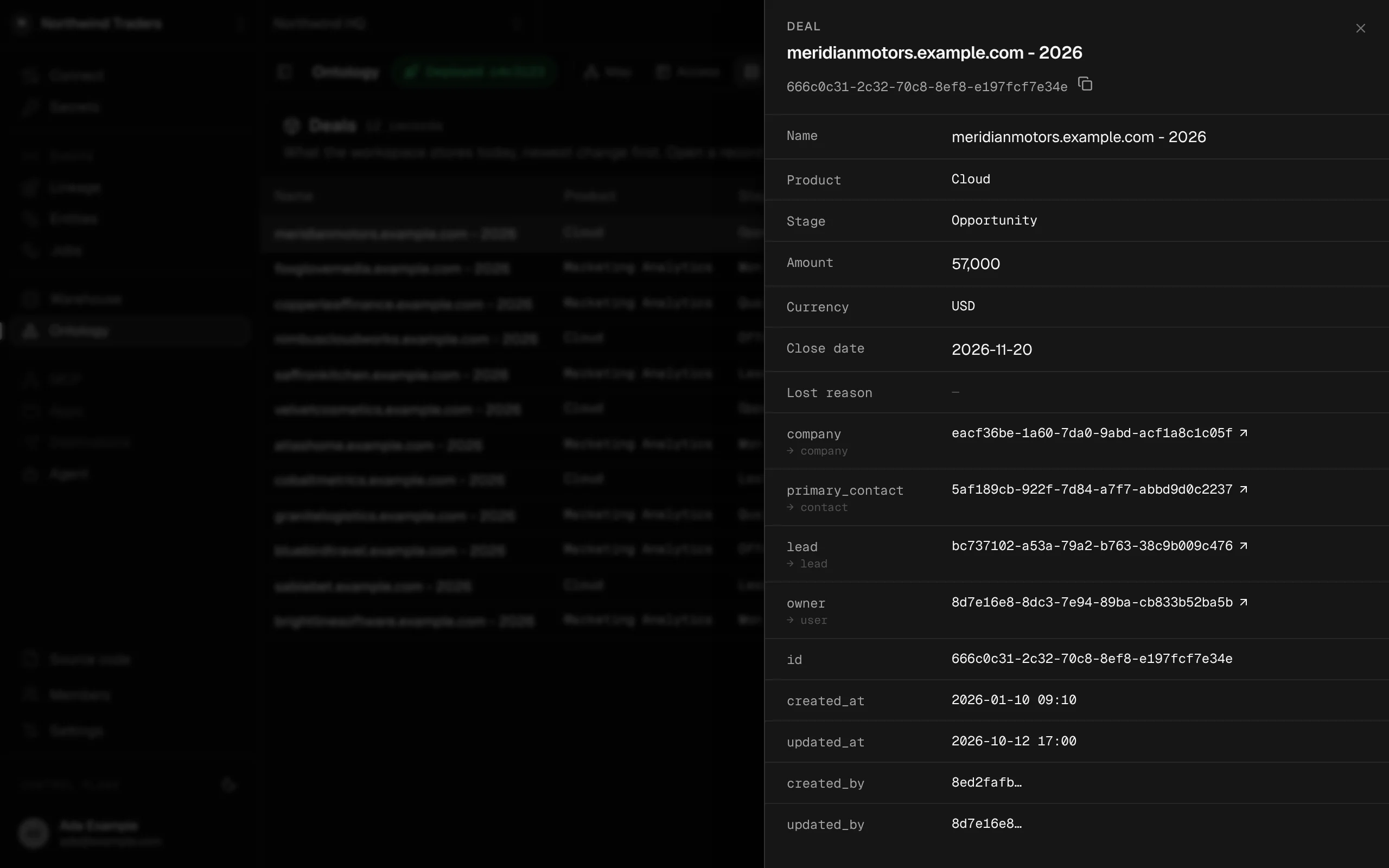
One record with its relationships and who last changed it. Records change only through actions, and every change is kept in history.
Example: a deal moving stage
This is a simplified version of the deal entity from the CRM we run our own sales on.
- A deal moves through stages.
- "Lost" and "disqualified" need a reason.
- "Won" is final.
- In the same transaction, it creates a client record, which marks the company as a paying customer.
// ontology/deal.ts (simplified)
import { action, ActionRejected, entity, p, rel, role } from "@segmentstream-cloud/ontology";
import { Effect, Schema } from "effect";

import { Client } from "./client";
import { Company } from "./company";

export const Deal = entity("deal", {
  id: "ent_deal",                                              // (1)
  label: "Deal",
  plural: "Deals",
  title: "name",
  description: "A sales opportunity with one company. Opened when a lead is qualified.",
  properties: {
    name: p.text({ description: "The short name the team uses for the deal." }),
    stage: p.select(
      [
        { value: "qualified", label: "Qualified", description: "Fit confirmed. First call booked." },
        { value: "proposal", label: "Proposal", description: "We sent a proposal and a price." },
        { value: "won", label: "Won", description: "They signed. Final." },
        { value: "lost", label: "Lost", description: "They decided against buying. Needs a reason." },
        { value: "disqualified", label: "Disqualified", description: "Not a fit. Needs a reason." },
      ],
      { default: "qualified", managed: true },                 // (2)
    ),
    lostReason: p.text({ optional: true, managed: true, description: "Why the deal was lost or disqualified." }),
  },
  relationships: {
    company: rel.one(Company, {
      inverse: "deals",
      onDelete: "restrict",
      phrase: ["is with", "has"],
      description: "The company the deal is with.",
    }),
  },
}).actions((self) => ({
  moveStage: action({
    description:
      "Move a deal to another stage. Lost and disqualified need a lost reason. Won is final and creates the client.",
    input: Schema.Struct({
      deal: self.ref,
      stage: self.properties.stage,
      lostReason: p.text({ optional: true, description: "Required for lost and disqualified." }),
    }),
    handler: ({ input }) =>
      Effect.gen(function* () {
        const deal = yield* self.get(input.deal, { forUpdate: true });   // (3)
        if (deal.stage === "won") {
          return yield* new ActionRejected({ message: "Won deals are final." });   // (4)
        }
        const closing = input.stage === "lost" || input.stage === "disqualified";
        if (closing && !input.lostReason) {
          return yield* new ActionRejected({ message: "A lost or disqualified deal needs a lost reason." });
        }
        yield* self.update(deal, { stage: input.stage, lostReason: closing ? input.lostReason : null });
        if (input.stage === "won") {
          const existing = yield* Client.find({ where: { companyId: deal.companyId }, limit: 1 });
          if (existing.length === 0) yield* Client.create({ company: deal.companyId });
        }
      }),
  }),
}));

export const sales = role("sales", {
  description: "Works qualified deals through to won or lost.",
  permissions: ["deal:read", "deal:moveStage", "company:read", "client:read"],   // (5)
});- 1
idis the entity's permanent identity. It lets a deploy recognize renames and plan safe changes to the database. - 2
managed: truekeepsstageout of the generated update action, so onlymoveStagecan change it. - 3
forUpdatelocks the deal until the transaction ends, so two people moving the same deal can't overwrite each other. - 4
ActionRejectedundoes everything in the transaction and returns the message to whoever called the action. - 5The sales role can read deals and move them. It holds no permission to create deals, because a generic create could set the stage to "won" and skip creating the client. Deals open only through the lead's qualify action.
When a person runs it
- A sales rep clicks "Mark as won" in your CRM app.
- The app calls SegmentStream Cloud as the signed-in rep, through the typed SDK, and holds no database credentials of its own.
- SegmentStream Cloud confirms that the rep's role grants
deal:moveStage. - In one transaction, it locks the deal, updates the stage and creates the client.
- Then it writes history and saves.
When their agent runs it
- The rep adds
https://crm.yourcompany.com/mcp, the app's MCP address, as a connector in Claude. - Claude opens your app's own sign-in page.
- The sign-in uses OAuth, the standard behind buttons like "Sign in with Google".
- A consent screen names the agent and offers three choices: everything my roles allow, read only, or deny.
- The agent receives an access token that lasts one hour and works only on that app.
On connecting, the agent calls describe and reads the model in plain words, limited to what the rep may do:
Deal (deals): A sales opportunity with one company. Opened when a lead is qualified.
  Identified by: name.
  Properties: stage (changed only through actions): Qualified: fit confirmed ... Won: they signed. Final.
  Relationships: is with one Company (company).
Actions you may run: move_stage: Move a deal to another stage. Lost and disqualified need a lost reason.deal_find, deal_get, deal_history and deal_move_stage, because the rep's role grants reading deals and moving them.- The rep asks the agent to mark a deal as lost, and the agent calls
deal_move_stagewithout a reason. - The action refuses and sends back a message the agent can read: "A lost or disqualified deal needs a lost reason."
- The agent asks the rep for the reason.
- Actions you write are flagged to agents as making changes, so Claude asks the rep to confirm before it runs the call again.
- History then records:
{
  "action": "deal.move_stage",
  "principal_id": "<the rep>",
  "at": "2026-10-11T09:14:02.381Z",
  "changes": {
    "stage": { "before": "proposal", "after": "lost" },
    "lost_reason": { "before": null, "after": "Chose to build in-house" }
  }
}role grants deal:moveStage
rules in one transaction
deal_move_stage
history
deal.move_stage
Access: one set of roles for people, keys and agents
Roles say who may read which entities and run which actions.
- A permission is
<entity>:<verb>:deal:read,deal:moveStage. A role is a named set of them, and*covers every entity or verb. - Members hold the built-in
memberrole plus the roles you give them. An API key holds exactly the roles it was created with. - An agent a member connects, and the company agent, act as that member, with the roles they hold at that moment.
- Every read and every action is checked by the ontology service itself, whichever app, key or agent sends it. Hiding a button in the app is only a convenience.
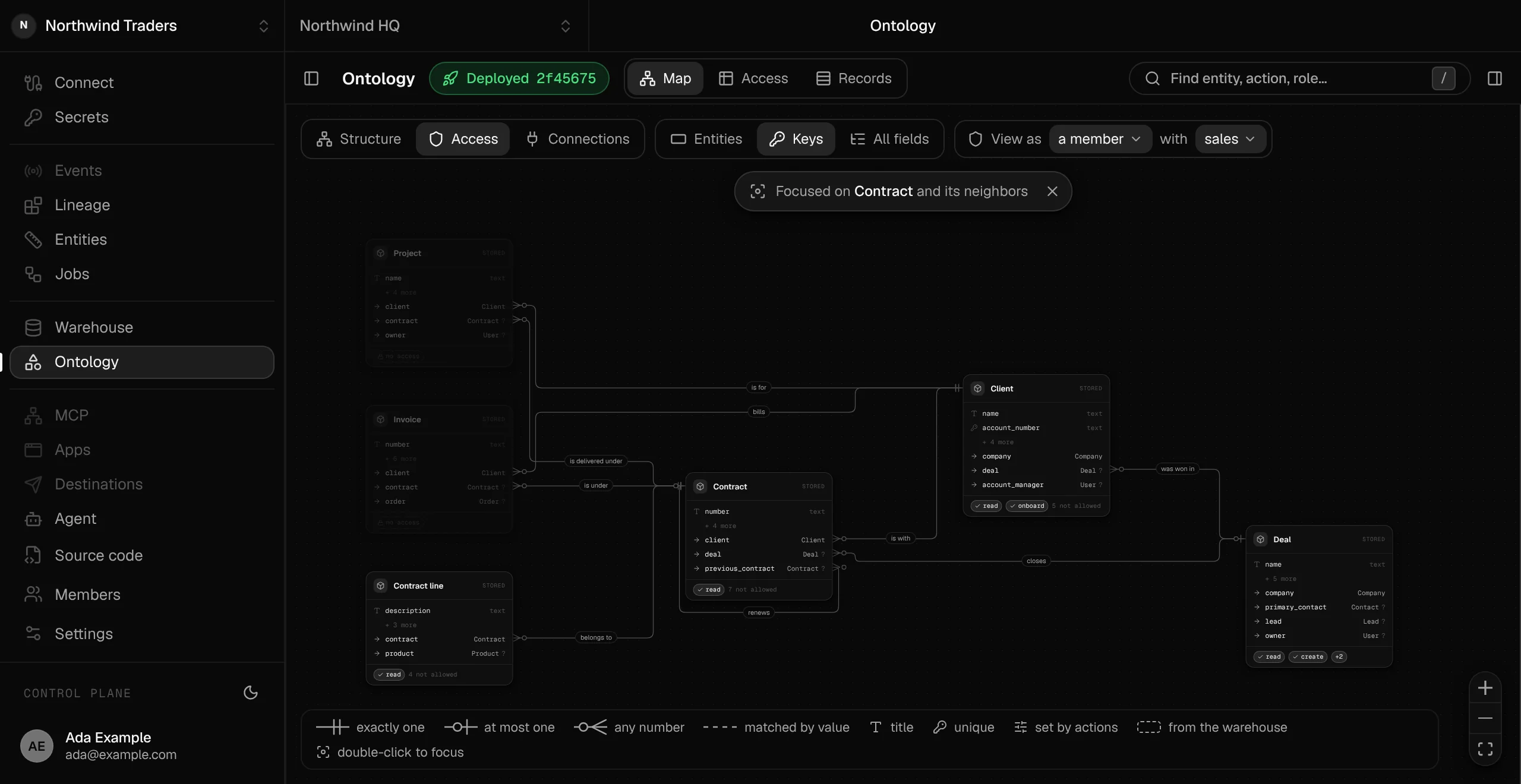
The console computes access from the ontology. View the map as any member or API key, and see who may do what before you invite anyone.
The map viewed as a member with the sales role: contracts can be read but not changed, clients onboarded and deals created. Projects and invoices are out of reach.
Ontology and semantic layer in one model
A semantic layer is a shared set of metric definitions over warehouse tables, such as "revenue is paid invoices minus refunds". With one in place, every report and agent counts the same way.
The two fit together.
The ontology is the register: it holds each record and the rules for changing it.
The semantic layer is the accountant that counts the totals.
Order
description: “A client’s order.”
Records and actions (Postgres)
- numbertext
- client→ Client
- amountmoney
- statusselect
Measures (warehouse)
- #count of orders
- Σsum of revenue
How it compares
Definitions
SegmentStream Cloud ontology
TypeScript in your own Git repo, deployed to SegmentStream Cloud
- Docs in a Git folder
- Text files, versioned and reviewed
- Semantic layer
- Metrics and dimensions in code
- Off-the-shelf CRM or other SaaS
- Configured in the vendor's admin screens
Live records
SegmentStream Cloud ontology
In your own Postgres database
- Docs in a Git folder
- Files, changed through Git
- Semantic layer
- Reads warehouse tables
- Off-the-shelf CRM or other SaaS
- In the vendor's database
Rules on changes
SegmentStream Cloud ontology
Code inside actions, the only way to change records
- Docs in a Git folder
- Instructions the agent is asked to follow
- Semantic layer
- Read only
- Off-the-shelf CRM or other SaaS
- Validation rules and workflows, configured per vendor
Permissions
SegmentStream Cloud ontology
Roles per entity and per action, the same for people, API keys and agents.
- Docs in a Git folder
- Repository access
- Semantic layer
- Varies by tool
- Off-the-shelf CRM or other SaaS
- Mature, detailed role controls
History
SegmentStream Cloud ontology
Every change, with the action, the caller, and values before and after
- Docs in a Git folder
- Git log
- Semantic layer
- Versioned definitions
- Off-the-shelf CRM or other SaaS
- Change history on tracked properties, scope varies by vendor and plan
Agent access
SegmentStream Cloud ontology
An MCP server per app, where agents sign in as the person
- Docs in a Git folder
- Agents read files
- Semantic layer
- Query API for metrics
- Off-the-shelf CRM or other SaaS
- Vendor API or vendor MCP server, in the vendor's model
Metrics
SegmentStream Cloud ontology
Measures declared on entities over warehouse data
- Docs in a Git folder
- Written as prose
- Semantic layer
- Its core strength
- Off-the-shelf CRM or other SaaS
- Built-in reports over its own objects
Shipped and in progress
Shipped:
- Entities, relationships, actions, roles and history, available through the REST API, the MCP server and the typed SDK
- An MCP server for every app, with OAuth sign-in for your team
- Schema changes planned against the live database and tried on a copy of production first, with unsafe changes refused before anything applies
- Measures and totals over warehouse data
- Replication to BigQuery, on by default
- The ontology map: a diagram of entities and relationships, with an inspector and a view of which roles can do what
- A company agent that answers in Telegram as the member, with the member's permissions (new)
- Your own Git repo, with a built-in source viewer
- Connections inside actions, and follow-up effects after a change is saved
- File storage attached to records (first version)
In progress: app logs for whoever deploys an app.
We run our own CRM on it
SegmentStream HQ, the app we run our own company on, is built on this ontology: CRM, contracts and revenue recognition, documents and social listening, in 14 entities across ten roles.
Our website forms submit leads through an API key whose role can submit leads and read nothing else, so a leaked key cannot list contacts.
Questions
Where does the data live?
Records live in your own Postgres database, in your company's own environment on SegmentStream Cloud, hosted in the EU or the US. By default they also replicate to your BigQuery warehouse.
What happens if a deploy is refused?
The deploy reports each refused change, and nothing is applied. The running version keeps serving until you fix the definition and deploy again.
How detailed are permissions?
Roles grant reading per entity and running per action, and the rules inside an action decide the rest: who may approve what, over which amount, and when. An API key holds exactly the roles it was created with.
Do I need to write TypeScript?
An AI coding assistant can write it for you, and you review the result in your repo. The command-line tool keeps the instructions those assistants read in your project up to date.
How do existing records get in?
Every entity has generated upsert actions keyed on its unique properties, such as upsert_by_email. Create an API key whose role can only import. Run the import with validate_only to catch problems, then run it for real. Each imported record gets its own history.
Who signs in to the apps?
People you invite. They sign in to your app with an email code, or a link the first time, and need no SegmentStream account. The ontology's roles decide what each of them may do.
How do agents connect?
Add your app's /mcp address as a connector in Claude, ChatGPT, Claude Code or another MCP client that supports OAuth sign-in. Each person signs in on your app's own page and chooses what the agent may do.
What happens when someone leaves?
Deactivate the person, and every agent they signed in stops working right away. Their past changes stay in history under their name.
Can analysts query the records?
Yes. Entities replicate to BigQuery as views of each record's current state, so analysts can join them with the rest of the warehouse in SQL. Postgres remains the source of truth.
Start with a pilot
Our engineers build one solution with you, on your data, in your own environment, as code you own. The first version goes live in two weeks, at a fixed scope and price. If you continue, the pilot price is credited to your contract.
Self-serve sign-up opens to the waitlist first.
Start a pilot