
Social listening, audiences and campaigns on the same records as sales.
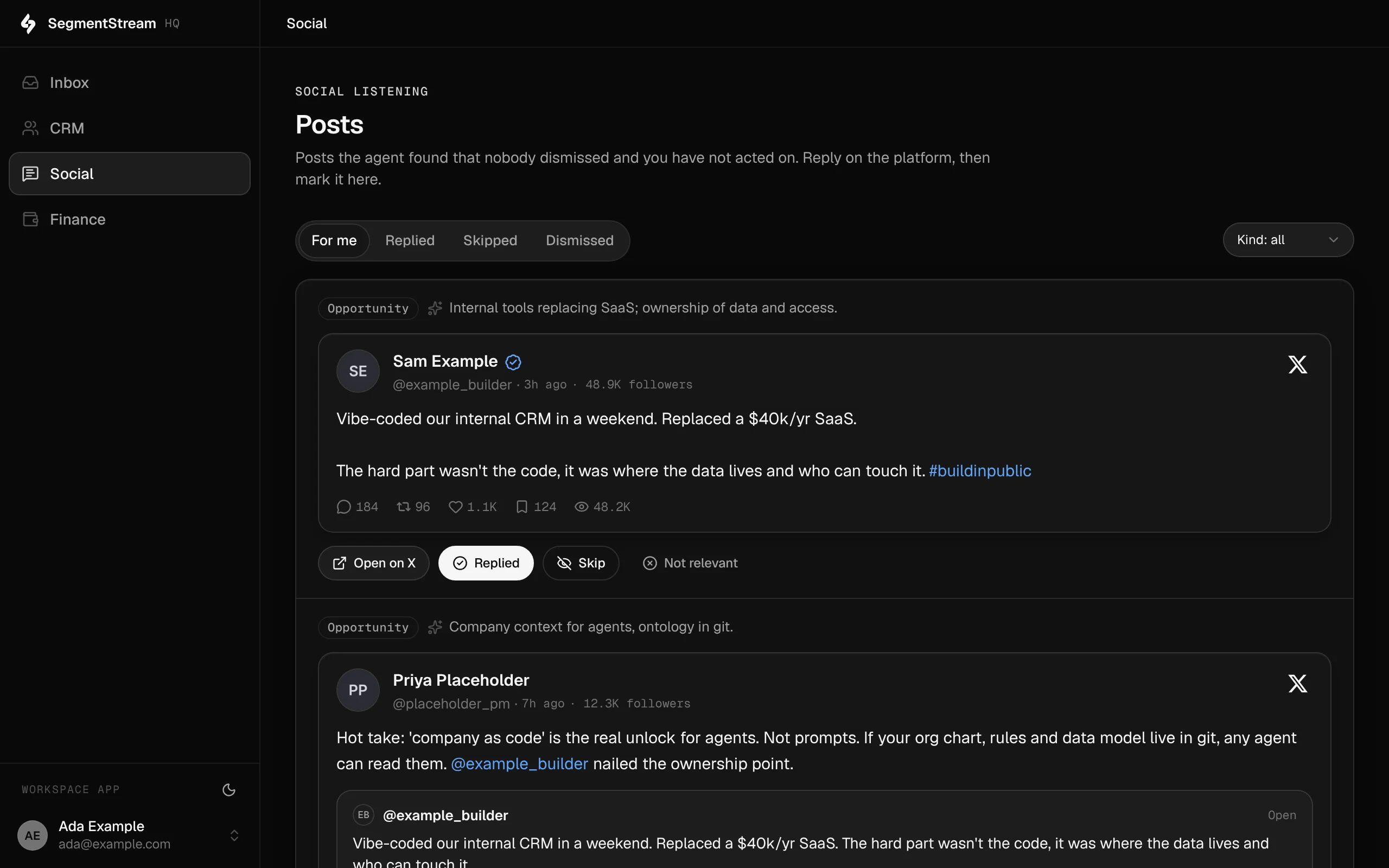
An agent searches X and LinkedIn for posts worth answering and says why it picked each one. Your team decides, and the agent learns from those decisions. Contacts carry consent and email status on the same records sales works.
Posts the agent brings in, with why it picked each one. Reply on the platform, then mark it here.
How we run our own marketing on it
Our own social listening and email consent run on it, in the same workspace as our CRM.
How we run SegmentStream on SegmentStream →- An agent searches X and LinkedIn for mentions and posts worth answering, and writes each into the workspace with the reason it picked it.
- The team marks each post replied, skipped or dismissed. The agent reads those verdicts before its next search.
- The selection policy is written on the entity, so every agent follows the same rules and a change ships with a deploy.
- The agent's API key can add posts and read reviews, and nothing else.
- Contacts carry subscription and email status, synced from Resend, on the same records sales works.
- Newsletters go to audiences built from those contacts, through your own Resend account.
What it covers
Social listening
An agent finds posts on X and LinkedIn worth answering, the team reviews them, and the agent learns from the verdicts.
Consent and email status
Subscriptions, unsubscribes, bounces and complaints recorded on the contact, synced from Resend.
Newsletters and campaigns →
Newsletters and campaigns sent through your Resend account to audiences built from your contacts, with consent checked on every send.
LinkedIn reporting
Page and campaign reporting from LinkedIn through the ready-made LinkedIn Pages and LinkedIn Ads connections.
Built from typed blocks
No new product to buy: the blocks below, written by an agent into your workspace's repository and deployed with one command.
None required.
$ segmentstream deploy
Every block ships together from one git repository your company owns. SegmentStream runs it.
- Brand24
- Mention
- Sprout Social listening
- Mailchimp or Customer.io audience lists
Our engineers write the selection policy with your team, connect the sources, set up the monitoring agent with its own key, and move your audience lists and consent records in.
Enterprise, with our engineers
Our engineers write the selection policy with your team, connect the sources, set up the monitoring agent with its own key, and move your audience lists and consent records in.
Self-serve, with your own agent
Tell your agent what is worth answering. It writes the entities, the review actions and a key for the monitoring agent that can only add posts.
Related solutions
Questions
What does the agent have access to?
A monitoring agent with its own API key. The key can add posts and read the team's reviews; it cannot review, dismiss or change anything else.
Where do the selection rules live?
In the description of the social_post entity, in the repository. Every agent reads the same policy, and a change ships with a deploy.
Can we send newsletters from it?
Yes. Campaigns go out through your own Resend account to audiences built from your contacts, and the send action leaves out anyone who unsubscribed, bounced or complained.
Rather have it built for you? Start a pilot.
Our engineers write the selection policy with your team, connect the sources, set up the monitoring agent with its own key, and move your audience lists and consent records in.
- One solution, on your data, in your own workspace
- First version live in two weeks
- Parity proven before anything is switched off
- Fixed scope and price, credited to your contract if you continue
Not ready for a pilot? Send the form anyway with your question. An engineer will reply, not a sales rep.
How the pilot worksYour company’s software, built by agents, owned by you.
$ segmentstream workspace create acme --region eu --subdomain acme
▸ Created workspace acme · database, warehouse and a private git repository
$ segmentstream workspace WORKSPACE-ID clone acme && cd acme
▸ your agent writes the five folders and runs the checks
$ git add -A && git commit -m "First version"
$ segmentstream deploy
▸ app, ontology API and MCP tools live for your invited members
Our engineers build the first version on your data in two weeks, at a fixed price.
Or join the waitlist for self-serve:
Self-serve opens to the waitlist first.