
The Braze alternative you own: your customer data, your journeys, the senders you choose.
One place for every customer profile, consent record and event, in a workspace you own. Your agents build the audiences and run the campaigns and journeys, and every message goes out automatically through the email, SMS, WhatsApp and push services you choose. We do the whole move off Braze for you, side by side, until each channel matches.
Salesforce is buying Braze. Nothing changes for you until it closes.
On 20 October 2026 Salesforce signed a definitive agreement to acquire Braze for $47.50 per share in cash, about $5.66 billion in enterprise value. Closing is expected in Salesforce's fiscal year 2028, which starts in February 2027, subject to Braze shareholder and regulatory approval. Braze told its customers that existing contracts continue as is, account teams stay the same, and the two companies remain separate until closing. Salesforce has said Braze is expected to strengthen Marketing Cloud and connect to Data 360 and Agentforce; Braze has said that no decisions about the period after closing have been made.
- Your contract and your account team are unchanged until the deal closes. Braze said so in writing to customers on 20 October 2026.
- Which product owns journeys, messaging and the customer profile after closing is an open question analysts are asking, and the answer is not published.
- If you renew in 2027 you will sign with a company whose plans for the product are undecided. That is the moment to decide where your data and your decisioning live, whichever tool sends the messages.
- Braze's export endpoints return 90 days of event history per user. The longer you wait, the more of your own history you cannot take with you.
One person: attributes, consent per topic with date and source, the events they sent and the messages they received, on the same record as their orders and support tickets.
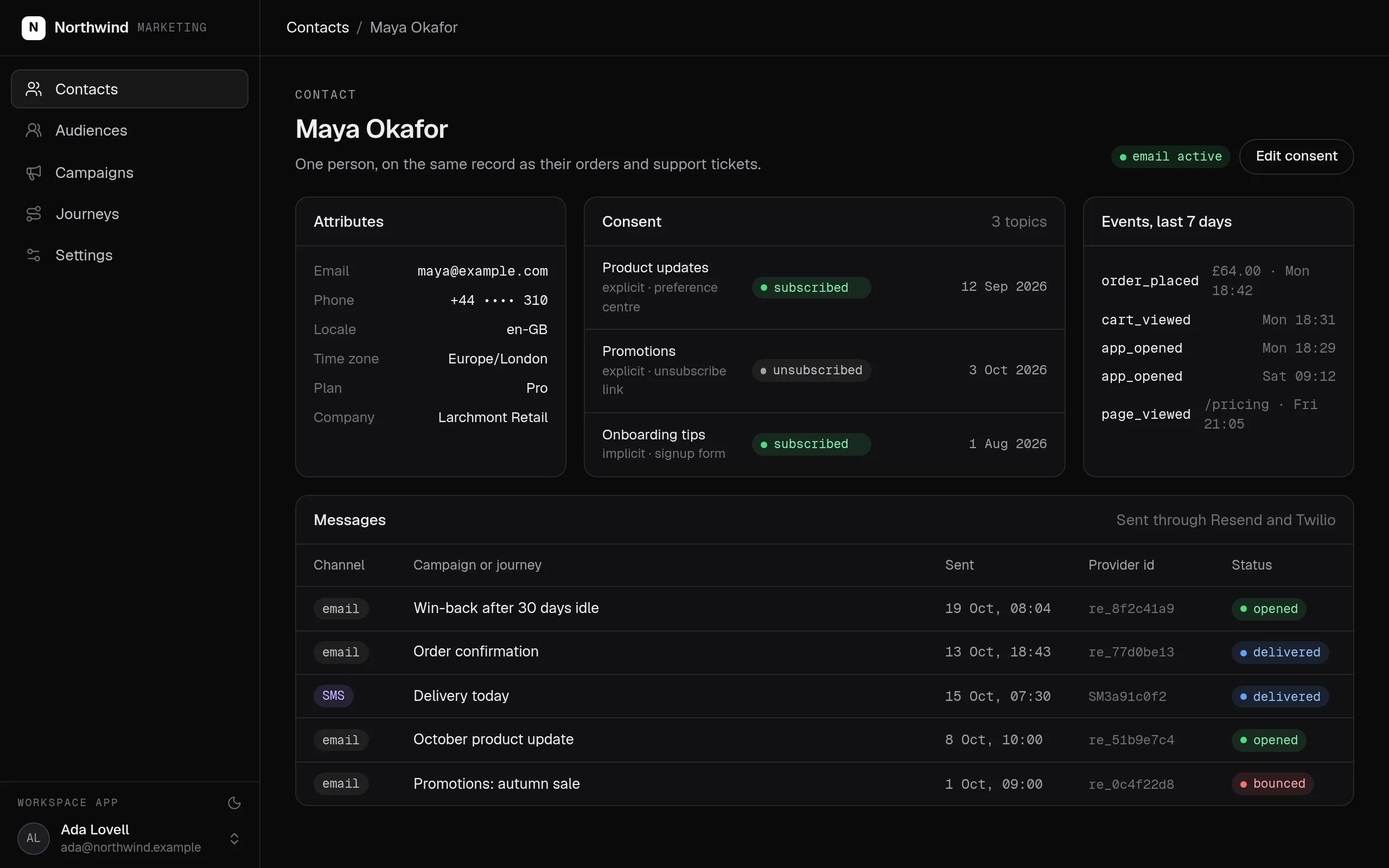
Swipe the screen sideways to see all of it.
What the Braze alternative does
Your lifecycle team keeps running every campaign and journey it runs today, now from one place that holds all your customer data. Agents draft audiences and journeys from a brief, your team approves them, and every send respects consent. Your customer data stops living with a vendor whose plans for the product are undecided.
- Every customer in one place: their profile, consent per topic, the events they sent and the messages they received, beside their orders and support tickets.
- Consent is a record per person and topic, kept with the date and source of every change, so you can always show why someone got a message.
- Audiences stay current: built from your own data and checked on every refresh, so a broken feed shows up before a wrong send does.
- Journeys run on their own: wait, check, send, follow up, with every step recorded. Your agent drafts them from a plain-language brief and your team approves.
- Every message checks consent first, whoever or whatever sends it: a person, a script or an agent.
- Plug in the sending services you choose, and every campaign, journey and transactional message goes out through them automatically, from your own domain.
- You own all of it: your own infrastructure, direct API access with no limit on calls, and full access for your agents to your own database, within the roles you give.
What it covers
Every customer, one profile you own →
Contacts with attributes, email status and a subscription per topic, linked to the companies, orders and tickets the rest of the company works on. Bounces, complaints and unsubscribes are recorded on the contact.
Events into your own warehouse →
Send events from your servers or your website and they land in tables in your own warehouse, in the region you choose. Keep the Braze SDK running beside it until you are sure.
Audiences you can trust →
Segments are built from your events and records, with checks on every run. Compare the counts with Braze side by side before a single message depends on them.
Journeys that run themselves →
A journey waits, retries and sends, on a schedule, from the app or from another journey. Your agent writes it from a plain-language brief, your team approves it, and every step is recorded.
Any sender you choose →
Connect the services you already use or prefer, such as Amazon SES, Resend, SendGrid, Twilio, WhatsApp or OneSignal, and every message goes out through them from your own domain. We set them up with you.
Your agents work with all your customer data →
Every profile, audience and message is open to your agents and your developers, with no limit on API calls, always within the caller's role. An agent can build an audience or draft a journey as the member it works for.
Plug in any sending service. Everything goes out through it.
Campaigns, journeys, transactional and triggered messages, run by your agents and workflows on your own data, all go out automatically through the sending services you choose. You keep their deliverability: your domain, SPF, DKIM and DMARC, and dedicated IPs if you have them. And you are never locked into one vendor's sender.
- Amazon SES
- Resend
- SendGrid (Twilio)
- Mailgun
- Postmark
- SparkPost
- Brevo
- Mailchimp Transactional (Mandrill)
SMS
- Twilio
- Vonage
- Sinch
- Plivo
- Bird (MessageBird)
- WhatsApp Business Platform (Meta Cloud API)
- Twilio for WhatsApp
Push
- Firebase Cloud Messaging
- Apple Push Notification service
- OneSignal
Connect any sending service you like, such as Amazon SES, Resend, SendGrid, Postmark, Twilio or OneSignal. SegmentStream sends every campaign, journey and transactional message through it from your own domain, and we set it up with you.
Every Braze concept, and where it lives in your workspace
For your engineers: every Braze concept and where it lives once you have moved.
| In Braze | In your workspace | What to know |
|---|---|---|
| User profile and custom attributes | contact entity with typed properties and history | Loaded once through the ontology API; attributes keep their names |
| Subscription groups and global email status | subscription per contact and topic; emailStatus on the contact | Original opt-in dates and sources are kept |
| Custom events and purchases | Event streams into BigQuery tables | Server-side with a write key; browser with an origin allowlist |
| Segments | SQL models with checks, plus audience definitions | Sizes compared with Braze before any send depends on them |
| Canvas | Workflows in ontology/workflows/ | Steps that wait, retry and call actions; started on a schedule, from the app or from another workflow |
| Campaigns and messages | campaign and message entities with a send action | Consent is checked inside the action |
| Email sending | The email service you choose: Amazon SES, Resend, SendGrid, Mailgun, Postmark or another | Set up with you in the migration; your domain stays yours |
| Push, SMS, WhatsApp | The providers you choose: Twilio, Vonage, Sinch, WhatsApp, OneSignal, Firebase or Apple push | SegmentStream decides who gets what and when, and sends through them automatically |
| In-app messages and the mobile SDK | Your app, or the tool you keep for them | There is no SegmentStream mobile SDK or in-app message builder |
| Currents and export endpoints | Your own warehouse, from the start | Nothing to export later; no 90-day window |
| Connected Content | Connections declared in code | Credentials held by the platform, never in the repository |
| BrazeAI | Any agent over MCP, as the member it works for | Under your roles, with every change recorded |
| Dashboard rules | Actions in code, reviewed as pull requests | Deployed with one command |
What you bring, and what SegmentStream does not do
- An account with each sending service you use. SegmentStream does not run its own mail servers, SMS gateways or IP pools; it sends through yours.
- Your mobile app's device registration for push. There is no SegmentStream mobile SDK, and no in-app message builder.
- A drag-and-drop canvas and template editor. Journeys are workflows your agent writes and your team reviews; templates live in code or in your provider.
- A journey that starts the instant one event arrives. That is an action your app calls, which checks consent and sends in one step.
How a migration from Braze works
We do every step for you, or your team does it with its own agent and our engineers on call. Braze keeps sending until each channel has switched.
- 01
Model what you message
The contact, subscription, audience, campaign and message entities are written with your attributes, your topics and your consent rules, and the roles that may change them. The result is a pull request you read.
- 02
Take your data out of Braze while it is still there
Profiles, attributes and consent load once through the ontology API, with the original opt-in dates kept. Users and their 90-day history come through Braze's segment export endpoint; engagement events stream through Currents into your own warehouse from day one, so history stops being lost.
- 03
Point events at your workspace
Your servers and your website send their events into tables you own. The Braze SDK keeps running beside it until the counts agree.
- 04
Rebuild segments as models
Each Braze segment becomes a SQL model with a check on every run, and an audience definition over your contacts. Sizes are compared with Braze side by side; a difference is explained, not ignored.
- 05
Rewrite journeys, connect your senders
One Canvas at a time becomes a workflow: steps that wait, retry and call the send action. Your email, SMS, push and WhatsApp providers are connected for you. Suppression lists import onto the contacts, so a bounced or unsubscribed address never gets a message, whoever sends it.
- 06
Switch a channel when it matches
Email usually first. Both systems run through a full cycle, every count is compared, and a channel moves only when its numbers match. Braze stays until your contract says otherwise.
We move you off Braze, end to end, if you want us to.
Our engineers model your profiles, consent and topics with your lifecycle team, take your users, events and suppression lists out of Braze, rebuild your segments and the journeys that matter, connect the senders you choose, and run both systems side by side until each channel matches. Or do it with your own agent and our help on call.
Nothing switches until the numbers match.
Both systems run side by side. Every number your teams rely on is compared, and every difference is explained before anything is turned off.
| Metric | Braze | Workspace | Status |
|---|---|---|---|
| Active profiles | 61,284 | 61,284 | match |
| Opted in: product updates | 38,912 | 38,912 | match |
| Segment: lapsed 30 days | 4,819 | 4,812 | explained |
| Win-back journey, week 1 sends | 4,600 | 4,600 | match |
| Unsubscribes, last 30 days | 312 | 312 | match |
Built from typed blocks
No new product to buy: the blocks below, written by an agent into your workspace's repository and deployed with one command.
$ segmentstream deploy
Every block ships together from one git repository your company owns. SegmentStream runs it.
- phone
- locale
- email status
- company
- subscription
- event
- message
- subscribe
- setEmailStatus
- topic
- status
- explicit
- source
- contact
- type
- time
- payload
- contact
- name
- definition
- refreshed
- campaign
- define
- name
- channel
- status
- audience
- message
- approve
- channel
- provider id
- status
- sent at
- contact
- campaign
- send
- kind
- provider
- sender
- message
The rule is code, not a setting someone can skip.
Every change goes through an action. The role that may run it is checked first, then the rule inside it. The same check applies to people in the app, to API keys and to agents over MCP.
const mail = connection("resend", { description: "Sends email from our own domain." });

export const Message = entity("message", {
  id: "ent_01JB8MSG4Q",
  label: "Message",
  plural: "Messages",
  title: "topic",
  description: "One message to one person. Sent only if the contact may receive the topic.",
  properties: {
    channel: p.select(CHANNELS),
    topic: p.select(TOPICS),
    providerId: p.text({ optional: true, managed: true, description: "The provider's id, once sent." }),
    status: p.select(MESSAGE_STATUS, { default: "queued", managed: true }),
  },
  relationships: {
    contact: rel.one(Contact, { inverse: "messages", description: "Who receives it." }),
    campaign: rel.one(Campaign, { optional: true, inverse: "messages", onDelete: "setNull", description: "The campaign it belongs to." }),
  },
}).actions((self) => ({
  send: action({
    description: "Send a queued message through our own provider.",
    input: Schema.Struct({ message: self.ref }),
    connections: [mail],
    prepare: ({ input }) =>
      Effect.gen(function* () {
        const message = yield* self.get(input.message);
        const contact = yield* Contact.get(message.contactId);
        if (contact.emailStatus !== "active")
          return yield* new ActionRejected({ message: `The address is ${contact.emailStatus}.` });
        const consent = yield* Subscription.find({ where: { contactId: contact.id, topic: message.topic }, limit: 1 });
        if (consent[0]?.status !== "subscribed")
          return yield* new ActionRejected({ message: "No consent for this topic." });
        const response = yield* mail.post("/emails", {
          headers: { "Idempotency-Key": `message:${message.id}` },
          json: { from: SENDER, to: contact.email, subject: subjectOf(message), html: render(message) },
        });
        // Throttled or down: fail as retryable, so the journey's step runs again.
        if (response.status === 429 || response.status >= 500)
          return yield* new ConnectionError({
            connection: "resend",
            message: `Resend answered ${response.status}.`,
            reason: "unavailable",
            retryable: true,
          });
        if (!response.ok) return yield* new ActionRejected({ message: "The provider refused the message." });
        const sent = yield* response.json(Schema.Struct({ id: Schema.String }));
        return { providerId: sent.id };
      }),
    handler: ({ input, prepared }) =>
      Effect.gen(function* () {
        const message = yield* self.get(input.message, { forUpdate: true });
        yield* self.update(message, { status: "sent", providerId: prepared.providerId });
      }),
  }),
}));- Braze segments and Canvas
- Customer.io
- Iterable
- Klaviyo flows
- Mailchimp audiences
Braze keeps sending while you move. Profiles and consent come over with their original dates, events and history through Braze's export endpoints and Currents into your warehouse, and each segment is rebuilt and compared with Braze's count. Journeys are rewritten one at a time, and email, SMS, push and WhatsApp go out through the providers you choose. A channel switches when its numbers match, and nothing is switched off before that. We do the whole move for you if you want: see the offer below.
We move you off Braze, end to end, if you want us to.
Our engineers model your profiles, consent and topics with your lifecycle team, take your users, events and suppression lists out of Braze, rebuild your segments and the journeys that matter, connect the senders you choose, and run both systems side by side until each channel matches. Or do it with your own agent and our help on call.
Enterprise, with our engineers
Our engineers model your profiles, consent and topics with your lifecycle team, take your users, events and suppression lists out of Braze, rebuild your segments and the journeys that matter, connect the senders you choose, and run both side by side until each channel matches.
Self-serve, with your own agent
Connect Resend or your other senders, then tell your agent who you message, about what, and who approves. It writes the contacts, consent, audiences, the send action and the first journey, and segmentstream deploy gives you the app, the API and the MCP tools.
Related solutions
Questions
Is SegmentStream Cloud a Braze alternative?
Yes, for what matters most: your customer profiles, consent, events, audiences and journeys live in a workspace you own, and your agents and your team run campaigns from it. Messages go out automatically through the sending services you choose, such as Resend, Amazon SES, SendGrid, Twilio or OneSignal, so you are never locked into one vendor's sender.
Can SegmentStream send push notifications, SMS and WhatsApp messages?
Yes, through your own providers. Connect Twilio, Vonage, Sinch, OneSignal, Firebase Cloud Messaging, the WhatsApp Business Platform or another provider with an HTTP API, and every campaign and journey sends through it automatically. SegmentStream does not run its own gateways, and it has no mobile SDK and no in-app message builder: your app registers devices with your push provider, as it does today.
Which email, SMS, WhatsApp and push services can we use?
Any of them: Amazon SES, Resend, SendGrid, Mailgun, Postmark, SparkPost, Brevo or Mailchimp Transactional for email; Twilio, Vonage, Sinch, Plivo or Bird for SMS; WhatsApp; OneSignal, Firebase or Apple for push. We set up whichever you use as part of the migration.
Can we migrate from Braze to SegmentStream without losing data?
Profiles, attributes and consent load through the ontology API with their original dates. Users and 90 days of their history come through Braze's segment export endpoint; engagement events stream through Currents into your warehouse from the day you turn it on, so nothing more is lost. Suppression lists import onto the contacts.
Will SegmentStream do the migration for us?
Yes. Our forward-deployed engineers do the whole move if you want it: the model, the export, the event stream, the segments, the journeys, the senders and the side-by-side comparison, starting with a fixed-scope pilot. Request it on this page and your note goes to our founder, not a sales queue.
Do we have to leave Braze now?
No. Braze has told its customers that existing contracts continue as is and that nothing changes before the acquisition closes, which Salesforce expects in its fiscal year 2028. Owning your data and your decisioning now makes the renewal a choice rather than a default.
How do journeys work without a Braze Canvas?
A journey is a workflow file in your repository: steps that wait, retry, call actions and call your providers, started on a schedule, from the app or from another workflow. Your agent writes it from a plain-language description, your team reviews the pull request, and every run and step is recorded. A message that must react to one event the moment it happens is an action your app calls, which checks consent and calls the provider in one step.
Who handles deliverability?
Your providers and your authenticated domain, as today: SPF, DKIM and DMARC, and dedicated IPs if you have them. We configure them with you during the migration. The workspace keeps the suppression truth: a bounced, complained or unsubscribed address is recorded on the contact and the send action refuses it, whoever or whatever is sending.
How long does a Braze migration take?
Our engineers put the first version in your workspace in two weeks at a fixed price, usually profiles, consent, the event stream and email first. Each further channel switches when its numbers match Braze's through a full cycle. Nothing is switched off before that.
What does it cost to run?
Usage: compute, storage, queries, app traffic, the company agent and AI evaluations. No seats and no feature gates. Your providers bill their own sending as they do now.
Who owns the code and the data?
You do. The code lives in a private git repository for your workspace; clone it with plain git, keep a copy on GitHub, take it with you. The database and the warehouse are yours, with no limit on API calls and full agent access within the roles you give. SegmentStream runs it.
Rather have it moved for you? Request a pilot.
Our engineers model your profiles, consent and topics with your lifecycle team, take your users, events and suppression lists out of Braze, rebuild your segments and the journeys that matter, connect the senders you choose, and run both side by side until each channel matches.
- One solution, on your data, in your own workspace
- First version live in two weeks
- Parity proven before anything is switched off
- Fixed scope and price, credited to your contract if you continue
Not ready for a pilot? Send the form anyway with your question. An engineer will reply, not a sales rep.
How the pilot worksYour company’s software, built by agents, owned by you.
$ segmentstream workspace create acme --region eu --subdomain acme
▸ Created workspace acme · database, warehouse and a private git repository
$ segmentstream workspace WORKSPACE-ID clone acme && cd acme
▸ your agent writes the five folders and runs the checks
$ git add -A && git commit -m "First version"
$ segmentstream deploy
▸ app, ontology API and MCP tools live for your invited members
Our engineers build the first version on your data in two weeks, at a fixed price.
Or join the waitlist for self-serve:
Self-serve opens to the waitlist first.