
The Intercom alternative you own: tickets on your own customer records, answered from your own inbox.
Conversations from your support address land on the customer's record, beside their contracts, orders and deals. Each one is classified on arrival, replies go out from the same address, and your agents draft answers within your roles. No per-agent seats. We do the whole move off Intercom for you, with every ticket and its history.
- First version in two weeks, at a fixed price
- Every ticket and its history comes over
- Your support address stays the same
- No per-agent seats
SegmentStream gives you a support desk on your own customer records instead of Intercom: conversations beside each customer's contracts, orders and deals, classified on arrival, answered from your own address, with agents drafting replies within your roles and no seats. Stay on Intercom if your support lives in its Messenger inside your product. Move if your support runs mostly on email and you want it next to the rest of the company. We move every conversation for you and run both side by side until every team has switched.
Stay on Intercom if
- Your support runs in the Intercom Messenger inside your product.
- Fin answers your customers in the Messenger, and you are happy with its outcomes.
- You use Intercom's product tours or in-app messages.
Move to SegmentStream if
- Intercom is priced per seat, and Fin is billed per outcome on top.
- Your support runs mostly on email.
- Support needs the customer's contracts, orders and deals to answer well.
- You want your own agents drafting answers within your roles, paid for by usage.
We move you, if you want
Our engineers bring conversations, contacts and companies over through Intercom's API, connect your support address, rebuild your inbox rules as classification you can read, and run both side by side until every team has switched.
Request a pilot →Last reviewed October 2026 · Sources: Intercom pricing
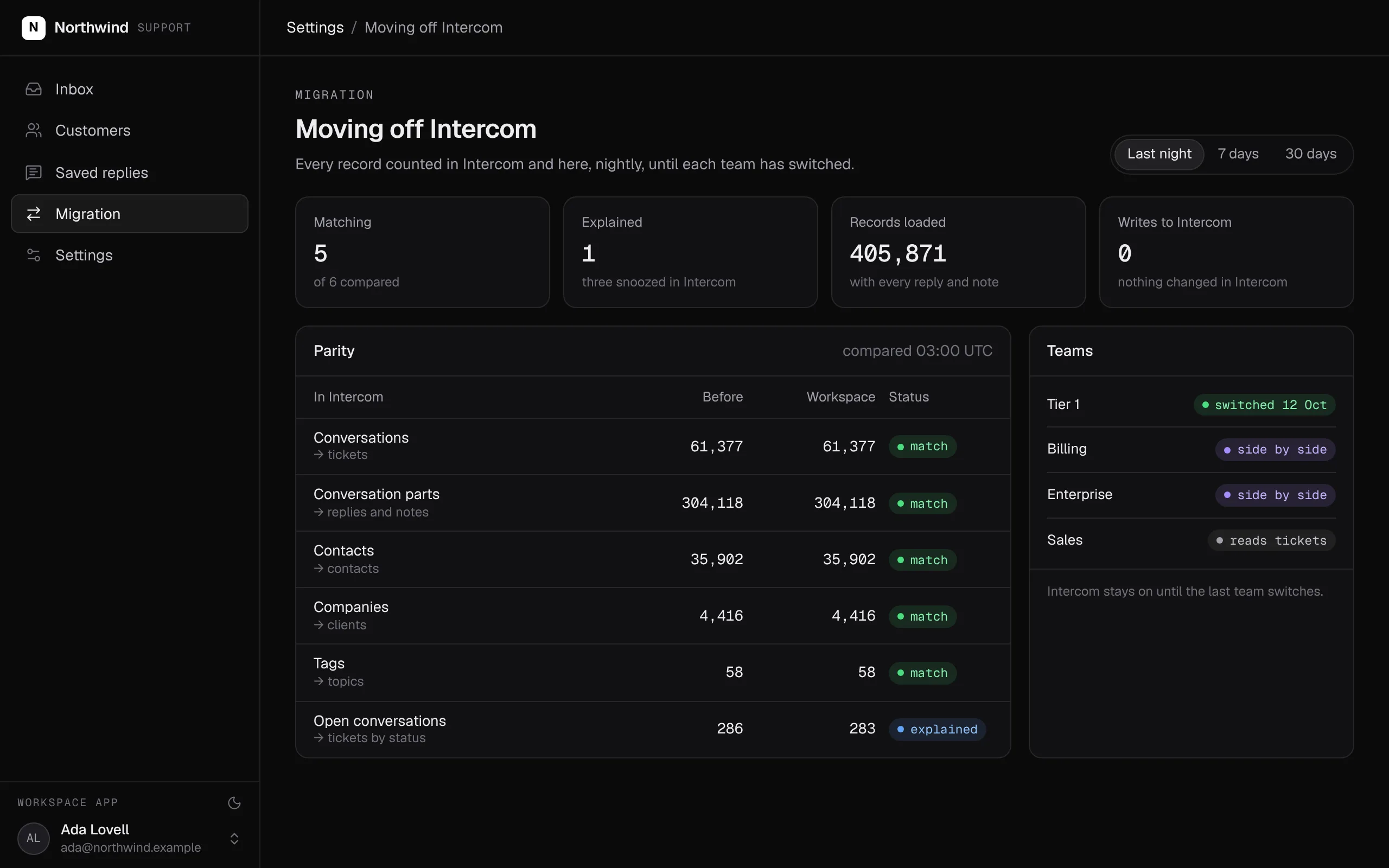
Every conversation counted in Intercom and in your workspace, every night, until each team has switched. Intercom is never written to.
Swipe the screen sideways to see all of it.
What comes over, and what stays
What you bring from Intercom, and what you keep in the tools you like.
- Conversations, with every reply and internal note
- Contacts and companies, as contacts and clients
- Tags, as topics
- Your inbox rules, as classification you can read and edit
- The Messenger in your product, if you keep it: its conversations can come in through Intercom's API
- Product tours and in-app messages
- Your help centre's articles, published where you choose
What the Intercom alternative does
Your support team answers from everything the company knows about the customer, on the address customers already write to. Agents draft, your team decides, and nobody needs a seat to see a ticket.
- Tickets come over from Intercom with their full history.
- New conversations arrive from your support address through a connection, on the schedule you set.
- Each one is classified by topic and urgency on arrival, against categories you can read and edit.
- Tickets sit on the customer's record, beside their contracts, orders and deals.
- Replies go out from the same address, as the member who wrote them.
- Response times are SQL models, so the report and the inbox agree.
- No per-agent seats: everyone who needs to see a ticket can.
What it covers
Tickets on the customer's record →
Each conversation lands on the customer's record, beside their contracts, orders and deals, so an answer starts from everything the company knows.
Classified on arrival
A decision model reads each new conversation and picks a topic and an urgency from categories written in plain language. Change a category by editing its text.
Replies from your own address
Replies go out from your support address as the member who wrote them, so customers see no change.
Response times you can trust
Response times are SQL models, so the report and the inbox agree.
Agents draft, your team sends →
Any agent can read a conversation and draft a reply as a note, with the permissions of the member it works for. Who may send is decided by your roles.
The company agent →
Ask which urgent tickets are waiting for a reply in Slack, Teams, WhatsApp, Telegram or email, and get an answer with your own permissions.
Every Intercom concept, and where it lives in your workspace
For your engineers: every Intercom concept and where it lives once you have moved.
| In Intercom | In your workspace | What to know |
|---|---|---|
| Conversations | ticket entity on the customer's record | Loaded with every part |
| Replies and internal notes | Replies and ticket notes | Replies go out as the member who wrote them |
| Contacts and companies | contact and client entities | Linked to contracts, orders and deals |
| Tags | Topics | Kept as your team names them |
| Workflows and assignment rules | Classification on arrival, and workflows | Topics and urgency from categories you can read |
| Views | Pages in your support app | Queues by status, owner and priority |
| SLAs and reports | Response times as SQL models | The report and the inbox agree |
| Agents and seats | Members with roles | No per-agent seats |
What SegmentStream does not do
- Phone support and live chat. Keep the voice and chat tools you use; their conversations can come in through their APIs.
- A help centre builder. Publish your articles where you like.
- Its own mail servers. Replies go out from your support address.
How a migration from Intercom works
We do every step for you, or your team does it with its own agent and our engineers on call. Intercom keeps running until the last team has switched.
- 01
Model how your team triages
Your topics, priorities, queues and roles are written with your support lead, as a pull request you read before anything moves.
- 02
Bring your tickets over from Intercom
Tickets load with their full history, and customers and companies become contacts and clients. Nothing in Intercom is changed.
- 03
Read new conversations from your address
New conversations arrive from your support address through a connection, and replies go out from the same address.
- 04
Rebuild queues and saved replies
Your views become queues in your support app and your team's standard answers become saved replies, compared with Intercom side by side.
- 05
Switch team by team
Each team switches when its queues match. Intercom stays until your subscription says otherwise.
Moving off Intercom? We do the whole move for you.
Our engineers bring your tickets and their history over from Intercom, connect your support address, rebuild your queues and saved replies, and run both side by side until every team has switched. It starts with a fixed-scope pilot.
Nothing switches until the numbers match.
Both systems run side by side. Every number your teams rely on is compared, and every difference is explained before anything is turned off.
| Metric | Intercom | Workspace | Status |
|---|---|---|---|
| Conversations | 61,377 | 61,377 | match |
| Conversation parts | 304,118 | 304,118 | match |
| Open conversations | 286 | 283 | explained |
| Companies | 4,416 | 4,416 | match |
| Tags | 58 | 58 | match |
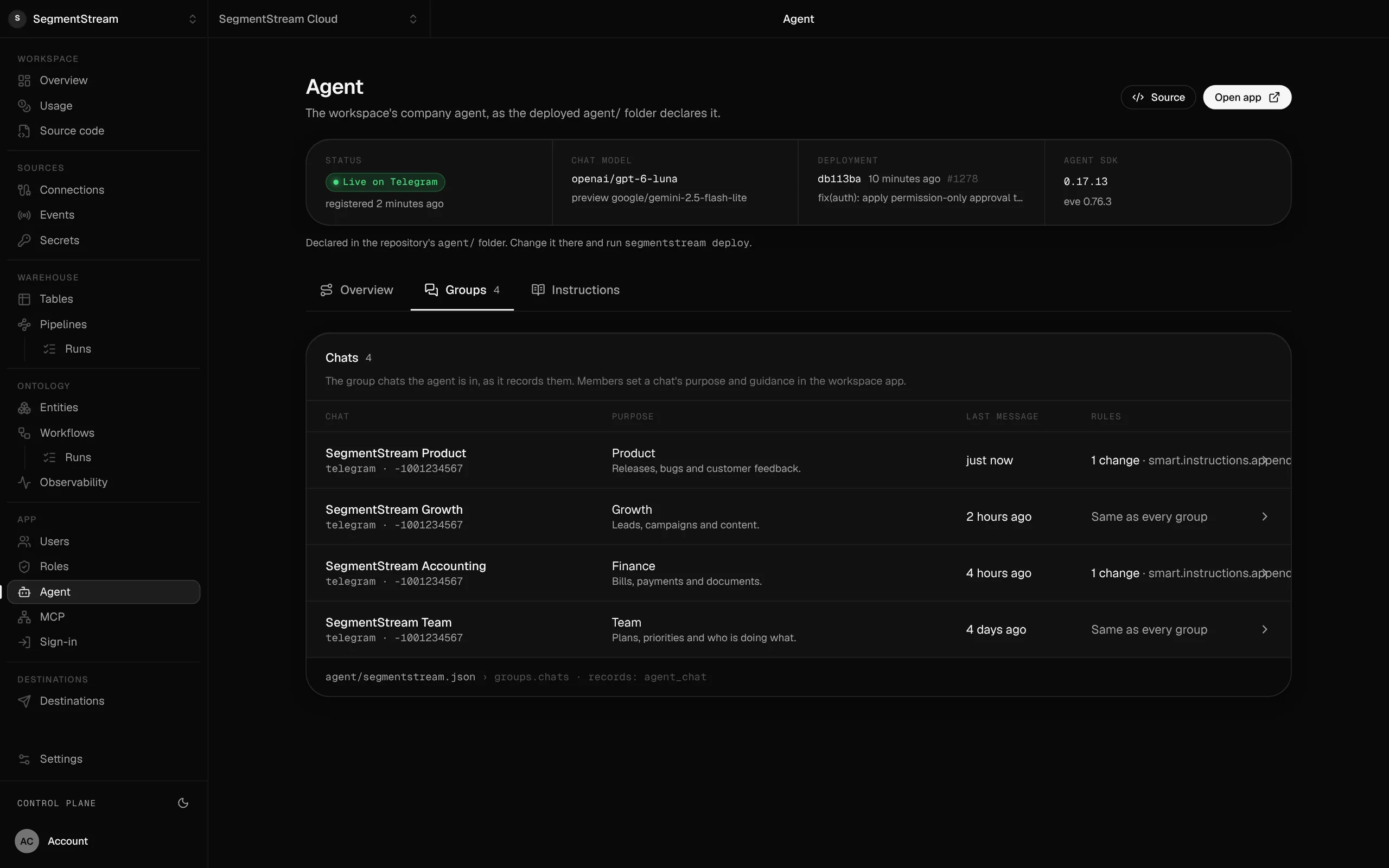
The company agent in your team's chats.
The same agent that drafts replies works in your team's chats, each with its purpose, with the permissions of whoever asks.
- Intercom
- Intercom reports
- Shared-inbox spreadsheets
Intercom keeps running while you move. Tickets come over with their history, new conversations arrive from your support address, and each queue is compared with Intercom's before a team switches.
Enterprise, with our engineers
Our engineers bring your tickets and their history over from Intercom, connect your support address, rebuild your queues and saved replies, and run both side by side until every team has switched.
Self-serve, with your own agent
Connect Intercom and your support inbox, and tell your agent how your team triages. It writes the import, the classification, the ticket actions and the inbox page, and segmentstream deploy puts it online.
curl -fsSL https://cloud.segmentstream.com/install.sh | shRelated solutions
Questions
Is SegmentStream Cloud a Intercom alternative?
For support that runs on email, yes: conversations land on your own customer records, are classified on arrival and are answered from your own address, with agents drafting replies within your roles. It has no phone support, live chat widget or help centre builder; keep the tools you like for those.
Do we need to move our support email?
No. Your support address stays where it is. The workspace reads new conversations through a connection and replies from the same address, so customers see no change.
Can we keep our ticket history?
Yes. Conversations come over through Intercom's API with every reply and internal note, and contacts and companies become contacts and clients. Nothing in Intercom is changed, and both run side by side until each team's queues match.
Can an agent help answer?
Yes. Any agent connected to the workspace can read a conversation and draft a reply as a note, with the permissions of the member it works for. Who may send is decided by your roles.
Will you do the Intercom migration for us?
Yes. Our forward-deployed engineers do the whole move if you want it: the model, the import, your support address, the queues and the side-by-side comparison, starting with a fixed-scope pilot.
What does it cost?
Usage: compute, storage, queries, app traffic, the company agent and AI evaluations. No per-agent seats and no charge per resolution.
Who owns the code and the data?
You do. The code lives in a private git repository for your workspace; clone it with plain git, keep a copy on GitHub, take it with you. The database is yours, with no limit on API calls and full agent access within the roles you give. SegmentStream runs it.
Rather have it moved for you? Request a pilot.
Our engineers bring your tickets and their history over from Intercom, connect your support address, rebuild your queues and saved replies, and run both side by side until every team has switched.
- One solution, on your data, in your own workspace
- First version live in two weeks
- Parity proven before anything is switched off
- Fixed scope and price, credited to your contract if you continue
Not ready for a pilot? Send the form anyway with your question. An engineer will reply, not a sales rep.
How the pilot worksBuild your company’s own software. Let agents run it.
$ segmentstream workspace create acme --region eu --subdomain acme
▸ Created workspace acme · database, warehouse and a private git repository
$ segmentstream workspace WORKSPACE-ID clone acme && cd acme
▸ your coding agent builds what your team asked for and runs the checks
$ git add -A && git commit -m "First version"
$ segmentstream deploy
▸ app, company agent, API and MCP tools live for your invited members
Our engineers build the first version on your data in two weeks, at a fixed price.
Or build it yourself with your coding agent:
curl -fsSL https://cloud.segmentstream.com/install.sh | sh