
The Airtable alternative you own: your bases become a system with rules, roles and an agent.
When an Airtable base has become how your company runs, SegmentStream turns it into software you own: the same records with rules that hold, roles for every team, the history of every change, integrations and a company agent. No seats and no record caps per plan. We do the whole move for you and run both side by side until every team has switched.
- First version in two weeks, at a fixed price
- Every record and attachment comes over
- Airtable keeps running until every team has switched
- No seats
SegmentStream turns an Airtable base that runs your company into your own system: the same records with rules that hold, roles for every team, the history of every change, integrations and a company agent, with no seats and no record caps per plan. Stay on Airtable for flexible tables a team changes by hand. Move when the base has become how the company runs. We do the whole move for you and run both side by side until every team has switched.
Stay on Airtable if
- A team needs a flexible table it changes by hand, today, without anyone reviewing it.
- The base is one team's tracker, not the record the company runs on.
- You want to change the structure yourself, in the grid.
Move to SegmentStream if
- Airtable charges per seat, and every editor counts.
- You are hitting the record, automation or API limits of your plan.
- Rules matter: an order over a limit needs approval, and a closed record must stay closed.
- You want the base next to your CRM, finance and support records, open to your agents within your roles.
We move you, if you want
Our engineers turn your tables, fields and links into a data model with rules and roles, import every record and attachment through Airtable's API, rebuild the interfaces and automations your teams rely on, and run both side by side until every team has switched.
Request a pilot →Last reviewed October 2026 · Sources: Airtable pricing
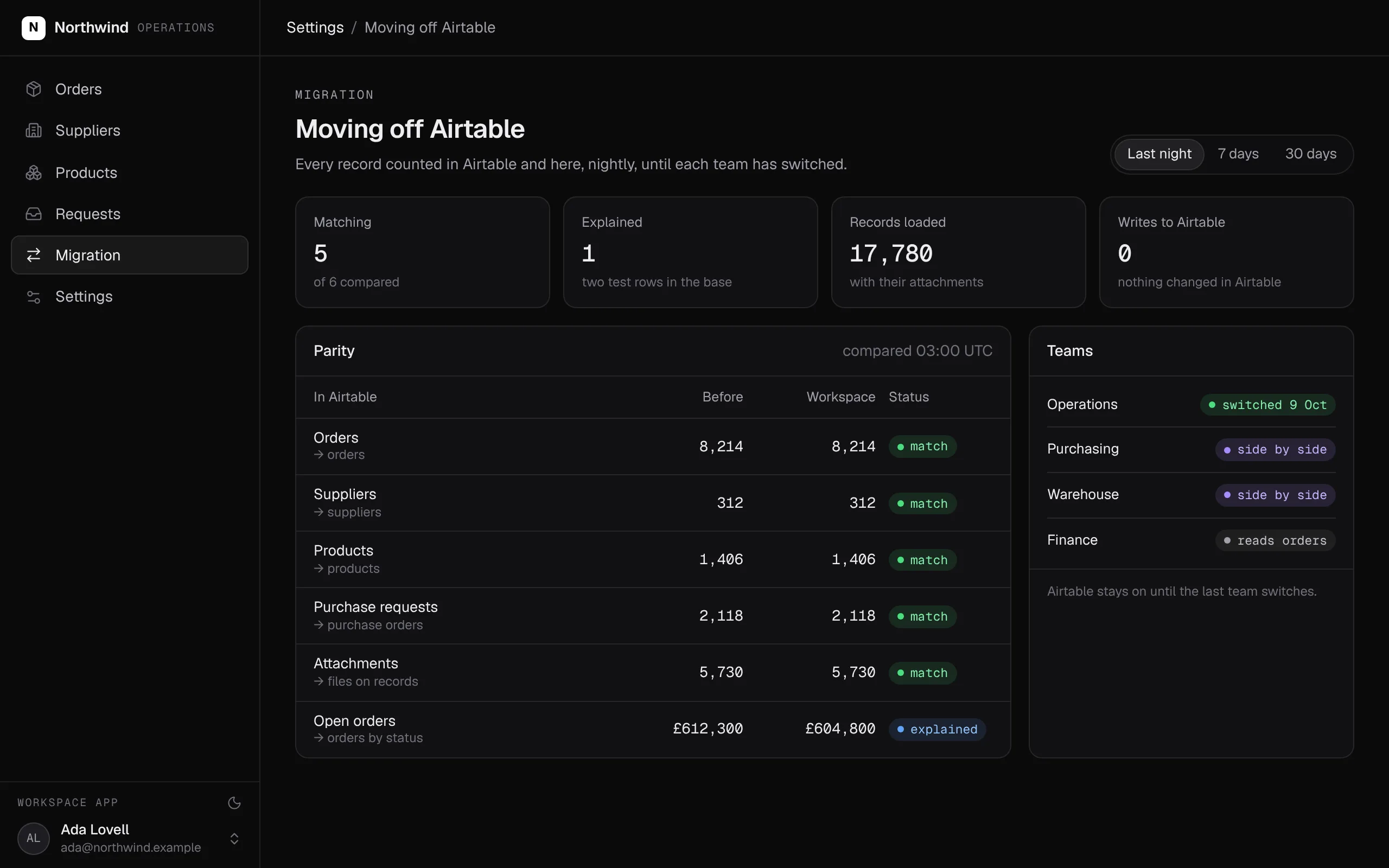
Every table counted in Airtable and in your workspace, every night, until each team has switched. Airtable is never written to.
Swipe the screen sideways to see all of it.
What comes over, and what stays
What you bring from Airtable, and what you keep in the tools you like.
- Tables and records, with their linked records
- Field types, as typed properties with checks
- Attachments, stored on the records they belong to
- Views and interfaces, as pages in your own app
- Automations, as workflows that start on a schedule or when something happens
- Forms, sending records straight in
- Quick personal tables and one-off trackers, in Airtable or a spreadsheet
- Changing the structure in a grid: the data model changes through a pull request your team reviews
- Airtable's extensions and marketplace apps
What the Airtable alternative does
The base your company runs on becomes software it owns: the same records, rules that hold, a page for every team, and a company agent that answers and updates them. Nobody pays for a seat to see what they need.
- Every table, record, linked record and attachment comes over from Airtable.
- Formulas that decide something become rules that hold, whoever or whatever makes the change.
- Each team gets its own pages, with sign-in and the roles you set.
- Automations run on a schedule or when something happens, and every run is recorded.
- Every change is kept with who made it and when.
- The records sit next to your CRM, finance and support, open to your agents within your roles.
- No seats and no record caps per plan.
What it covers
Your bases, as a data model →
Each table that matters becomes a record type with typed fields and named links. A single select is a fixed list, and a linked record is a relationship both sides can follow.
Rules that hold
Formulas that decide something become rules that hold: an order over your limit needs approval, and a closed record stays closed whoever tries to change it.
Pages for every team →
Views and interfaces become pages in your own app. Invited members sign in with an email code and see what their role allows.
Automations you can read
Automations become workflows that start on a schedule or when something happens, with every run and every step recorded.
The history of every record
Every change is kept with who made it and when, so a number on a page can be traced to the records behind it.
The company agent →
Ask what is late or who has not replied in Slack, Teams, WhatsApp, Telegram or email. The company agent answers and acts with the permissions of whoever asks.
Every Airtable concept, and where it lives in your workspace
For your engineers: every Airtable concept and where it lives once you have moved.
| In Airtable | In your workspace | What to know |
|---|---|---|
| Bases and tables | Entities with relationships | One entity for each table that matters |
| Fields | Typed properties | A single select becomes a fixed list; a deciding formula becomes a rule |
| Linked records | Relationships | Named both ways |
| Attachments | Files stored on the record | Loaded through Airtable's API |
| Views and interfaces | Pages in your own app | Sign-in for invited members and roles on every page |
| Automations | Workflows in code, and rules inside actions | Started on a schedule, from the app or from another workflow |
| Forms | Your forms, submitting through an API key | The key can submit and read nothing else |
| Collaborators and permissions | Members with roles | The same roles for people, API keys and agents |
| Seats | Members | No seats; you pay for usage |
What SegmentStream does not do
- A grid where anyone can add a column. The data model changes through a pull request your team reviews.
- Airtable's extensions and marketplace. Features are written into your workspace by your agent or our engineers.
How a migration from Airtable works
We do every step for you, or your team does it with its own agent and our engineers on call. Airtable keeps running until the last team has switched.
- 01
Model your bases
Each table that matters becomes a record type with typed fields, named links, rules and the roles that may change it, as a pull request you read before anything moves.
- 02
Import every record and attachment
Records, linked records and attachments load through Airtable's API and are counted against the base, table by table. Nothing in Airtable is changed.
- 03
Rebuild the pages your teams use
Views and interfaces become pages in your own app, each compared with the view it replaces.
- 04
Rewrite automations
Each automation becomes a workflow that starts on a schedule or when something happens, with every run recorded.
- 05
Switch team by team
Each team switches when its pages match. Airtable stays until your subscription says otherwise, and nothing is switched off before that.
Moving off Airtable? We do the whole move for you.
Our engineers turn your bases into a data model with rules and roles, import every record and attachment, rebuild the interfaces and automations your teams rely on, and run both side by side until every team has switched. It starts with a fixed-scope pilot.
Nothing switches until the numbers match.
Both systems run side by side. Every number your teams rely on is compared, and every difference is explained before anything is turned off.
| Table | Airtable | Workspace | Status |
|---|---|---|---|
| Orders | 8,214 | 8,214 | match |
| Suppliers | 312 | 312 | match |
| Products | 1,406 | 1,406 | match |
| Open orders value | £612,300 | £604,800 | explained |
| Attachments | 5,730 | 5,730 | match |
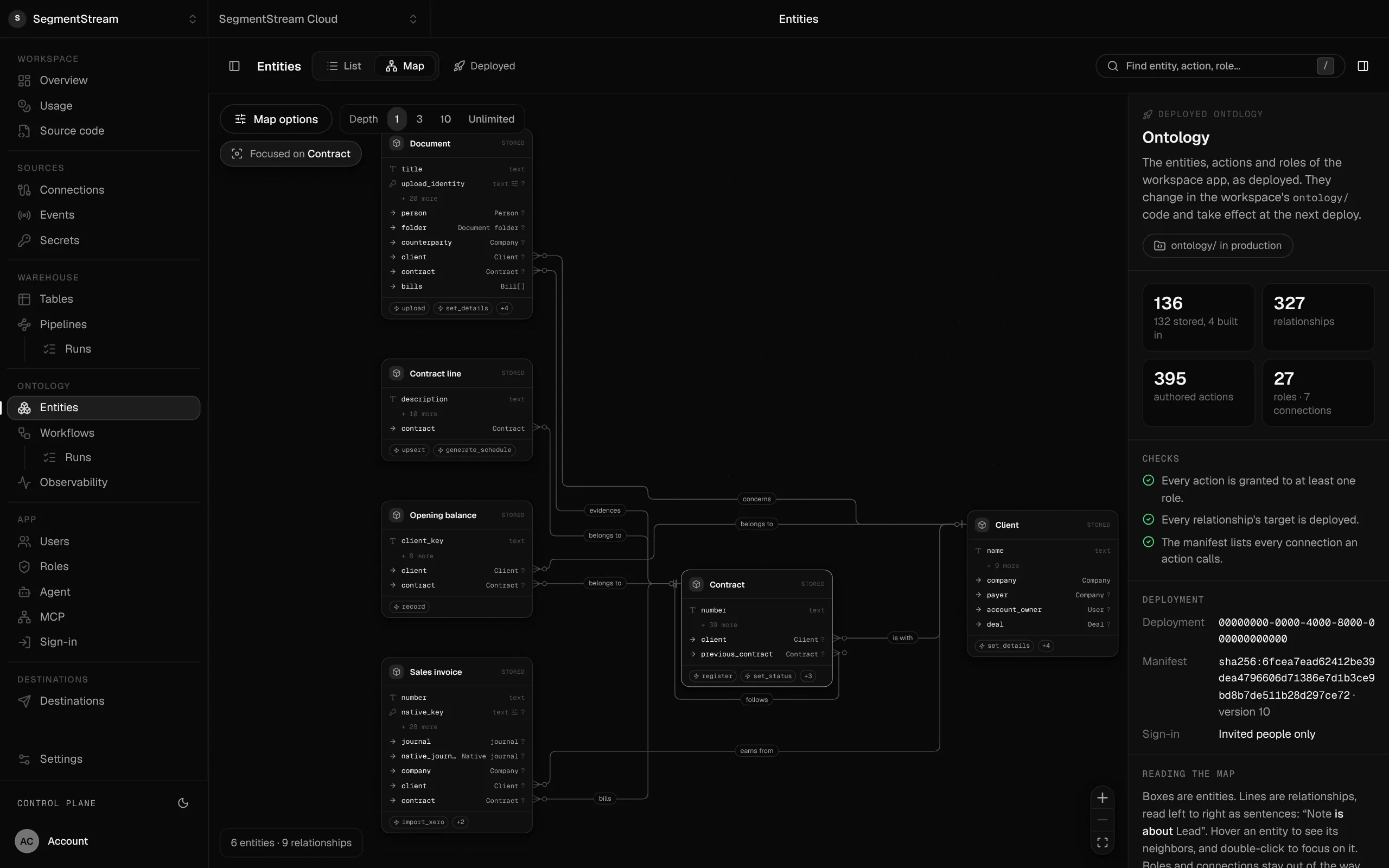
Your bases become one company database.
Every table becomes an entity with typed fields, named relationships and the actions that change it, checked on every deploy.
- Airtable bases
- Airtable interfaces
- Airtable automations
Airtable keeps running while you move. Each table that matters becomes a record type with rules and roles, every record and attachment comes over, and each page is compared with the base it replaces. Each team switches when its pages match.
Enterprise, with our engineers
Our engineers turn your bases into a data model with rules and roles, import every record and attachment, rebuild the interfaces and automations your teams rely on, and run both side by side until every team has switched.
Self-serve, with your own agent
Connect Airtable with a personal access token and tell your agent which bases run the business. It writes the entities, actions and roles, loads your records, and segmentstream deploy gives you the app, the API and the MCP tools.
curl -fsSL https://cloud.segmentstream.com/install.sh | shRelated solutions
Questions
Is SegmentStream Cloud an Airtable alternative?
When a base has become how the company runs, yes: the same records live in a workspace you own, with rules that hold, roles for every team, the history of every change, integrations and a company agent. For quick tables a team changes by hand, Airtable is still a good tool.
Can we move off Airtable without losing records?
Yes. Records, linked records and attachments come over through Airtable's API, checked table by table against Airtable's counts. Nothing in Airtable is changed, and both run side by side until each team's pages match.
Can we still change the structure?
You describe the change to your agent, it writes it, your team reviews the pull request, and one command deploys it. That is slower than adding a column in a grid, and it is why the rules hold.
Will you do the Airtable migration for us?
Yes. Our forward-deployed engineers do the whole move if you want it: the model, the import, the pages, the automations and the side-by-side comparison, starting with a fixed-scope pilot.
What does it cost?
Usage: compute, storage, queries, app traffic, the company agent and AI evaluations. No seats and no record caps per plan.
Who owns the code and the data?
You do. The code lives in a private git repository for your workspace; clone it with plain git, keep a copy on GitHub, take it with you. The database is yours, with no limit on API calls and full agent access within the roles you give. SegmentStream runs it.
Rather have it moved for you? Request a pilot.
Our engineers turn your bases into a data model with rules and roles, import every record and attachment, rebuild the interfaces and automations your teams rely on, and run both side by side until every team has switched.
- One solution, on your data, in your own workspace
- First version live in two weeks
- Parity proven before anything is switched off
- Fixed scope and price, credited to your contract if you continue
Not ready for a pilot? Send the form anyway with your question. An engineer will reply, not a sales rep.
How the pilot worksBuild your company’s own software. Let agents run it.
$ segmentstream workspace create acme --region eu --subdomain acme
▸ Created workspace acme · database, warehouse and a private git repository
$ segmentstream workspace WORKSPACE-ID clone acme && cd acme
▸ your coding agent builds what your team asked for and runs the checks
$ git add -A && git commit -m "First version"
$ segmentstream deploy
▸ app, company agent, API and MCP tools live for your invited members
Our engineers build the first version on your data in two weeks, at a fixed price.
Or build it yourself with your coding agent:
curl -fsSL https://cloud.segmentstream.com/install.sh | sh