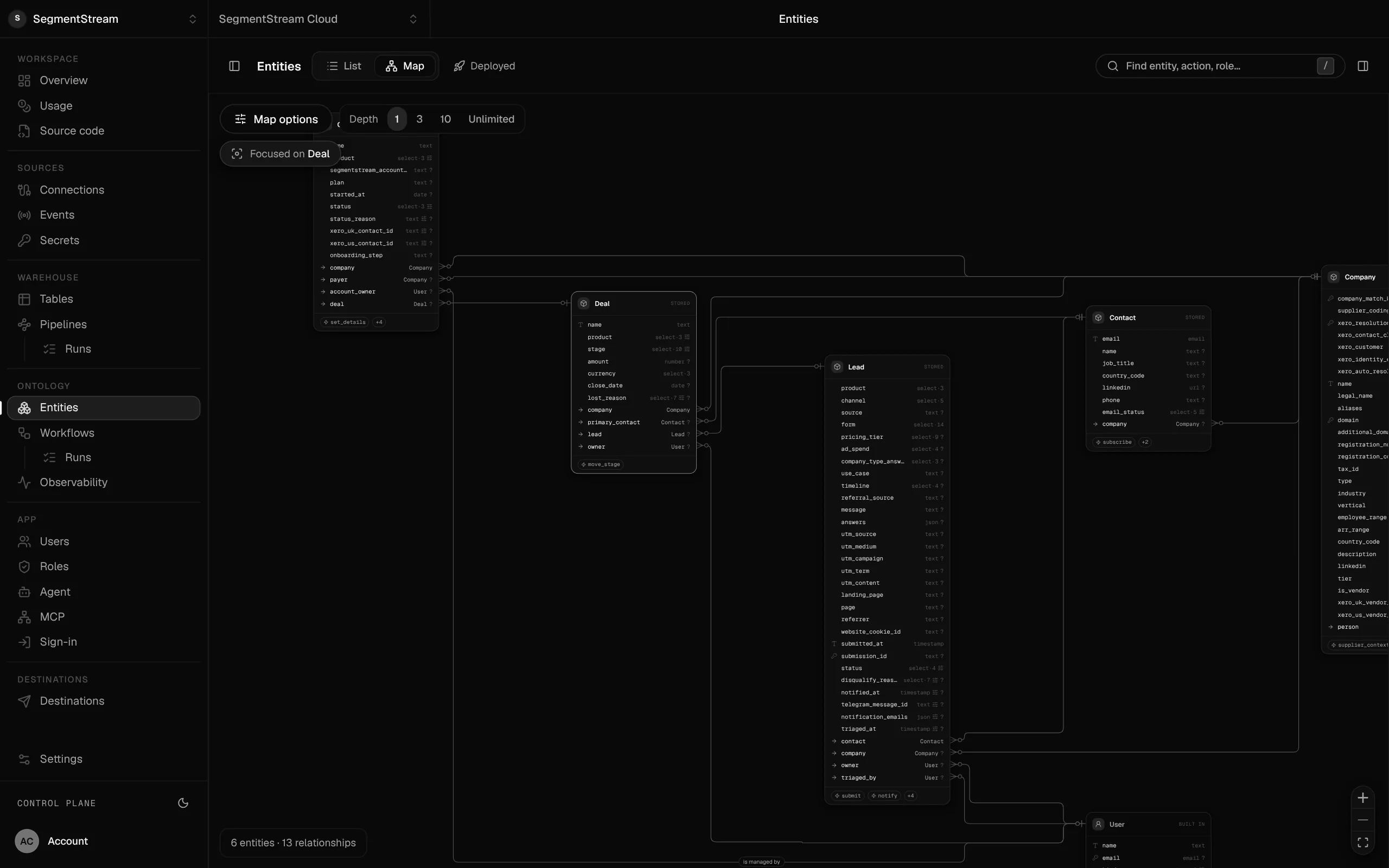
Build your own CRM with Claude Code: what you need besides the code
Claude Code can write a CRM's screens in an afternoon. A CRM your sales team can run on also needs a data model with rules, sign-in and roles, history, integrations, work that runs on its own and someone to keep it running. Here is what each part involves, and a plan for the first week.
SegmentStream team · Updated 28 October 2026 · 7 min read
On this page
Build your own CRM when the way you sell is part of what makes you different, and the CRM you rent keeps getting in the way. Keep renting when a standard pipeline fits, your team uses what you pay for, and nobody would own the software you build.
With Claude Code, Codex or Cursor, the screens are no longer the hard part. Ask for a pipeline board, a lead inbox and a company page, and you will have them before lunch. What decides whether the sales team can run on it is everything underneath: the rules for changing a deal, who may see which accounts, the history behind every number, the integrations, and the work that happens when nobody is looking.
This guide walks through those parts, in the order you will need them.
When building your own CRM makes sense
| Build your own when | Keep renting when |
|---|---|
| Your stages, fields and rules don't fit the CRM's model, and admins spend their week bending it | A standard pipeline fits and the team uses it as sold |
| Sales data has to sit with finance, support or operations data, and syncing it never quite works | The CRM is the only system that needs this data |
| You pay for seats or tiers mostly to unlock one feature or to let agents read the data | Seat costs are small next to the value |
| You want agents to qualify leads, update deals and answer pipeline questions, as each person | You don't plan to put agents to work on the pipeline |
| Someone will own the software | Nobody would maintain it |
If most of the left column applies, read on. If most of the right column applies, the build vs buy guide explains how to compare the two honestly.
What Claude Code does well, and what decides success
Coding agents are excellent at screens, forms, list views, imports from CSV and the first version of a report. They will happily write a CRM against any database you point them at.
What they don't decide for you is the shape of your business: what a deal is, what moves it between stages, who may do that, and what must be true before it happens. Those decisions are the CRM. Get them written down and enforced in one place, and every screen, report and agent built on top behaves the same way.
The seven parts of a company CRM
1. A data model with rules
Start with the records: companies, contacts, leads, deals, and whatever is particular to you, such as subscriptions, sites or projects. Then the relationships between them, and the actions that change them.
The important word is actions. A deal should change stage only through one action, "move to stage", which checks the rules: a lost deal needs a reason, a won deal creates the client. If pages, imports and agents can each write to the deal table directly, those rules live in many places and drift.
On SegmentStream this is the workspace's data model, written in TypeScript in your repository: entities, relationships, actions with their checks, and roles. Your coding agent writes it; the deploy checks it.
2. Sign-in and roles
Decide who uses the CRM and what each person may do before the first real lead arrives. Sales may move their own deals; managers may move anyone's; marketing may read contacts but not deals; finance may read won deals.
The roles have to hold everywhere: in the app, in the API and for every agent. On SegmentStream, invited members sign in with an email code and the same roles are checked on every read and every action. A permission can cover only the caller's own records.
3. History
The pipeline number you take to the board should be one you can explain. That needs the history of every change: who moved the deal, from which stage, when, and through which action. Add it before anyone relies on the numbers, because history cannot be recreated later.
4. Integrations
A CRM is fed by forms, email, calendars and enrichment, and it feeds marketing and finance. Typical first connections:
- Website forms that create leads, with a key that can submit leads and nothing else
- Email sending for follow-ups and alerts, through a service such as Resend
- Enrichment of new leads with company and contact data, such as Apollo
- Your current CRM, HubSpot or Salesforce, while you move off it
Keep every credential out of the code. On SegmentStream, connections hold the keys and tokens, and code calls them by name.
5. Work that runs on its own
Much of a CRM's value is what happens without anyone clicking: a reminder when a lead has waited too long, a welcome email when a lead is qualified, a weekly list of deals with no next step.
Write these as workflows that start on a schedule or after an action, not as scripts on someone's laptop. The SegmentStream starter includes two examples: one reminds owners of stale leads every weekday morning, the other starts after a lead is qualified. Each workflow runs as its own user with its own role, so history shows what it did.
6. Reports that match
Pipeline by stage, conversion by source and forecast by month are measures over many records. Define each once, so the app, the weekly report and every agent give the same number. On SegmentStream, measures are defined on the data model, and the records are also replicated into the workspace's warehouse for heavier analysis.
7. Agents on top
Once the CRM has rules and roles, agents can work on it safely. Each person can connect Claude or ChatGPT and ask about their pipeline, as themselves. The company agent can answer in Slack, Teams, WhatsApp, Telegram or email, qualify new leads and draft follow-ups for a person to approve. See how to give AI agents access to company data safely.
A plan for the first week
| Day | Goal | What to ask your coding agent |
|---|---|---|
| 1 | Records and rules | "Model our companies, contacts, leads and deals with the stages we use. A deal moves only through a move-to-stage action; lost needs a reason." |
| 2 | Roles and sign-in | "Add roles for sales, managers and marketing. Sales can move only their own deals." |
| 3 | Screens | "Build a pipeline board, a lead inbox and a company page on these records." |
| 4 | Integrations | "Connect our website form so it creates leads, and import companies, contacts and deals from HubSpot." |
| 5 | Work on its own | "Remind owners of leads untouched for three days, every weekday at 8am." |
On SegmentStream, getting to day one looks like this:
curl -fsSL https://cloud.segmentstream.com/install.sh | sh
segmentstream login
segmentstream workspace create acme --region eu --subdomain acme
segmentstream workspace WORKSPACE-ID clone acme && cd acme
# ask your coding agent for days 1 to 5, review the change, then
git add -A && git commit -m "First version"
segmentstream deploy
The workspace comes with a database, a warehouse, sign-in, a private git repository and the starter's example of leads, roles and workflows. Your agent reads the workspace's instructions first and builds from there.
Moving off HubSpot or Salesforce
Don't switch everything on one day. Load your companies, contacts and deals with their history, run both systems side by side, compare the numbers every night, and switch one team at a time when its views match. Nothing is written back to the old CRM while you move.
The pages for moving off HubSpot and Salesforce list what moves where, and our engineers can do the whole move for you.
What it costs
Building your own CRM replaces seats with usage: the compute, storage and agent work the CRM actually uses, plus the time to build it. The honest comparison is in the build vs buy guide. The cost that is easiest to forget is maintenance, which is why it matters how much of the stack you have to run yourself.
Frequently asked questions
Can Claude Code build a CRM?
Yes. Claude Code, Codex and Cursor can write a CRM's screens, imports and reports quickly. What makes it usable for a sales team is the data model with rules, sign-in and roles, history and integrations underneath. Build on a platform that provides those, and the agent only has to write your business.
How long does it take to build your own CRM with AI?
A first version your team can use takes days, not months, when the database, sign-in, roles and hosting are already there. Moving off an existing CRM takes longer, because both run side by side until the numbers match. Our engineers put the first version in place in two weeks.
Is building our own CRM cheaper than HubSpot?
It depends on how many seats and tiers you pay for and what you would have to build. Compare seat and tier costs with build time, running costs and maintenance, using the worksheet in the build vs buy guide.
How do I move our data from HubSpot to our own CRM?
Connect HubSpot, load companies, contacts, deals and their property history into your own records, then run both side by side and compare counts every night. Switch team by team. See moving off HubSpot.
Who maintains a CRM we built ourselves?
Someone on your team, your agency or ours. On SegmentStream the platform runs hosting, the database, sign-in and connections, so what you maintain is your business rules and screens, and your coding agent can change them.