
SegmentStream vs Render
Render hosts web services, static sites, background workers, cron jobs, Postgres and Key Value, and coding agents can deploy to it through its CLI and MCP server. SegmentStream is for the software your company runs on: your records and rules, your team’s apps, integrations, data and a company agent, built by your coding agent and run for you.
- Choose Render when
You need to host the backend or the services of a product, with workers, cron jobs and a Postgres database you manage yourself.
- Choose SegmentStream when
You are building company software rather than a product: you need rules, roles, a history of every change, integrations and an agent your team can talk to.
- Use both when
A specialised service stays on Render; SegmentStream calls it through a connection and keeps the company’s records and agent.
SegmentStream and Render, side by side
The same rows on every comparison, so you can line them up. Where something is not the other platform’s focus, that is a choice it made, not a flaw.
| Row | Render | SegmentStream |
|---|---|---|
| What it is | RenderA cloud for hosting web services, workers and databases | SegmentStreamA platform for your company’s own software and the company agent that runs it |
| Database with your company’s rules | RenderManaged Postgres and Key Value; you design the schema and the rules | SegmentStreamIncluded: your records, the actions that change them, the roles allowed to take each one and the history of every change |
| Sign-in and roles for your team | RenderYou build it | SegmentStreamIncluded: sign-in for the members you invite, with roles checked on every record |
| Hosting your apps | RenderIncluded: web services, static sites and private services | SegmentStreamIncluded: your app at your-company.segmentstream.app, deployed with one command |
| Integrations, with credentials held for you | RenderYou build them in your code | SegmentStreamIncluded: ready-made connections and any API, with credentials held by the platform, never in code |
| Pipelines and a warehouse | RenderNot the focus | SegmentStreamIncluded: pipelines in your repository and a warehouse in every workspace |
| Company agent in Slack, Teams, WhatsApp, Telegram and email | RenderNot included | SegmentStreamIncluded: one company agent that acts with the permissions of whoever asks, and asks before changes that matter |
| Work that starts on a schedule or when something happens | RenderCron jobs and background workers; you write the logic | SegmentStreamIncluded: on a schedule, when a record changes, or when another service calls in |
| Built with Claude Code, Codex and Cursor | RenderYes, with its CLI and MCP server | SegmentStreamYes, with the SegmentStream CLI, plus an API and MCP tools for every record |
| Where the code lives | RenderYour Git repository | SegmentStreamA private git repository for each workspace, which you can clone and take with you |
| Engineers to build it with you | RenderNot the focus | SegmentStreamOur engineers build the first version with you in two weeks, at a fixed price |
| Pricing | RenderRender pricing | SegmentStreamUsage, with no seats |
What Render is built for, and what SegmentStream is built for
Render is a cloud for builders: web services, static sites, background workers, cron jobs, private services, Postgres and Key Value. Coding agents deploy to it through its CLI and MCP server, and your code decides everything the application does.
SegmentStream adds what company software needs on top of running code. Your records, the actions that change them and the roles allowed to take each one are declared once and enforced for every app, API key and agent. Sign-in, integrations with credentials held by the platform, a warehouse and a company agent come with the workspace.
Choose by what you are building: the backend of a product fits Render; the system your teams and agents work in every day fits SegmentStream.
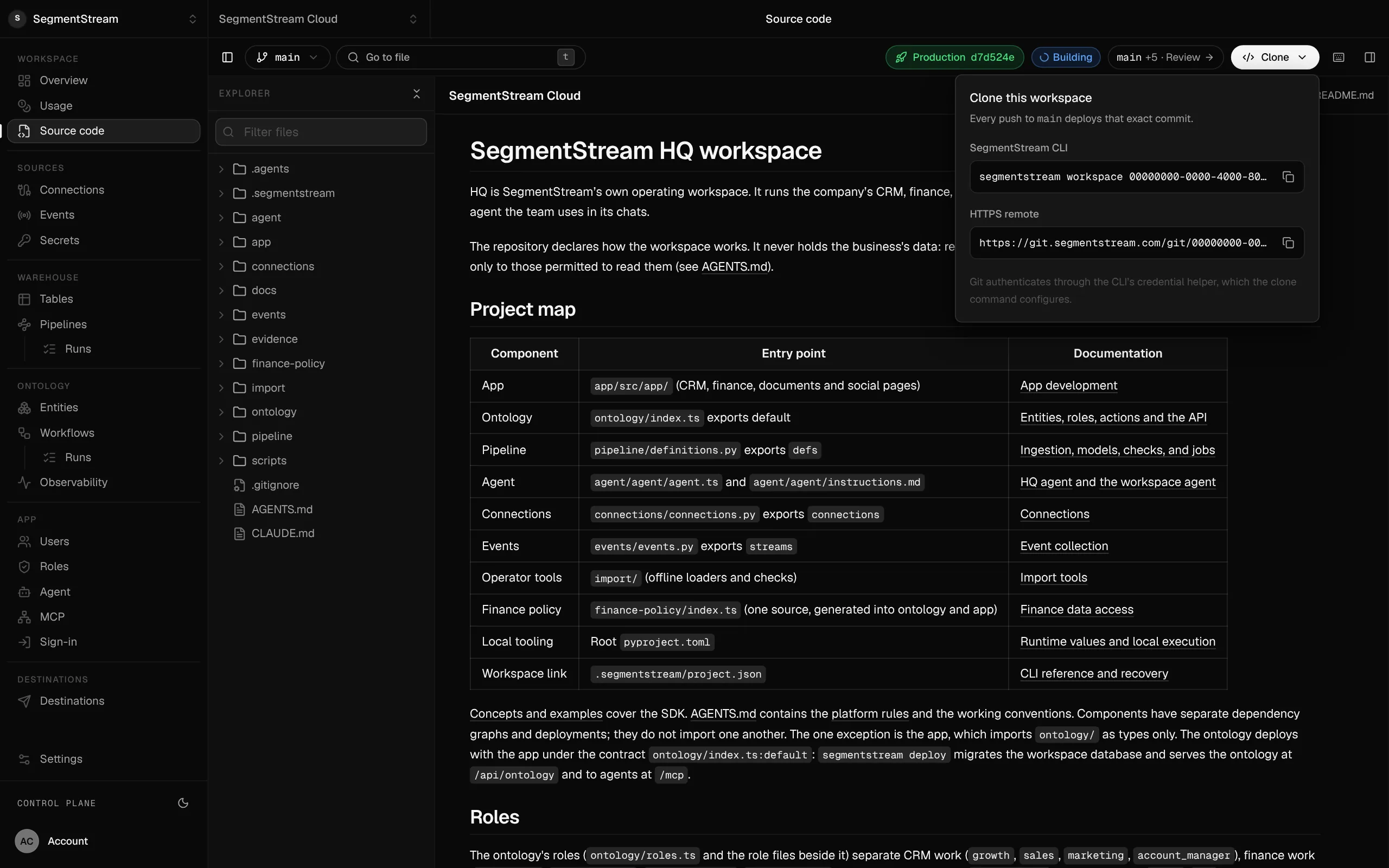
Your code, in a repository you own.
Every folder of the workspace in one git repository. Each push to main deploys that exact commit.
SegmentStream and Render together
Keep a specialised service on Render and call it from SegmentStream through a connection. The records, the rules and the company agent stay in SegmentStream.
Questions
Is SegmentStream a Render alternative?
For internal company software, yes. For the backend of a product with its own workers and databases, Render is built for that.
Does SegmentStream work with coding agents the way Render does?
Yes. Your coding agent uses the SegmentStream CLI to build and deploy, and once deployed every record is available through a REST API and MCP tools, limited by the caller’s role.
Can SegmentStream call a service hosted on Render?
Yes. A SegmentStream action or workflow calls a service on Render through a connection, with the credentials held by the platform.
More comparisons
All comparisons →- SegmentStream vs RailwayInfrastructure for any service, or the platform for your company’s own software
- SegmentStream vs VercelHosting for websites and web apps, or the platform for your company’s own software
- Where to deploy software your coding agent builtVercel, Railway, Render, Fly.io, Supabase, Replit, Lovable and SegmentStream, and when to choose each
Last reviewed: October 2026. What this page says about Render comes from its own site and documentation:
Build your company’s own software. Let agents run it.
$ segmentstream workspace create acme --region eu --subdomain acme
▸ Created workspace acme · database, warehouse and a private git repository
$ segmentstream workspace WORKSPACE-ID clone acme && cd acme
▸ your coding agent builds what your team asked for and runs the checks
$ git add -A && git commit -m "First version"
$ segmentstream deploy
▸ app, company agent, API and MCP tools live for your invited members
Our engineers build the first version on your data in two weeks, at a fixed price.
Or build it yourself with your coding agent:
curl -fsSL https://cloud.segmentstream.com/install.sh | sh