
The Snowplow alternative: keep your trackers and schemas, run no pipeline.
Point your Snowplow trackers at your workspace and every event lands in your own warehouse, checked against schemas in your repository. There is no collector, enricher or loader to operate, and the same workspace holds the apps that use the data.
- One setting changes in Snowplow
- Your history comes over
- Collected on your own domain
- First version in two weeks, at a fixed price
SegmentStream collects the events your Snowplow trackers already send into a warehouse you own, by changing one setting, the collector address. Schemas live in your repository and are checked on every event, with no pipeline to operate. Stay on Snowplow if your team depends on its custom enrichments; move if you want the same ownership with nothing to operate.
Stay on Snowplow if
- You depend on custom enrichments written inside Snowplow.
- Your team wants to operate the pipeline itself.
Move to SegmentStream if
- You run a collector, enricher and loader yourself and would rather not.
- You want your schemas in the same repository as the rest of your company's software.
- You want events beside the company database, apps and agent that use them.
We move you, if you want
Our engineers install the endpoint, serve it from your domain, bring your history over and rebuild your reports, then change the setting with you when the numbers match. It starts with a fixed-scope pilot.
Request a pilot →Last reviewed October 2026 · Sources: Snowplow tracker initialisation, Snowplow warehouse loaders
Change the collector address. Nothing else.
Your tracking calls stay as they are. Only the address changes: your workspace's endpoint on collect.segmentstream.com, or the same path served from your own domain. Snowplow stops receiving the events your workspace now collects.
newTracker('sp', 'https://collector.yourcompany.com', { appId: 'website',});newTracker('sp', 'https://collect.segmentstream.com/v1/e/WORKSPACE_ID/snowplow', { appId: 'website',});Or drop the Snowplow SDK for a tracker of your own.
Your agent declares a stream in your repository and writes a small tracker for your site, sending the events your reports need. Nothing from Snowplow loads on your pages. Your Snowplow events become events the new tracker sends, in the shape you choose.
- Page views from the browser; requests and form submissions from your own server, with the IP address and user agent.
- A first-party cookie set by your own server on your domain, so it keeps its full lifetime.
- Bots and AI agents classified, sessions built and leads attributed, as models in your repository.
- This website is measured this way, with a tracker our own agent wrote.
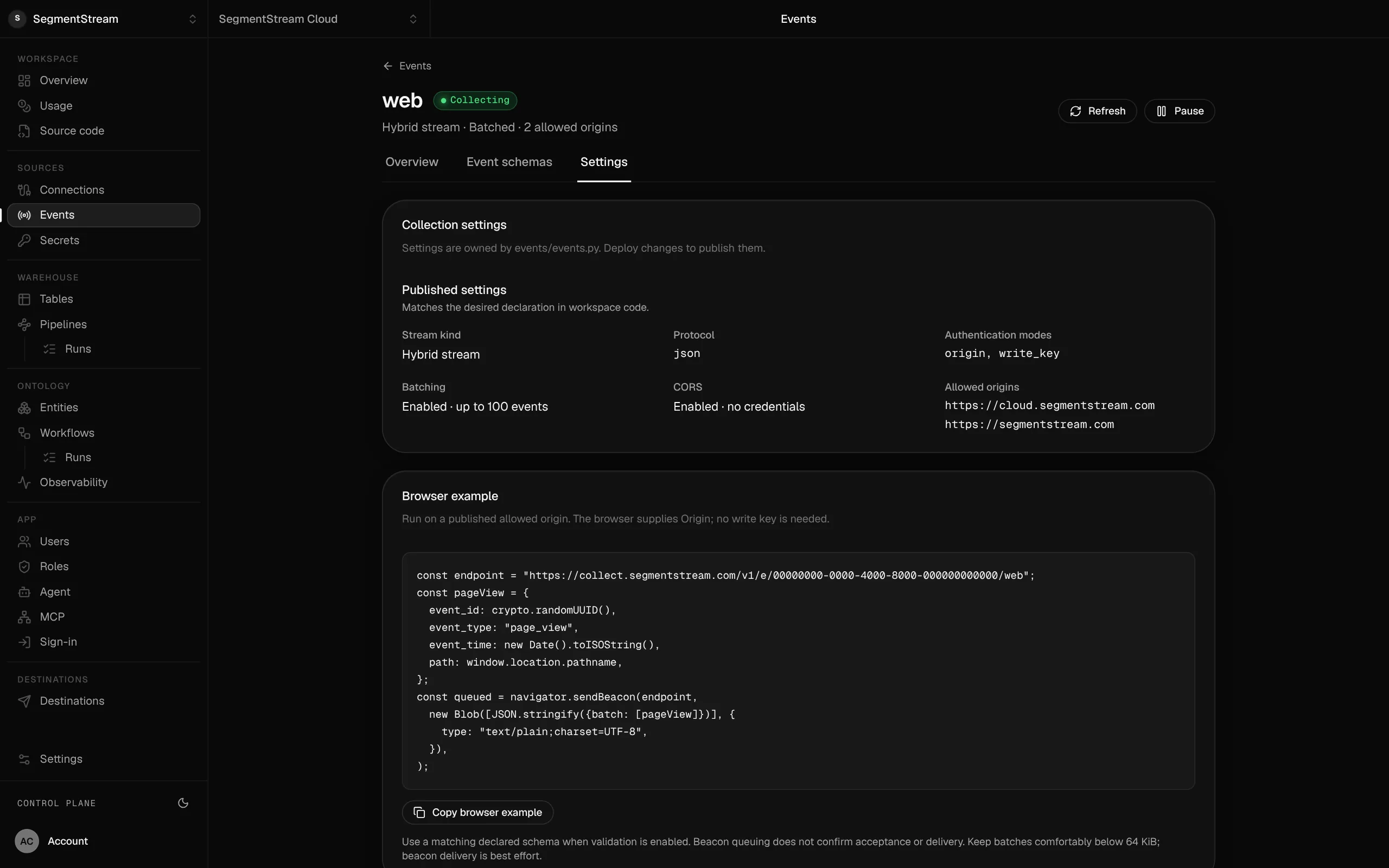
from segmentstream.events import Stream, auth, protocolstreams = ( Stream( key="web", auth=(auth.WriteKey(), auth.Origin(("https://www.yourcompany.com",))), protocol=protocol.Json(batch=True), ),)const endpoint = 'https://collect.segmentstream.com/v1/e/WORKSPACE_ID/web';export function track(type: string, payload: Record<string, unknown> = {}) { navigator.sendBeacon(endpoint, JSON.stringify({ batch: [{ event_id: crypto.randomUUID(), event_time: new Date().toISOString(), event_type: type, schema_version: 1, payload: { url: location.href, referrer: document.referrer, ...payload }, }], }));}track('page_view');An event stream as its events/ folder declares it: the origins it accepts, batching, and the endpoint your tracker sends to.
Swipe the screen sideways to see all of it.
What comes over, and what stays
What you bring from Snowplow, and what you keep in the tools you like.
- Every new event, from the day the setting changes
- Your history, from the warehouse Snowplow already loads, read in place
- Anonymous and user ids, so each person's history joins up
- Event names and properties as your developers sent them
- The reports your team relies on, rebuilt and compared
- Custom enrichments written inside Snowplow: rewrite them as pipeline models
Snowplow alternative: what it does
Your trackers and schemas stay as they are, with no collector, enricher or loader to operate. Events land in your own warehouse, beside the company database and apps that use them.
- Change the collector address in newTracker, or the collector endpoint in your mobile and server trackers and events start arriving in your own warehouse. No new tags, no new tracking plan.
- Raw events keep the shape the tracker sends, and one normalised events table brings every tracker into the same model.
- Collection runs on your own domain, so more of your traffic is measured.
- Your schemas move into your repository, and collection, validation and loading are run for you.
- Your history comes over from the warehouse Snowplow already loads, read in place.
- Sessions, channels and attribution join your events to ad cost and the CRM.
- The company agent answers questions from your events, within the roles of whoever asks.
What it covers
One setting, nothing re-instrumented
Point the Snowplow tracker you already run at your workspace by changing the collector address. The tracking calls your developers wrote keep working.
Every event in your own warehouse →
Every event lands in your own warehouse, in the region you choose, in the shape the tracker sends it, beside one normalised events table for every tracker you run.
Collected on your own domain
Collection is served from a path on your own domain, so ad blockers and browser tracking prevention cut less of it, and your first-party cookies keep their full lifetime.
No pipeline to run →
Collection, validation and loading are run for you. Schemas are versioned in your repository and checked on every event; there is nothing to host or scale.
Sessions, channels and attribution →
Sessions, channels, conversions and attribution built on your events and joined to ad cost and the CRM, which no single analytics tool sees.
Ask the company agent →
Your team asks about traffic, funnels and customers in plain language. The company agent answers from your warehouse, with the permissions of whoever asks.
Every Snowplow concept, and where it lives in your workspace
For your engineers: every Snowplow concept and where it lives once you have moved.
| In Snowplow | In your workspace | What to know |
|---|---|---|
| Tracking calls in your code | Unchanged: the tracker sends to your workspace | Only the collector address changes |
| Collector, enrich and loader | The managed collector and your warehouse | Nothing to host, scale or upgrade |
| Iglu schemas | Versioned event schemas in events/ | Checked on every event; invalid events are kept and flagged |
| Enrichments | Collector steps and pipeline models | IP, location and user agent added as events arrive |
| Data models | Sessions and channels as models in your repository | Run on a schedule with checks |
| Raw events | bronze.events_snowplow in your own warehouse | In the shape the tracker sends, in your region |
| One model for every tracker | silver/events | Event names, ids, pages and revenue in one schema |
| Access to the data | Roles for people, apps and agents | The same roles everywhere, with no extra seats |
What you keep elsewhere, and what SegmentStream does not do
- Once the tracker points to your workspace, Snowplow no longer receives its events. Plan the switch for when your reports match.
- Custom enrichments written in JavaScript or SQL inside Snowplow. Rewrite them as pipeline models in your repository.
How a move off Snowplow works
Each step is a pull request in your repository or a check in the console. Our engineers can do all of it with you.
- 01
Add the Snowplow endpoint
One template adds the Snowplow endpoint, the model that normalises its events and a guide to your repository. Your agent installs it and you review the pull request.
- 02
Bring your history
Your history comes over from the warehouse Snowplow already loads, read in place, so your reports start with every month you already have.
- 03
Rebuild the reports and compare
The reports your team relies on are rebuilt on your history and compared with Snowplow, month by month, until every number matches or the difference is explained.
- 04
Serve collection from your domain
A path on your own domain is routed to the collector through your CDN or web server, so cookies keep their full lifetime and fewer events are blocked.
- 05
Change the collector address
the collector address changes in newTracker, or the collector endpoint in your mobile and server trackers, a test event is sent with the real tracker, and real traffic is checked arriving in your warehouse.
- 06
Switch your team
Your team opens the rebuilt reports and asks the company agent instead. Nothing is switched off before the numbers match.
We move your analytics off Snowplow, end to end, if you want us to.
Our engineers install the Snowplow endpoint, serve it from your domain, bring your history over, rebuild the reports your team relies on and compare them with Snowplow, then change the setting with you. Or do it with your own agent and our help on call. It starts with a fixed-scope pilot.
Nothing switches until the numbers match.
Both systems run side by side. Every number your teams rely on is compared, and every difference is explained before anything is turned off.
| Metric · Sept | Snowplow | Workspace | Status |
|---|---|---|---|
| Events | 88,412,905 | 88,414,109 | explained |
| Sessions | 3,904,226 | 3,904,226 | match |
| Users | 1,208,330 | 1,208,330 | match |
| Transactions | 21,448 | 21,448 | match |
- A self-hosted Snowplow pipeline
- Snowplow collector, enrich and loader
- Iglu outside your repository
Your history comes over first and the reports your team relies on are rebuilt and compared with Snowplow. Then one setting changes, collection moves to your own domain, and every new event lands in your warehouse. We do the whole move for you if you want: see the offer below.
Enterprise, with our engineers
Our engineers install the Snowplow endpoint, serve it from your domain, bring your history over, rebuild the reports your team relies on and compare them with Snowplow, then change the setting with you.
Self-serve, with your own agent
Tell your agent you run Snowplow. It installs the endpoint and its model, prepares the first-party path for your domain and shows you the one setting to change, and segmentstream deploy puts it live.
curl -fsSL https://cloud.segmentstream.com/install.sh | shRelated solutions
Questions
Is SegmentStream Cloud a Snowplow alternative?
Yes, for collecting and owning your data. SegmentStream collects the events your Snowplow trackers already send into a warehouse you own, by changing one setting, the collector address. Schemas live in your repository and are checked on every event, with no pipeline to operate. Stay on Snowplow if your team depends on its custom enrichments; move if you want the same ownership with nothing to operate.
Do we have to re-instrument our product or website?
No. You change the collector address in newTracker, or the collector endpoint in your mobile and server trackers, and the tracking calls already in your website, app and servers keep working. No new tags and no new tracking plan. Re-instrumenting only comes in if you choose a tracker of your own instead.
Can we drop the Snowplow SDK altogether?
Yes. Your agent declares a stream in your repository and writes a tracker of your own: page views from the browser, requests and form submissions from your own server, and a first-party cookie on your domain. Your Snowplow events become events the new tracker sends, in the shape you choose. You can change the setting first and replace the SDK later, or do both at once.
What happens to Snowplow?
Once the tracker sends to your workspace, Snowplow stops receiving those events. That is the move, so the reports your team uses are rebuilt and compared on your history first, and the setting changes when they match.
Can we keep our history?
Yes. Snowplow already loads your events into a warehouse, and those tables are read into your workspace once. From the day the collector address changes, every event is collected directly.
We already own our data with Snowplow. Why move?
Your events stay in a warehouse, as with Snowplow; what changes is that there is no pipeline to operate, and the same workspace holds the company database, apps and agent that use the data.
Will SegmentStream do the migration for us?
Yes. Our forward-deployed engineers do the whole move if you want it: the endpoint, the first-party path, the history, the reports and the comparison, starting with a fixed-scope pilot. Request it on this page and your note goes to our founder, not a sales queue.
What does it cost to run?
Usage: events received, warehouse storage and queries, and the compute your pipelines and apps use. No seats and no charge per tracked user.
Who owns the data?
You do. The events sit in your workspace's warehouse in the region you choose, and the code lives in a private git repository you can clone, keep on GitHub and take with you. SegmentStream runs it.
Rather have it moved for you? Request a pilot.
Our engineers install the Snowplow endpoint, serve it from your domain, bring your history over, rebuild the reports your team relies on and compare them with Snowplow, then change the setting with you.
- One solution, on your data, in your own workspace
- First version live in two weeks
- Parity proven before anything is switched off
- Fixed scope and price, credited to your contract if you continue
Not ready for a pilot? Send the form anyway with your question. An engineer will reply, not a sales rep.
How the pilot worksBuild your company’s own software. Let agents run it.
$ segmentstream workspace create acme --region eu --subdomain acme
▸ Created workspace acme · database, warehouse and a private git repository
$ segmentstream workspace WORKSPACE-ID clone acme && cd acme
▸ your coding agent builds what your team asked for and runs the checks
$ git add -A && git commit -m "First version"
$ segmentstream deploy
▸ app, company agent, API and MCP tools live for your invited members
Our engineers build the first version on your data in two weeks, at a fixed price.
Or build it yourself with your coding agent:
curl -fsSL https://cloud.segmentstream.com/install.sh | sh