
SegmentStream vs Microsoft Copilot Studio
Microsoft Copilot Studio is a low-code studio for building agents and workflows, connecting them to your organisation’s data and publishing them to Teams, Microsoft 365 Copilot, websites and other channels. SegmentStream gives the agent a company to work in: your own records, rules and actions, the apps your team uses, and a company agent in Slack, Teams, WhatsApp, Telegram and email.
- Choose Microsoft Copilot Studio when
Your company runs on Microsoft 365, your knowledge sits in SharePoint and Teams, and makers want to build agents and workflows in a low-code studio.
- Choose SegmentStream when
The agent needs to change your company’s records safely, with roles, approvals and a history, and you want those records, the apps around them and the agent in one place you own.
- Use both when
Your team keeps Microsoft 365; the company agent works in Teams through records and rules that live in SegmentStream.
SegmentStream and Microsoft Copilot Studio, side by side
The same rows on every comparison, so you can line them up. Where something is not the other platform’s focus, that is a choice it made, not a flaw.
| Row | Microsoft Copilot Studio | SegmentStream |
|---|---|---|
| What it is | Microsoft Copilot StudioA low-code studio for building and managing agents and workflows | SegmentStreamA platform for your company’s own software and the company agent that runs it |
| Database with your company’s rules | Microsoft Copilot StudioConnects to your organisation’s data and systems | SegmentStreamIncluded: your records, the actions that change them, the roles allowed to take each one and the history of every change |
| Sign-in and roles for your team | Microsoft Copilot StudioRole-based access managed by administrators | SegmentStreamIncluded: sign-in for the members you invite, with roles checked on every record |
| Hosting your apps | Microsoft Copilot StudioNot the focus | SegmentStreamIncluded: your app at your-company.segmentstream.app, deployed with one command |
| Integrations, with credentials held for you | Microsoft Copilot Studio1,500+ prebuilt connectors, custom connectors and MCP servers | SegmentStreamIncluded: ready-made connections and any API, with credentials held by the platform, never in code |
| Pipelines and a warehouse | Microsoft Copilot StudioNot the focus | SegmentStreamIncluded: pipelines in your repository and a warehouse in every workspace |
| Company agent in Slack, Teams, WhatsApp, Telegram and email | Microsoft Copilot StudioIncluded: agents in Teams, Microsoft 365 Copilot, websites and other channels | SegmentStreamIncluded: one company agent that acts with the permissions of whoever asks, and asks before changes that matter |
| Work that starts on a schedule or when something happens | Microsoft Copilot StudioIncluded: workflows and agent flows | SegmentStreamIncluded: on a schedule, when a record changes, or when another service calls in |
| Built with Claude Code, Codex and Cursor | Microsoft Copilot StudioLow-code, with agents described in plain language | SegmentStreamYes, with the SegmentStream CLI, plus an API and MCP tools for every record |
| Where the code lives | Microsoft Copilot StudioIn Copilot Studio, in your Microsoft environment | SegmentStreamA private git repository for each workspace, which you can clone and take with you |
| Engineers to build it with you | Microsoft Copilot StudioNot the focus | SegmentStreamOur engineers build the first version with you in two weeks, at a fixed price |
| Pricing | Microsoft Copilot StudioCopilot Studio pricing | SegmentStreamUsage, with no seats |
What Microsoft Copilot Studio is built for, and what SegmentStream is built for
Microsoft Copilot Studio is a low-code studio for building and managing agents and workflows. Agents connect to your organisation’s data through prebuilt or custom connectors and MCP servers, and are published to Teams, Microsoft 365 Copilot, websites and other channels.
SegmentStream gives the agent a company to work in. Your records, the actions that change them and the roles allowed to take each one are part of the platform, so the agent acts with the permissions of whoever asks, asks before changes that matter and leaves a history of every change.
The same records serve the apps your team opens, the API and MCP tools for Claude, ChatGPT and other assistants, and a warehouse, all in a repository you own.
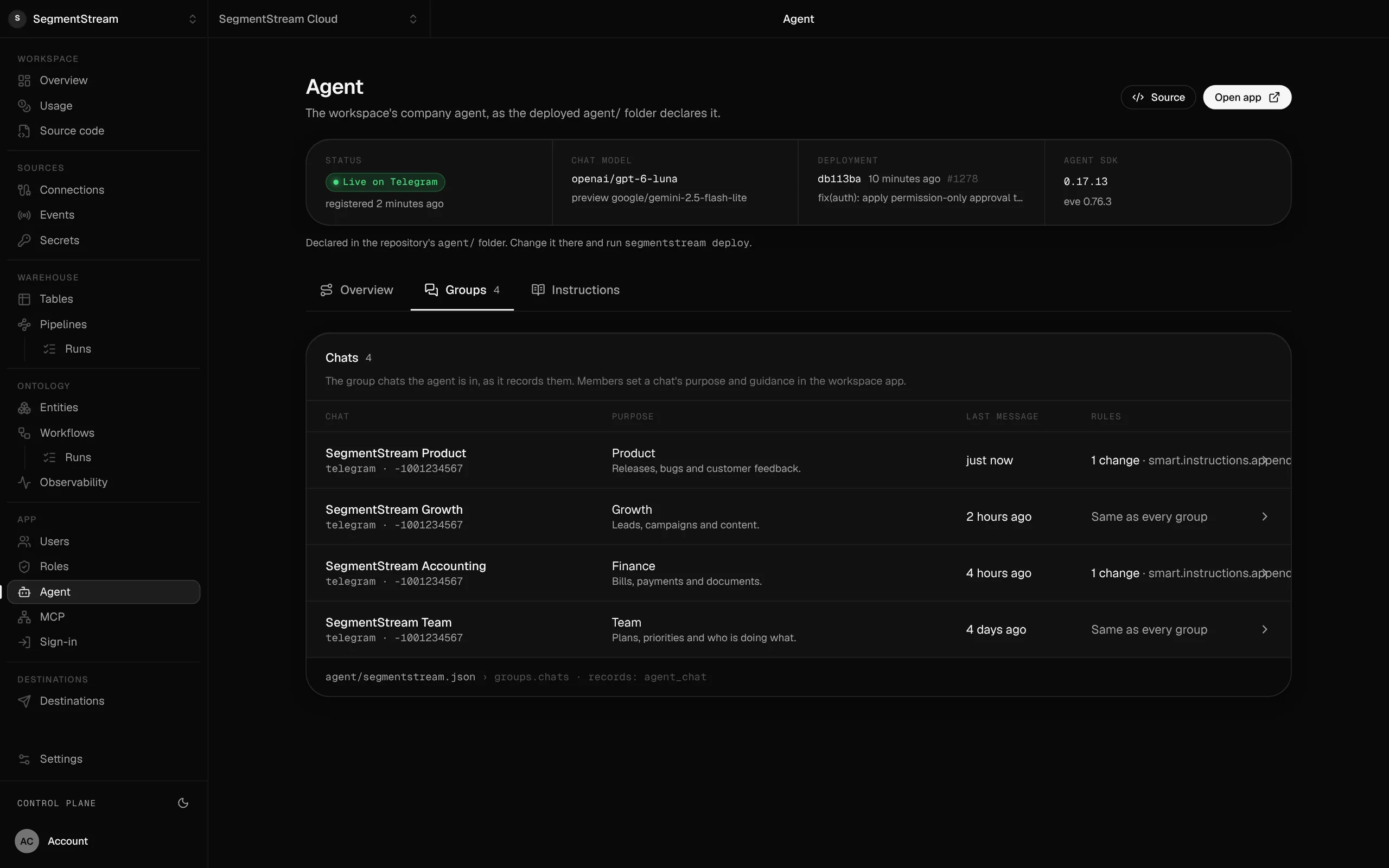
One company agent in your team's chats.
The agent your repository declares, the chats it works in and what each is for, acting with the permissions of whoever asks.
SegmentStream and Microsoft Copilot Studio together
The company agent works in Teams next to Microsoft 365, while the records and rules it works through live in SegmentStream.
Questions
Is SegmentStream a Copilot Studio alternative?
For an agent that works through your own records with roles and approvals, yes. For agents built by makers inside Microsoft 365, Copilot Studio is built for that.
Does the SegmentStream agent work in Microsoft Teams?
Yes. The company agent works in Teams as well as Slack, WhatsApp, Telegram and email, with the same records and rules everywhere.
How does the agent avoid changing the wrong records?
Each request runs with the permissions of the person asking. Changes that matter are shown for confirmation before they are made, and every change is recorded with who made it.
More comparisons
All comparisons →- SegmentStream vs PalantirAn ontology delivered by Palantir, or one your company builds and owns
- SegmentStream vs ZapierConnections between the apps you use, or work that runs on your own records
- SegmentStream vs n8nVisual workflows between tools, or work that runs on your own records
Last reviewed: October 2026. What this page says about Microsoft Copilot Studio comes from its own site and documentation:
Build your company’s own software. Let agents run it.
$ segmentstream workspace create acme --region eu --subdomain acme
▸ Created workspace acme · database, warehouse and a private git repository
$ segmentstream workspace WORKSPACE-ID clone acme && cd acme
▸ your coding agent builds what your team asked for and runs the checks
$ git add -A && git commit -m "First version"
$ segmentstream deploy
▸ app, company agent, API and MCP tools live for your invited members
Our engineers build the first version on your data in two weeks, at a fixed price.
Or build it yourself with your coding agent:
curl -fsSL https://cloud.segmentstream.com/install.sh | sh