AI-native infrastructure for custom software.
Run your company on software you own. Everything it needs is already here: a database and warehouse, a business ontology with roles and permissions, MCP and APIs, connections, pipelines and your company agent. Five folders, one deploy. Any AI agent can write them.
Work from any AI agent

- Replace the software you rent with software built for your company.
- Code, not clicks. Any agent can build on it.
- Every agent gets a role, not a token.
- Your data and your software stay yours, in your own repository.
Five folders. One deploy. Your repository.
A workspace is one git repository with five folders. An agent writes them against typed SDKs with a description on everything, runs the checks, and deploys with one command. You never read the code unless you want to; you own it either way.
Your repository
The five folders live in a private git repository that comes with your workspace. Clone it with plain git, keep a copy on GitHub if you like, and read every change a person or an agent made as a commit.
Run by SegmentStream, owned by you
SegmentStream runs the code and keeps the credentials. It never owns the code, and it cannot change it without a commit from you.
Leave with it any day
Export your data from the warehouse, take the repository, and leave. The ontology is plain TypeScript, the pipeline plain Python.
your-company/
├── app/            Next.js app for your team
├── ontology/       entities, actions, roles
├── pipeline/       ingestion and SQL models
├── connections/    connection declarations, no secrets
└── agent/          your company's own agent
segmentstream deploy migrates the database, serves the ontology at /api/ontology and over MCP at /mcp, and puts the app and the agent live in your workspace.
- app/
- Your team's app, signed in through the workspace. Data and credentials stay on the server.
- ontology/
- The model of your business, served as an API and over MCP. Every write is an action; every role sees only its actions.
- pipeline/
- Source tables and SQL models in your warehouse, scheduled and checked.
- connections/
- Credentials for the tools you keep, held by the platform, never in code.
- agent/
- A company agent that answers your team in Telegram, as the member who is talking to it.
Your agent assembles. It does not invent.
Every workspace is assembled from the same typed blocks, each with a description an agent can read and checks that refuse what does not fit. The agent picks the blocks and fills them in; it does not invent an architecture. Fewer mistakes, a structure you can predict, and an app the next agent understands.
The blocks
- ontology/
- Entitya thing your company has: Deal, Contract, Invoice
- Propertytyped fields with rules: text, select, money, date
- Relationshiphow entities connect, in both directions
- Actionthe only way anything changes, with checks
- Rolewho may read and do what
- connections/
- ConnectionXero, Stripe, HubSpot, Google Ads, your own API
- pipeline/
- Ingestiona source table, loaded on a schedule
- Modela SQL transformation with a schema and checks
- Schedulewhen a job runs
- app/ and agent/
- Pagea screen for your team, signed in through the workspace
- Skillsomething the company agent knows how to do
What you say, what comes back
- YouMove our CRM here: companies, contacts, leads and deals with our stages. Sales works deals, growth sees everything, nobody else sees amounts.
- Your agentAssembled from blocks: 5 entities, 9 relationships, 6 actions (submit, qualify, moveStage, win…), 3 roles. Amounts are visible to sales and growth only. Checks pass. Deploying.
- Your agentDeployed. 16 open deals imported from the old CRM. Pipeline page at /deals.
Shortened from real sessions.
See the block the agent wrote →Hide the code
export const Deal = entity("deal", { label: "Deal", description: "A sales opportunity with one company for one product.", properties: { name: p.text({ maxLength: 200 }), stage: p.select(DEAL_STAGES, { managed: true }), amount: p.number({ optional: true, min: 0 }), }, relationships: { company: rel.one(Company, { phrase: ["is with", "has"] }), owner: rel.one(User, { phrase: ["is owned by", "owns"] }), },}).actions(() => ({ moveStage: action({ description: "Move a deal along its pipeline." }),}));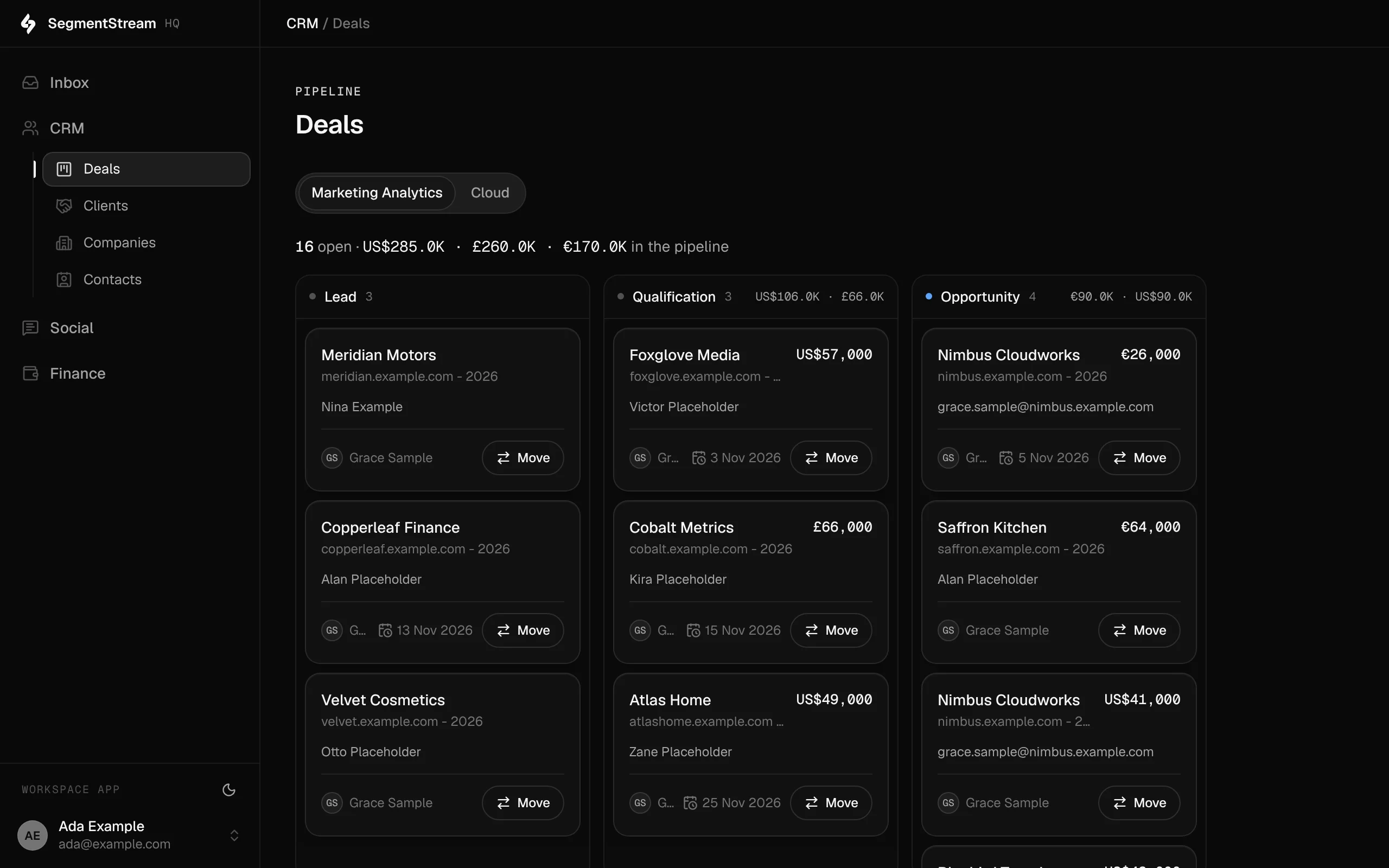
The pipeline page of our own CRM, built this way. The stages, the roles and the numbers are ours.
Customer stories.
Our own company runs on SegmentStream, built the way any customer builds theirs. So does lead scoring at an AI video company.
How we run SegmentStream on SegmentStream
A CRM from lead to client, contracts and revenue recognition alongside Xero, and social listening with a review queue for the team, built by agents in a week. Our team works in it every day.
Read the story →An AI video company · Lead scoringEvery demo request graded A to D, within hours
Demo requests from HubSpot graded against standards written in plain language, and a review queue where sales owns, notes and overrides every grade.
Read the story →What runs on it.
Most of what a company runs moves onto it, function by function: sales, finance, marketing, analytics, operations, projects, support and internal tools, each assembled from the same blocks on the same records.
Sales and CRM
Leads, deals and clients, shaped to how you sell
Finance and accounting
Contracts, revenue recognition and documents
Marketing
Social listening, audiences and consent
Growth and marketing analytics
Lead scoring, cost data and attribution as code
Internal tools and dashboards
Pages and dashboards on your records and data
Operations and back office
Orders, stock, suppliers and purchase orders
Projects and tasks
Projects, tasks and cycles with your workflow
Support desk
Your shared inbox, triaged, on the customer record
Newsletters
Campaigns to audiences built from your contacts
Something else you run?
If it is records, rules and roles, it runs here. Our engineers build it with you.
Start a pilot →Deals by stage, per product, with owners and close dates. The stages are ours, and so is the rule that only sales and growth see amounts.
SegmentStream HQ, the app our company runs on, written by agents in a week.
For enterprises
Forward-deployed engineers, a fixed-scope pilot, roles and permissions, change history on every record, and EU or US data residency.
Built by agents. Ready for agents.
Whatever your agent builds in the five folders arrives with what an AI system needs and nobody wants to write by hand: a typed API, MCP tools, roles and permissions, a model of the business agents can read, and a company agent that already has access to all of it, as the person it is talking to.
The console
cloud.segmentstream.com
Where the workspace is managed: what the code deployed, plus credentials, members and secrets.
The app
your-company.segmentstream.app
What your team opens every day, built in the workspace's app/ folder and signed in through it.
The agent
Telegram
Answers your team in Telegram as the member who is talking to it, with that member's permissions.
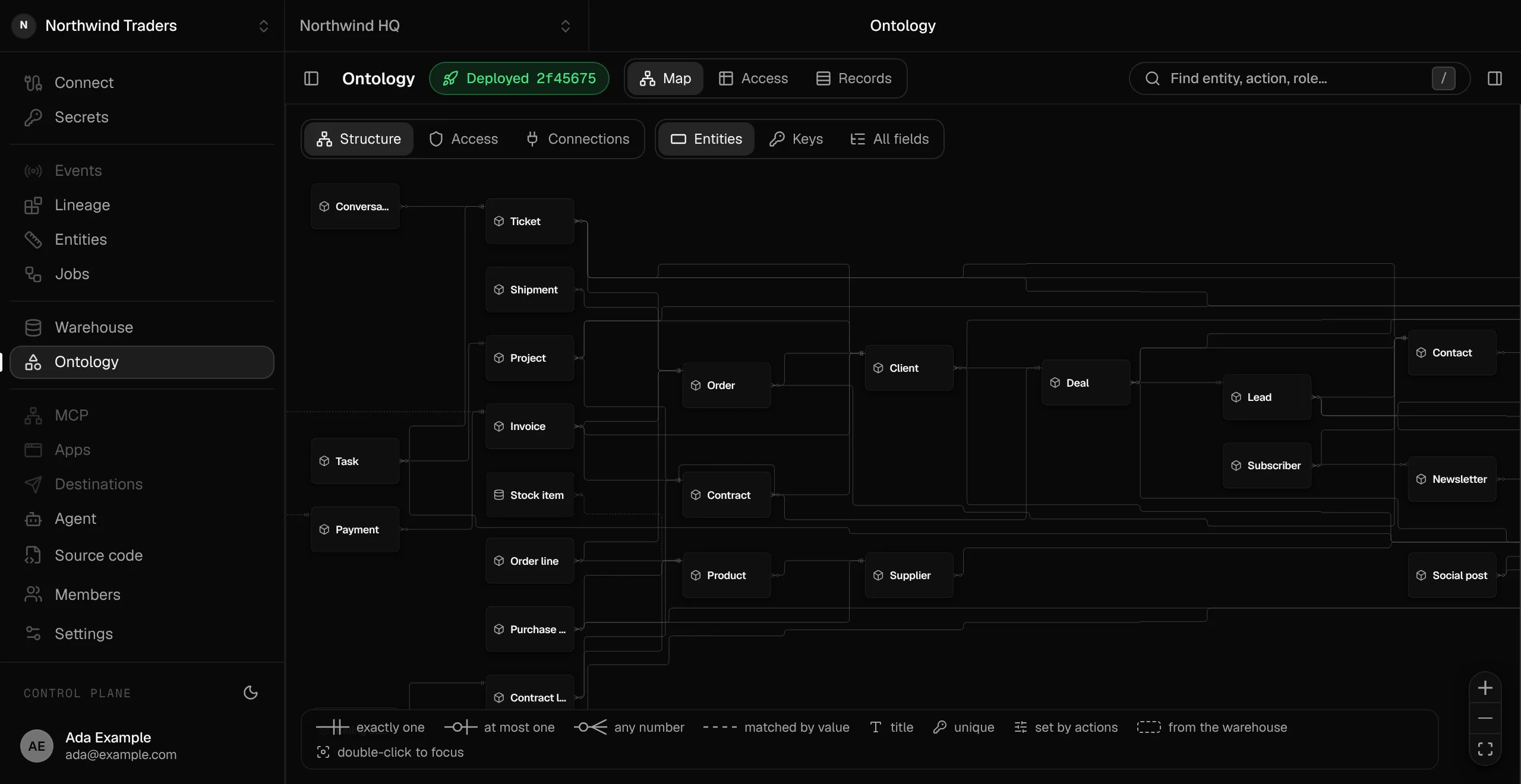
A whole company in one ontology, as deployed: support, operations, finance, sales and marketing on the same records. Double-click an entity to see only its neighbours.
Build it with any agent. Run it from any agent.
More than a prototype: a production contract that Claude, Codex, Cursor or your own agent writes against, with checks before every deploy. Once it is live, the same agents ask your data, change records through actions and ship the next feature in your private workspace.
- Claude
- ChatGPT
 Grok
Grok Muse
Muse- Cursor
 Codex
Codex- Gemini
- Your own agent
Switch agents any time
Your data, metrics and rules live in SegmentStream, not inside the agent.
Same permissions everywhere
Each person and agent sees only what they should.
Set up once
Connect a new agent in a minute. It starts with everything your team already set up.
Control what every person or AI agent can see or do.
Set roles once. Everybody gets exactly the data, metrics and apps their role allows, wherever they work.
Today
With SegmentStream
Agents run on a shared API key and see everything
Each agent sees only what its user is allowed to
Permissions set separately in every tool
Roles set once, applied in every app and agent
API keys copied into local .env files
No secrets on laptops
New hires wait days for invites and access
Ready on day one, with the right access
Everything your software needs is already running.
Warehouse, database, pipelines, the model of your business with its access rules, and an API and MCP tools on every app.
Your agent writes the business part. The platform runs the rest.
Your repository → what runs
- App host and sign-inHosting at your-name.segmentstream.appEmail-code sign-in for invited membersRoles from the ontology
app/
The screens your team opens
- Postgres, API and MCPPostgres for your recordsREST API and OpenAPIMCP tools at /mcpHistory on every change
ontology/
Entities, actions and roles
- Pipelines and warehouseManaged runs on a scheduleA warehouse per workspaceChecks and lineage
pipeline/
Ingestion, models and checks
- Connection vaultManaged OAuth and API keysWrite-only secretsTokens never reach your code
connections/
The tools you keep
- Agent runtimeTelegram as a channelActs as the memberThe ontology as its tools
agent/
Instructions and channels
The data stack is one layer, not the product.
Most companies stitch together a database, warehouse, pipelines, BI and more, then need engineers to keep it all running. Here it is one layer of the infrastructure your software runs on, managed, so nobody on your team wires it.
Before: the patchwork stack
9 vendors · engineers to wire them together
After: one platform

app/
ontology/
pipeline/
connections/
agent/
Configure directly from your AI agent via CLI & MCP
Usage-based · 1 contract · first version in two weeks
Works with the tools you already run
21 ready-made connections, and any other API with a key, OAuth 2.0 or client credentials. Xero, Stripe, HubSpot, Google Ads, Meta Ads, LinkedIn, Resend, Telegram and more, each declared in your repository with its credentials kept as secrets.
 ApolloStripeXeroResendTelegramGA4LinkedIn PagesGoogle SheetsSupabase
 ApifyAny API
24 connection classes in the SDK: 21 made for one service, and 3 that reach any other API with a key, OAuth 2.0 or client credentials.
Built by the team behind SegmentStream Marketing Analytics


Two ways to start.
Enterprise, with our engineers
Our engineers build the software your teams need in your own workspace, or move over what you run today, as code you own. It starts with a fixed-scope pilot.
Self-serve, with your own agent
Connect your agent. It creates the workspace, writes the five folders and deploys. Pay only for what runs. Opens to the waitlist first.
“Agents will keep changing. Your company’s context shouldn’t have to. Keep it in one place you own, and every agent starts from what your team already knows.”